- 15 -
2 - Installation
Advanced connections
If you do not have Wi-Fi (WPS) or if your network is connected to the Internet through a proxy or more generally, if the
Wi-Fi or the network cable connection failed, please use the configuration method below.
To configure the advanced connection settings, you have to log on to the machine’s embedded website.
Wi-Fi connection without WPS
To connect to the Internet box using a Wi-Fi connection without WPS, follow these steps:
1 Connect your machine to your computer using the network cable supplied. Note the IP address displayed on the
machine’s LCD screen. This operation may take up to 1 minute. To display the IP address, you can also use the
“Maintenance menu”, page 28.
2 Open a web browser on your computer and enter the IP address as follows: http://machine’s adresseIP (IP
address displayed on the LCD screen).
L’interface web s’affiche.
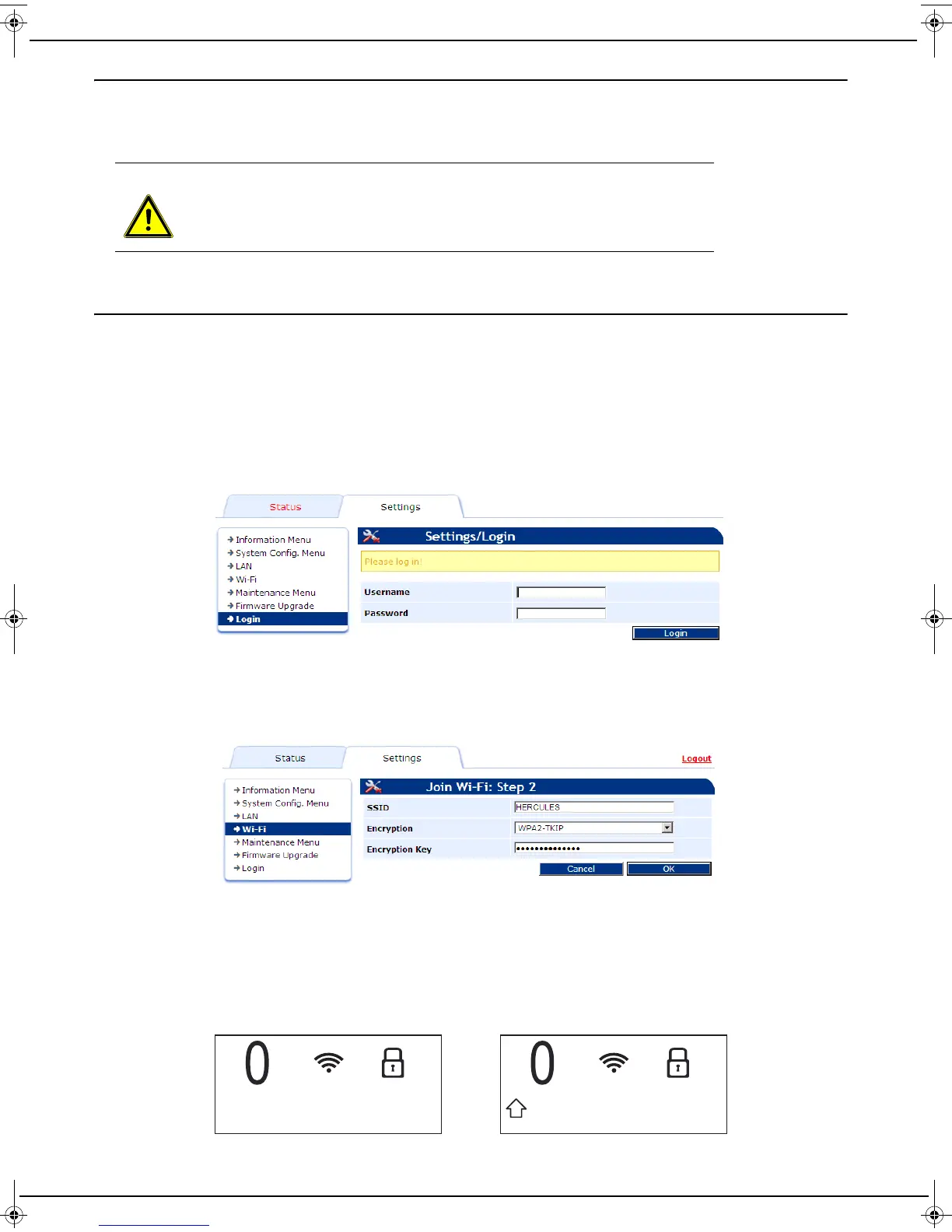
3 Enter your user name (default user) and password (default user) and then click on Login.
4 Click the Network Search button in the Wi-Fi menu to display the available networks.
5 Select your network from the list and click on Network Access.
6 Your Internet box's most secure type of encryption is displayed in the Encryption field. It is recommended not to
change the proposed value. Click the OK button. This information is available on the Internet box.
7 Leave the DHCP option enabled and click OK.
8 Once the settings have been made, click Logout to exit the web interface.
9 Unplug the network cable from your machine.
10 The connection steps take place successively.
11 When the machine is switched on for the first time, a software updating operation can start automatically (see
the section “Maintenance menu”, page 28). Do not turn the device off during this operation, as it might not restart.
Once the software has been updated, the following messages are displayed alternately on the LCD screen:
WARNING
To configure these types of connection, you need a computer connected to your
machine with the network cable supplied.
LU IB1100E_EN.book Page 15 Mercredi, 15. mai 2013 9:01 09


 To Next Page