- 18 -
3 - Using the machine
Using the machine
Loading documents
The scanner can scan original documents containing one or more sheets. You can load up to twenty 80 g/m² sheets
in the feeder.
Accepted formats
• A5, A4, Letter, Legal and other format complying with the following conditions:
• Length between 50 mm and 356 mm.
• Width between 50 mm and 229 mm.
• Paper weight of between 50 and 110 g/m² in standard mode.
Recommendations for use
• Do not load documents with different paper sizes or weights.
• Unfold sheets, remove staples and paper clips and separate sheets, sliding them over each other before inserting
the documents into the automatic feeder.
• Do not insert the following types of documents:
- Wrinkled or folded paper
- Torn paper
- Crumpled paper
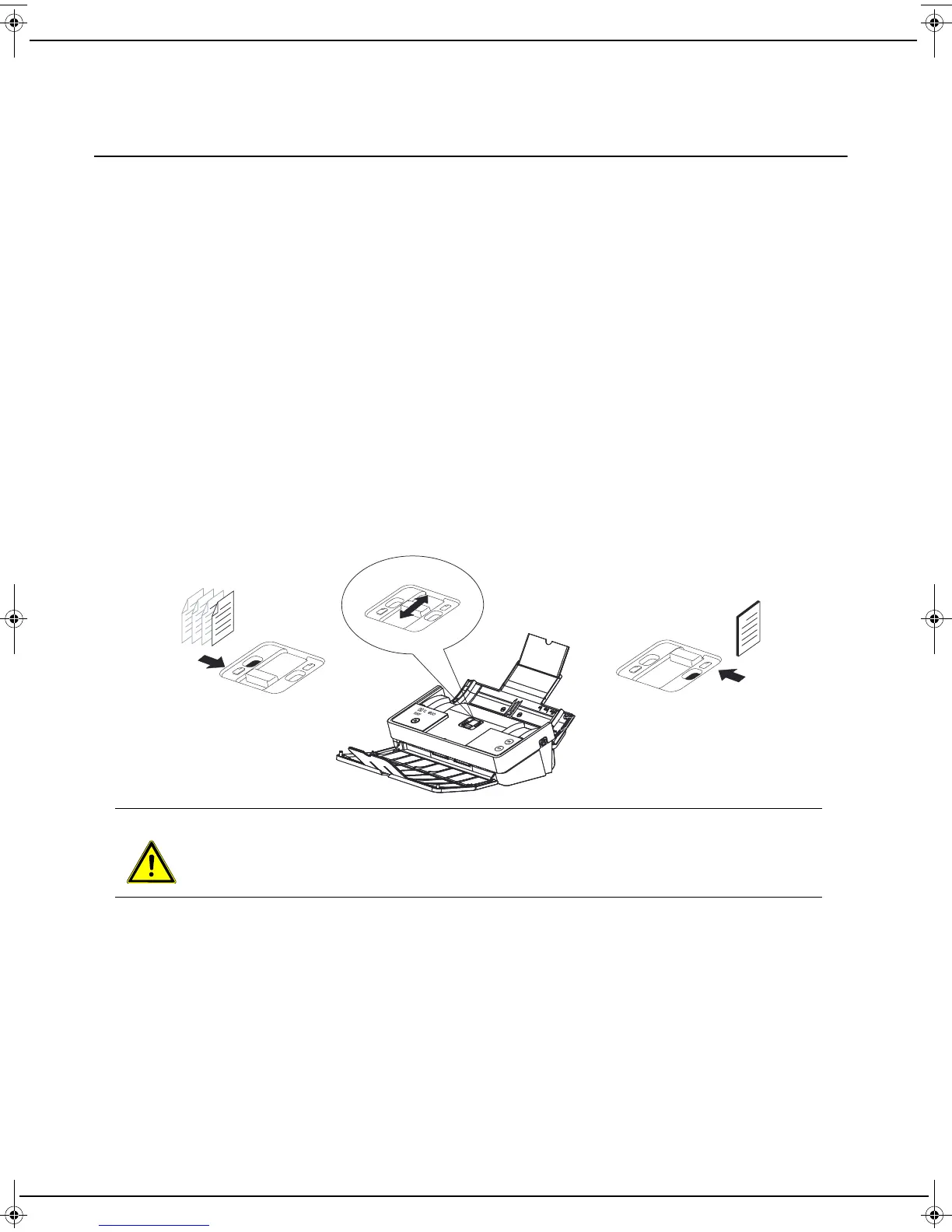
To load your documents, follow these steps:
1 Depending on the document(s) to be analyzed, select the Standard or Thick mode.
2 Spread the paper guides as far apart as possible.
CAUTION
The standard mode allows you to place up to 20 pages in the feeder. It is recommended to separate
your pages and make sure that none of them are stapled.
LU IB1100E_EN.book Page 18 Mercredi, 15. mai 2013 9:01 09


 To Next Page