- 21 -
3 - Using the machine
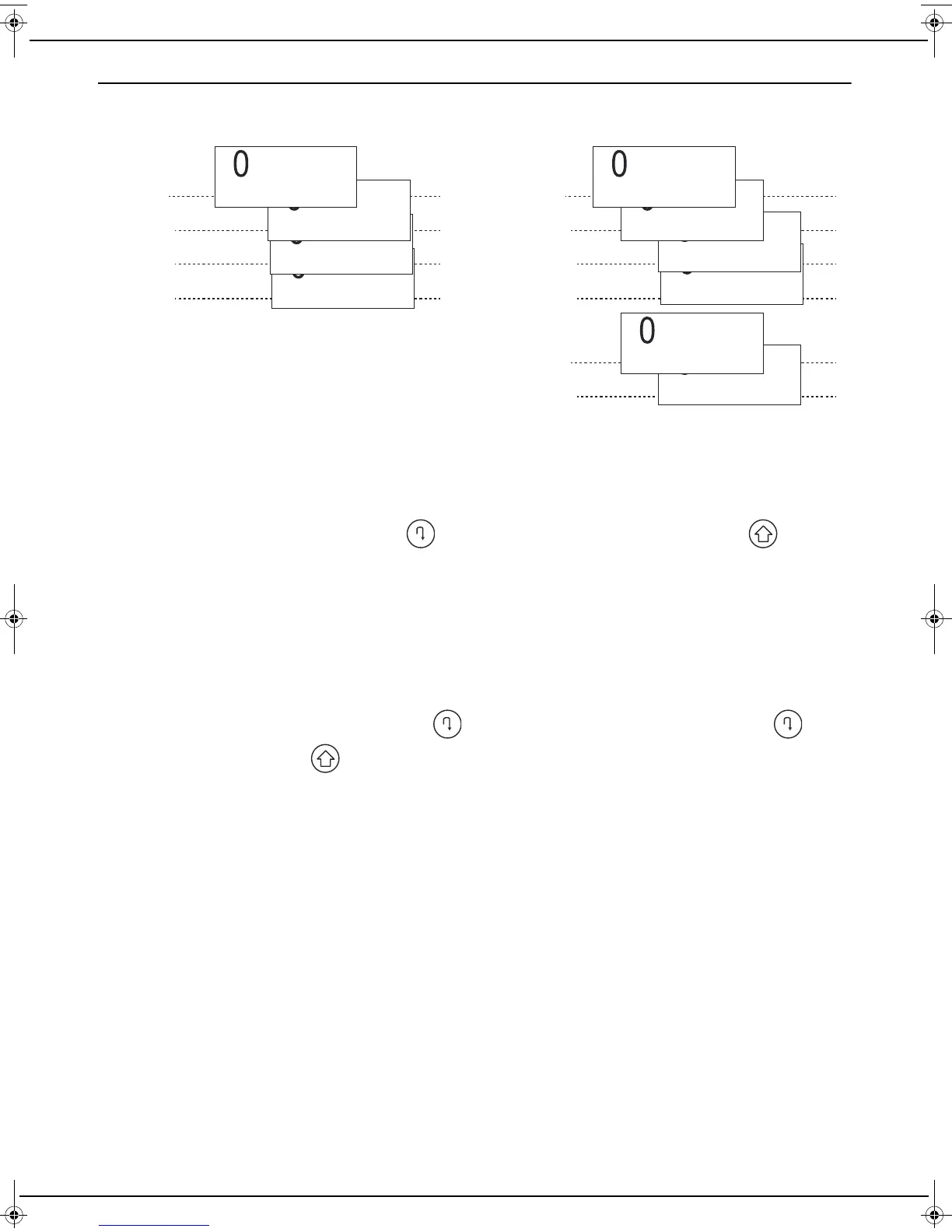
Multiple service providers
Your machine can manage several service providers and/or offers. The name of your service providers is displayed at
the top of your tree structure. This allows you to switch from one service provider to another quickly.
Pairing
To access your new service provider or a new contract for the first time, you have to carry out a pairing process. Your
service provider will have provided you with the procedure for connecting to its services.
To start a pairing process, press and hold down until PAIRING is displayed on the screen. Press and follow
the instructions that are displayed. You can also use the MAINTENANCE menu to initiate a pairing process. See the
menu on page 28.
Termination
You have changed your service provider or offer and want to remove the settings of your previous service provider or
offer from your machine.
If you have trouble removing these data, contact your old service provider to obtain the information required.
To start a termination process, press and hold down until PAIRING is displayed on the screen. Press , select
the TERMINATION menu, press and follow the instructions that are displayed. You can also use the
MAINTENANCE menu to initiate a termination process. See the menu on page 28.
Level 1
Level 2
Level 3
Level 2
Level 3
Level 3
Service 21
Offer 2
Service 3
Service 2
Service 1
Operator 1
Service 12
Service 11
Offer 1
Operator 2
Level 1
Level 2
Level 2
Level 2
LU IB1100E_EN.book Page 21 Mercredi, 15. mai 2013 9:01 09


 To Next Page