- 12 -
2 - Installation
Starting up the machine
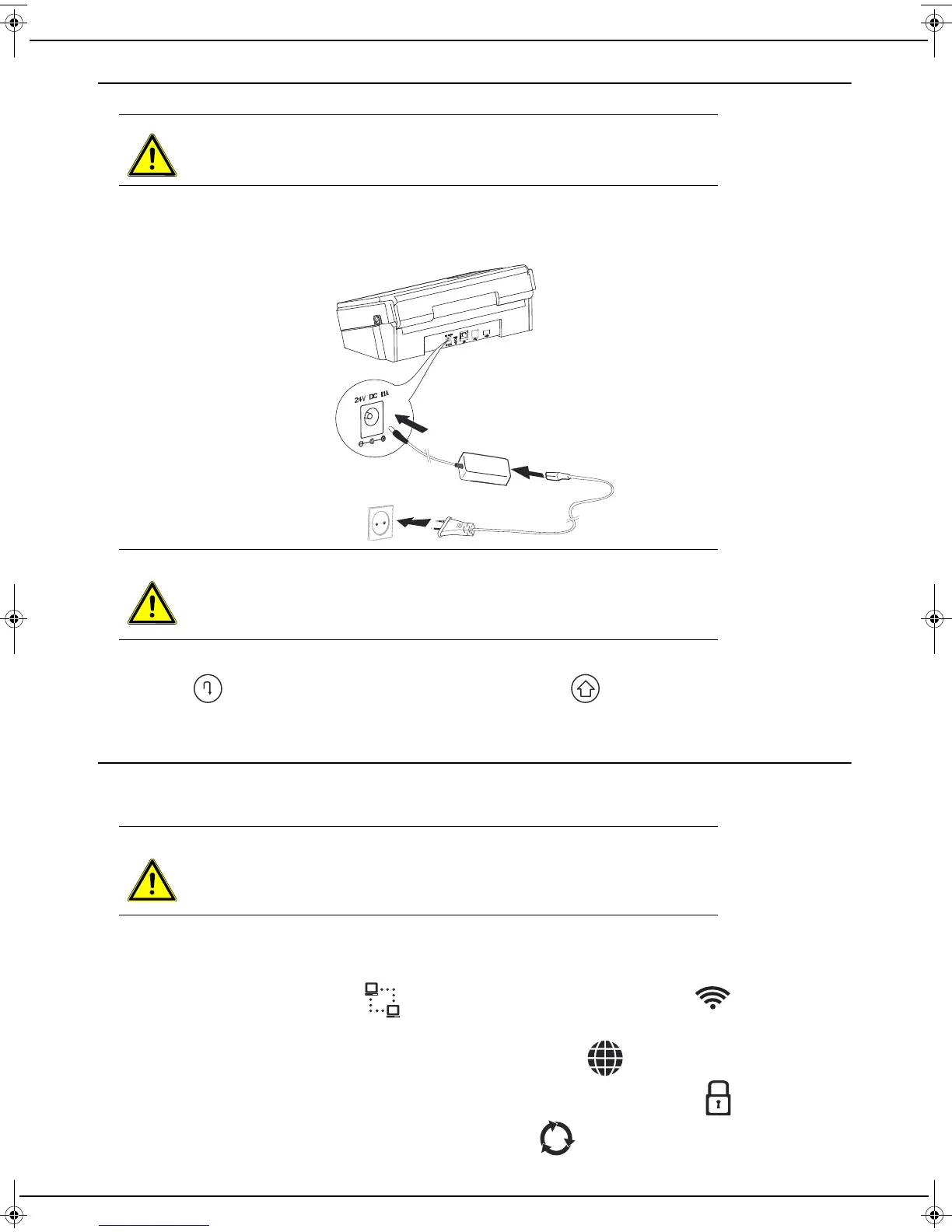
1 Take the power supply and power cord supplied.
2 Always first plug in the mains adapter cord into your machine (1), then the power cord into the mains adapter (2)
and finally the power cord into the power socket (3). If you do not make the connections in this order, you expose
yourself to the risk of an electric shock.
The machine starts and if it is the first time it is switched on, the user is prompted to select the interface language.
3 Use the key to scroll through the available languages and the key to select the desired language.
4 Connect your machine to your Internet box. Refer to the Network connection section.
0.0
Network connection
The machine can be connected to the network by a network hard-wired cable or through a wireless (Wi-Fi) connection.
Use the procedure below appropriate to the type of connection you want.
The connection always takes place in four steps. The various steps are represented by icons displayed on the screen.
These steps are as follows:
• Step 1: connecting the machine to the Internet box (via a network cable or through a Wi-Fi wireless connection).
When the operation is successful, the icon is displayed for the network cable or the icon for the Wi-Fi
connection
• Step 2: connection to the Internet. When the operation is successful, the icon is displayed.
• Step 3: logging on to the Service Provider’s website. When the operation is successful, the icon is displayed.
• Step 4: access to services. When the operation is successful, the icon is displayed, and the machine is then
ready for use. This step requires a manual step the first time the machine is switched on.
WARNING
Before connecting the mains cable, you must consult the Safety Instructions [
5].
WARNING
The mains cable is used to disconnect the machine from the power supply. As a
precaution, the mains power socket must be located near the machine and easily
accessible in the event of danger.
WARNING
when switching on the machine for the first time, you must have a computer con-
nected to the same network as the machine to activate the provider services
LU IB1100E_EN.book Page 12 Mercredi, 15. mai 2013 9:01 09


 To Next Page