T-Max® Manager/Plus and T-Max®3A/F/I User’s Guide Page 21
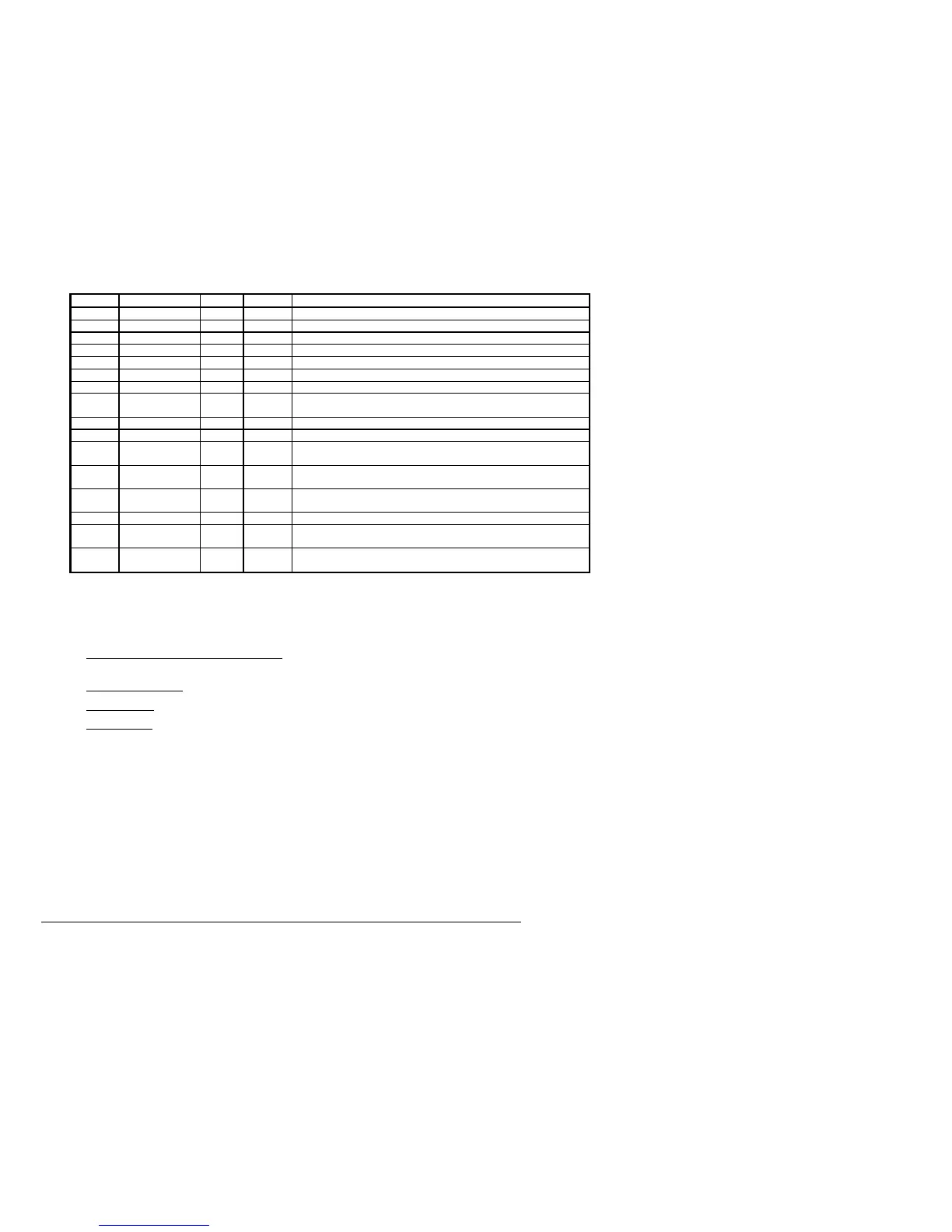
Table 4 - Parameter Table
Parm # Description Max # Default Notes
1 Address 255 254 Address of T-Max®3A/F/I
2 Beep Mode 1 0 Used for High Power beds. 0=Alarm only, 1=Alarm and Flip
3 Delay Time 5 0 Delay in minutes stored in the T-Max®3A/F/I.
4 Current Sense 1 0 For the T-Max® Sentry™ Option. 0=Disabled, 1=Enabled.
5 Session Counts 65535 0 Total session counts for T-Max®3A/F/Is.
6 Lamp Hours 65535 0 Bulb hours for each bed.
7 Bed Hours 65535 0 Number of hours a bed is on.
8 Manual Session
Counts
65535 0 Counts the number of sessions the T-Max®3A/F/I has run while in Stand
Alone Mode
9 Clean Room 1 1 0 = Clean Room Disabled, 1 = Enabled
10 Manual Lockout 1 0 0 = Stand Alone Enabled, 1 = Disabled
13 Cool Down
Mode
10 0 0 = Disabled, 1-10=Enabled. Time delay in minutes allowing bed to
cool.
15 Fixed Session
Counts
65535 0 Counts number of sessions ran through the T-Max®3A/F/I. This value
cannot be changed at all. Used as point of reference.
17 Clean Clear 1 0 0 = Press and hold the Up button for 3-4 seconds to clear the clean room.
1 = Press and release the Up button to clear instantly
20 External Speaker 1 0 0 = Speaker on T-Max®3A/F/I, 1 = External Speaker will be used.
21 Pause Mode 1 0 0 = When session is pause, session time continues to count down. 1 =
When session is paused, session time stops counting down.
22 Auto Shut Off 1 0 0 = When intercom is active, the bed will stay on. 1 = When intercom is
active, bed will turn off and go to pause mode
6.3.6
MANAGER UTILITIES
Click Manager Utilities with your left mouse button. The window will appear with the
following options:
Download Program from PC to Manager
- Allows you to load the T-Max® Mgr/Plus with
new software
Edit Manager Setup
- Allows you to change T-Max® Mgr/Plus Setting for manual use.
Rescan timers
- Allows you to have the T-Max® Mgr/Plus rescan the timer network
Auto Address
- Allows you to Auto Address the entire salon.
6.3.7
Download Program from PC to Manager
Click Manager Utilities then Download Program from PC to Manager with your left mouse
button.
ADNET 2000™ will load the T-Max® Mgr/Plus with the latest software. The Activity
Log will show Sending 256 bytes to different addresses. After the download is complete a
Manager Restart window will appear. The T-Max® Mgr/Plus will rescan. A status bar
will scroll across the window. Once this is complete, you can start new sessions.
6.3.8
Edit Manager Setup
1) Click Manager Utilities then Edit Manager Setup with your left mouse button.



 To Next Page