17 Fan Coil FC600 Instruction Manual
Press OK to conrm.
M
2
06:00
Thermostat will go to program
2.
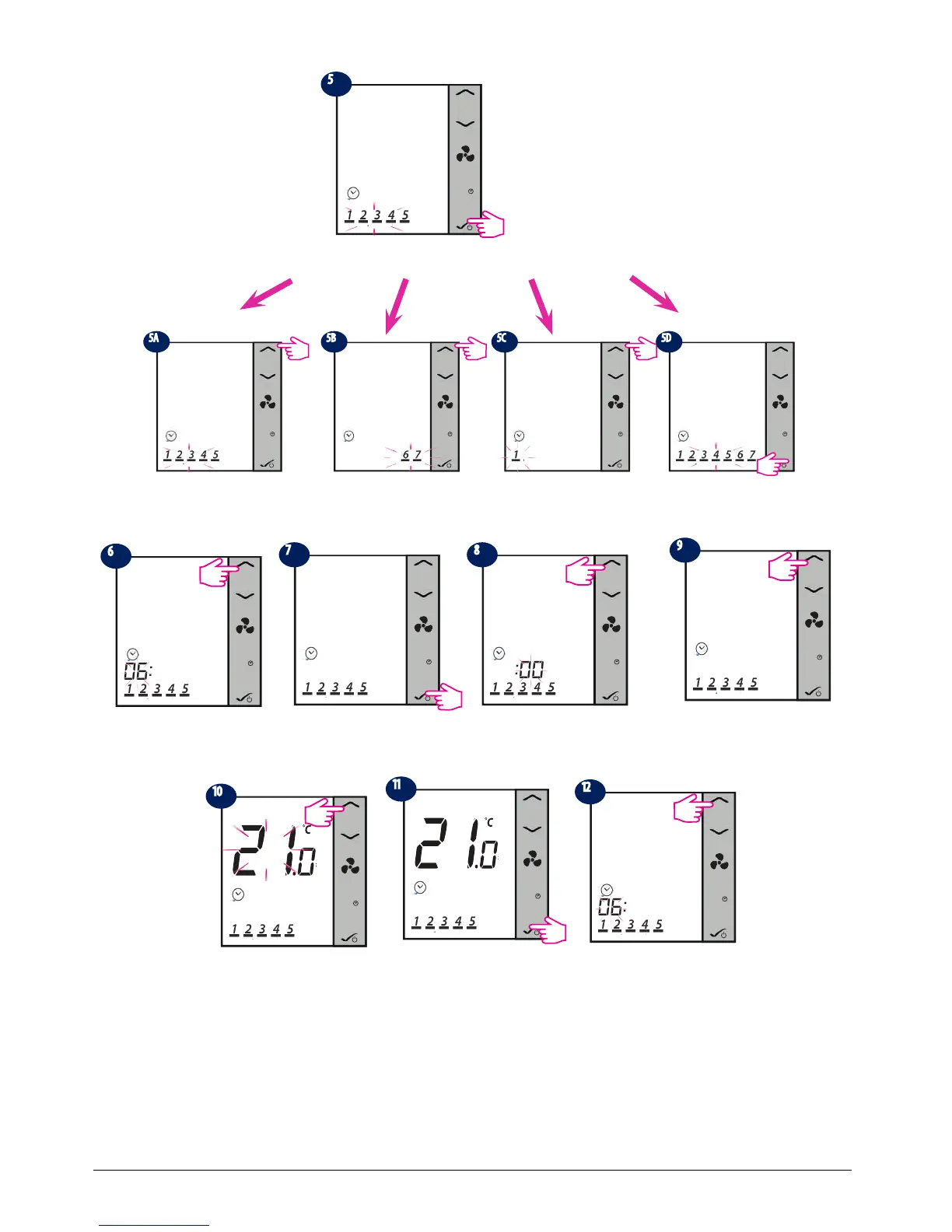
You will have to follow the same steps to set up all six programs, after which the thermostat will go to Sat-Sun
and will ask you to set the schedules for those days. You will have to set a start time and a temperature for
each of the six programs. If you are programming every day individually, you will have to set the programs
from 1- 6 for Monday, then Tuesday, Wed, Thu, Fri, Sat and Sun. If you are programming all week the same,
you will have to set all the 6 programs just once.
M
1
06:00
Press OK to conrm.
M
1
06:00
Press Up/Down arrows to set
the minutes.
M
1
06:00
Press OK to conrm.
M
1
06:00
Set a temperature for program
1 using Up/Down arrows.
M
1
06:00
Press Up/Down arrows to set
the start time for program 1.
M
1
Press Up/Down arrows to
choose the schedule mode.
M
1
Press 1 time to select Sat-Sun
only.
M
1
Press Up/Down to select each
day individually or 7 times to
select the whole week.
M
1
Press OK to select .
M
1
Press OK to choose Mon-Fri
Press OK button on this step if you want to
set a schedule for Mon-Fri. If you want to
choose another type of program, press Up/
Down arrow.
M
1
06:00



 To Next Page