121
Settings
6
6 Settings
6.2 Time
You can configure Clock Set or Sleep Timer. You can also set the product to automatically turn on or off
at a specified time using the Timer function.
6.2.1 Clock Set
Set the current time.
Changing the Setting for Clock Set
This product can only be controlled by using the remote control.
1 Press MENU on the remote control.
2 Press / to move to Setup and press [ ].
3 Press / to move to Time and press [ ].
4 Press / to move to Clock Set and press [ ].
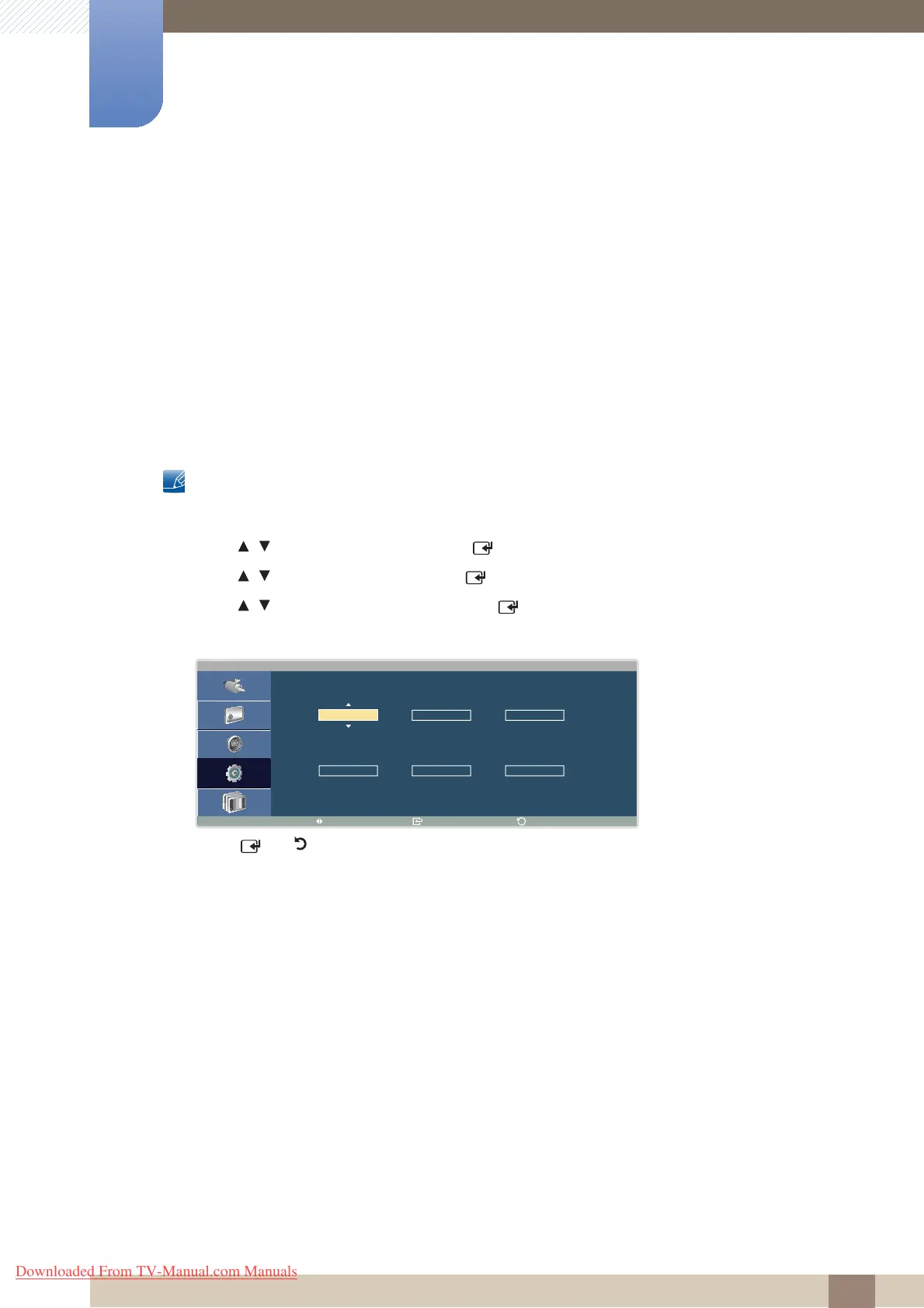
5 In the displayed Clock Set window, set the current time using the direction keys.
6 Press [ ] or [ ] when all settings are complete. The settings will be applied.
C l o c k S e t
M o v e E n t e r
R e t u r n
- -
- -
M o n t h D a y Y e a r
- - a m
- - - - - -
H o u r M i n u t e a m / p m
Downloaded From TV-Manual.com Manuals




 To Next Page