EasyManua.ls Logo

Samsung HD950 - Surround Sound Speaker Setup

Samsung HD950
75 pages
Print Icon
To Next Page IconTo Next Page
To Previous Page IconTo Previous Page
Loading...
ENG-62
CHANGING S
ETUP MENU
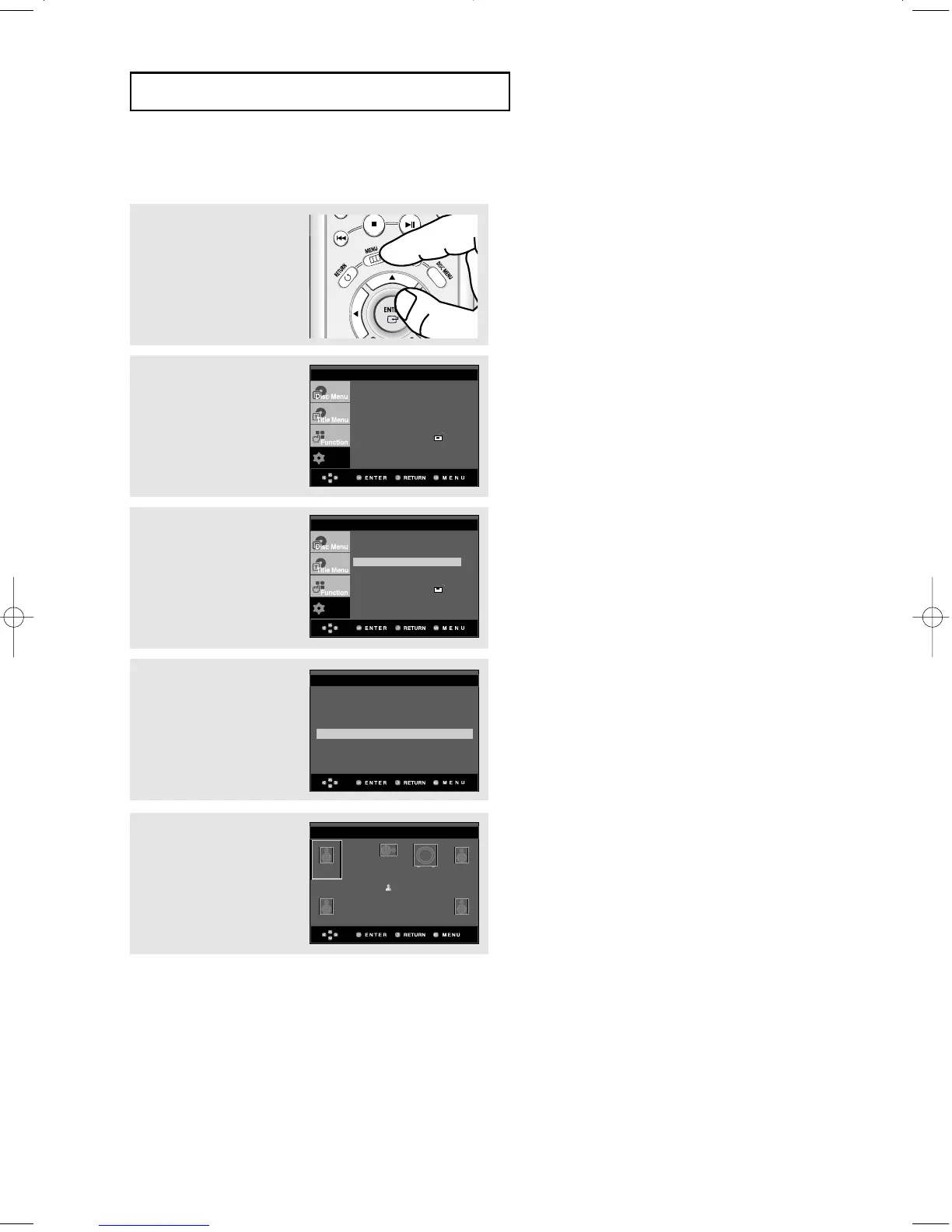
Surround Sound Speaker Setup
3
Press the
/
buttons to
select Audio Setup, then
press the
or ENTER
button.
4
Press the
/
buttons to
select Speaker Setup,
then press the
or
ENTER button.
1
With the unit in Stop
mode, press the MENU
button.
2
Press the
/
buttons to
select Setup, then press
the
or ENTER button.
To exit the setup menu, press the MENU
button.
Setup
Language Setup
Audio Setup
Display Setup
Parental Setup :
EZ Setup
Setup
Language Setup
Audio Setup
Display Setup
Parental Setup :
EZ Setup
AUDIO SETUP
5
Press the
//œ/
buttons to select the
desired item, then press
the ENTER button to set
the size.
L
SL
R
SR
C
LFE
SPEAKER SETUP
Small Small
User
Test
Small
Small Small
On
Dolby/DTS Digital Out : PCM
Dynamic Compression : On
PCM Down Sampling : On
Speaker Setup
00627B-HD950-XAA-2 5/6/05 3:26 PM Page 62

Related product manuals