English - 33
Freezing the Picture
1. Press the STILL button to freeze a moving picture.
Normal sound will still be heard. Press again to cancel.
PIP
Size :
Position :
Air/Cable : Air ►
Channel : Air 3
PIP
Size :
Position :
Air/Cable : Air ►
Channel : Air 3
Air
Cable
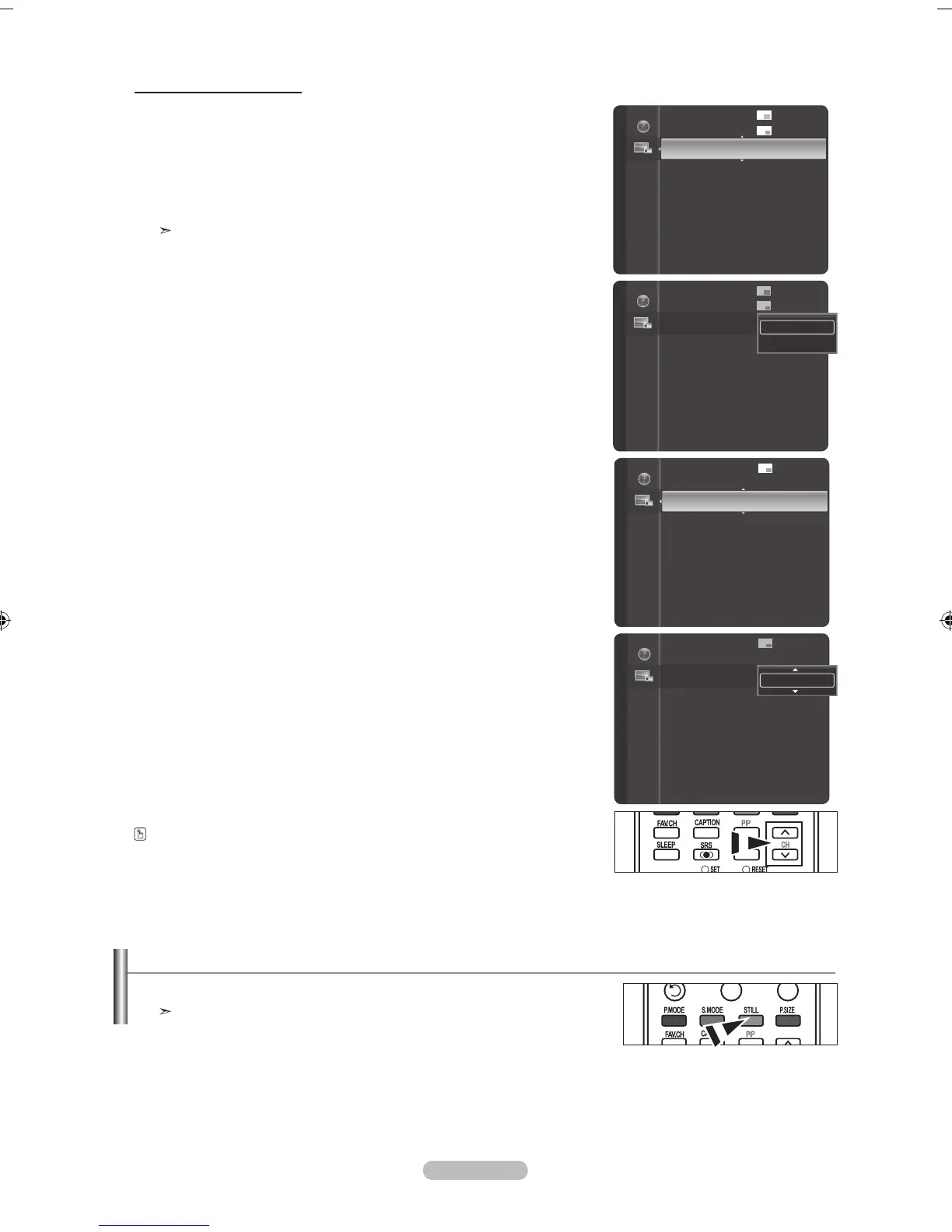
Changing the PIP Channel
6. Press the ▲ or ▼ button to select “Air/Cable”, then press the ENTER button.
Press the ▲ or ▼ button to select “Air" or "Cable”, then press the ENTER button.
7. Press the ▲ or ▼ button to select “Channel”, then press the E
NTER button.
Press the ▲ or ▼ button to select the desired channel in the PIP window.
Press the ENTER buttons.
The channel can be active when the sub picture is set to TV.
Alternatly, you can press the PIP Channel buttons on the remote control.
PIP
Position :
Air/Cable : Air
Channel : Air 3 ►
PIP
Position :
Air/Cable : Air
Channel : Air 3 ►
Air 3



 To Next Page