English - 34
Using Automatic Sound Settings
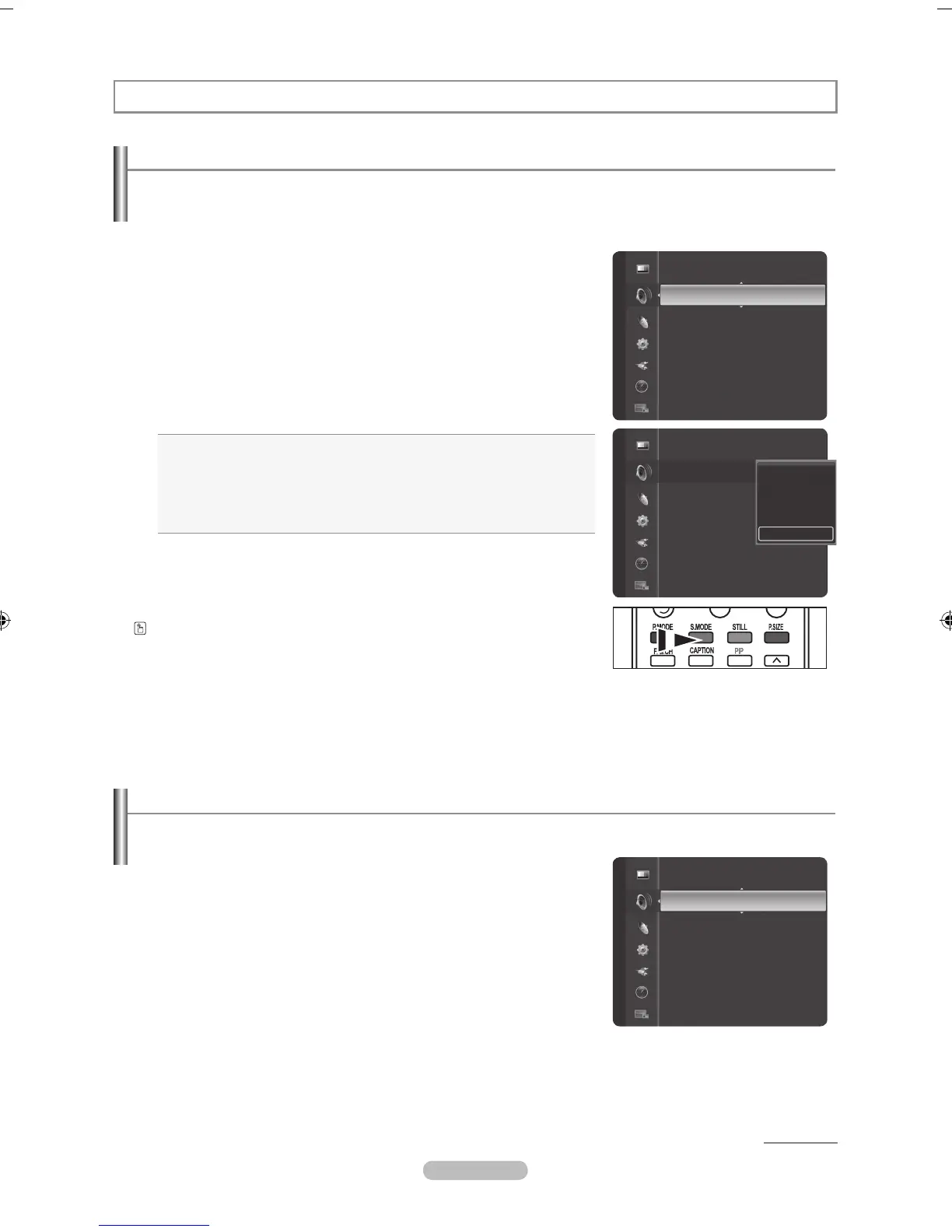
Your TV has automatic sound settings ("Standard", "Music", "Movie", "Speech" and "Custom") that are preset at the factory.
Or, you can select "Custom", which automatically recalls your personalized sound settings.
1. Press the MENU button to display the menu.
Press the
▲ or ▼
button to select "Sound", then press the ENTER
button.
2. Press the E
NTER
button to select "Mode".
Press the
▲ or ▼
button to select "Standard", "Music", "Movie", "Speech",
or "Custom" sound setting, then press the ENTER
button.
Press the EXIT button to exit.
• Standard: Selects the normal sound mode.
• Music: Selects to emphasize music over voices.
• Movie: Selects to provide live and full sound for movies like the movie theater.
• Speech: Selects to emphasize voice over other sounds.
• Custom: Selects to recall your personalized settings
(see "Customizing the Sound").
Press the S.MODE button on the remote control repeatedly to select one of
the sound settings.
Customizing the Sound
The sound settings can be adjusted to suit your personal preference.
1. Press the MENU button to display the menu.
Press the ▲ or ▼ button to select "Sound", then press the ENTER
button.
2. Press the ▲ or ▼ button to select "Equalizer", then press the E
NTER
button.
Sound Control
Mode : Custom ►
Equalizer
SRS TruSurround XT : Off
Audio Language
Multi-T
rack Sound : Stereo
Auto Volume : Off
Internal Mute : Off
Sound Select : Main
Sound
Mode : Custom ►
Equalizer
SRS
TruSurround XT : Off
Audio Language
Multi-T
rack Sound : Stereo
Auto Volume : Off
Internal Mute : Off
Sound Select : Main
Sound
Standard
Music
Movie
Speech
Custom
Mode : Custom
Equalizer ►
SRS TruSurround XT : Off
Audio Language
Multi-T
rack Sound : Stereo
Auto Volume : Off
Internal Mute : Off
Sound Select : Main
Digital Output
Sound
Continued...



 To Next Page