ENGLISH-17
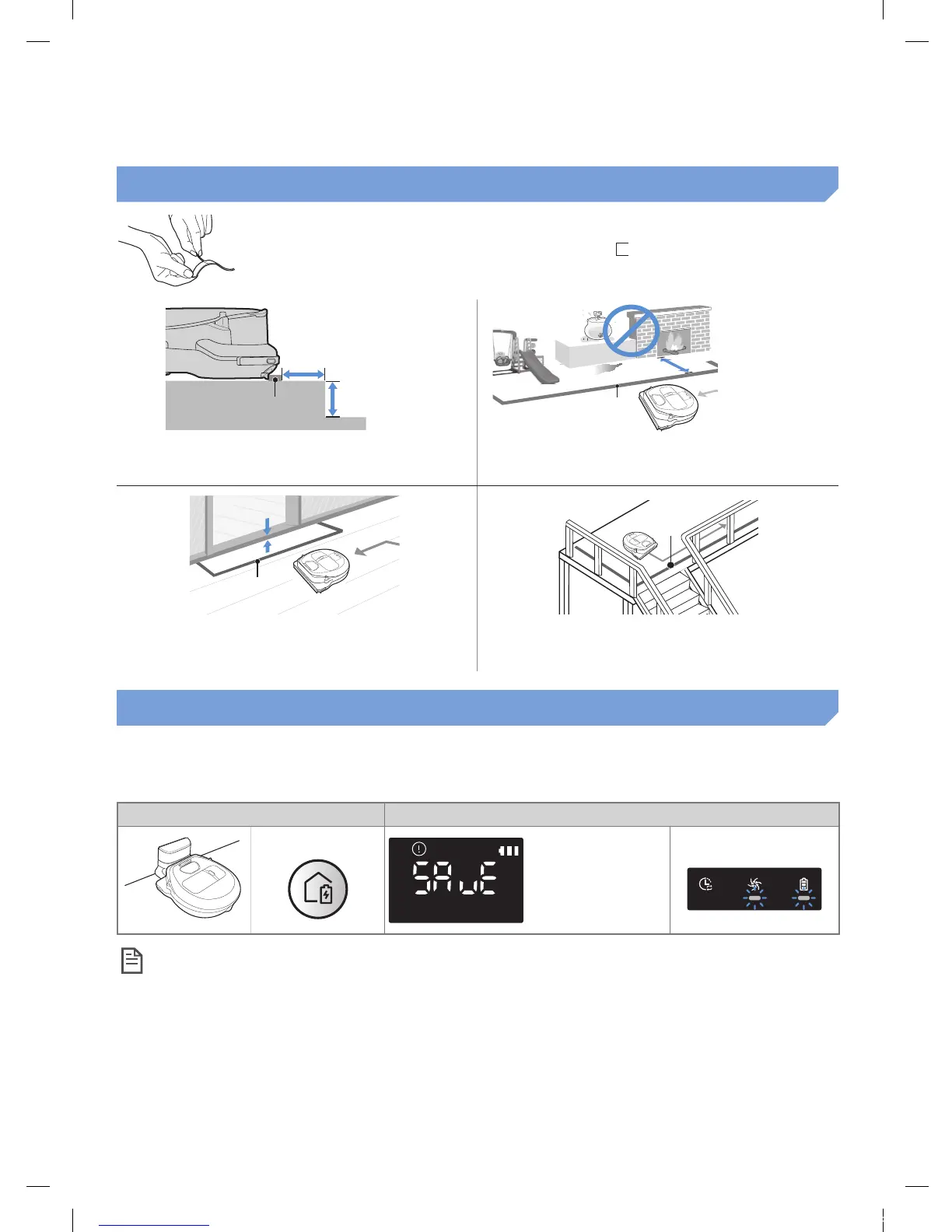
About the boundary markers
To prevent the POWERbot from entering the following areas, attach
the boundary markers on the oor in the shape at an interval of
about 5.9in (15cm).
About 5.9in
(15cm)
Boundary
markers
About 1.9in
(5cm)
About 5.9in (15cm)
Boundary
markers
where a raised spot is below 1.9in(5cm) where there is a slide, swing, replace or any
ammable substance or moisture.
Above 0.6in (1.5cm)
boundary
markers
Boundary
markers
where a threshold is above 0.6in (1.5cm) where there is risk of falling such as stairs,
porches or guardrails.
Using Energy-saving mode
You may selectthe Energy-saving modeto save energy during battery charging.Energy-saving mode
turns off all functions except battery charging.It reduces the powerconsumptionwhile you are away
from home for an extended period of time.
How to select or cancel Displayed icon
Press for 5 sec.
About 3
seconds later,
the previous
indicator will
appear.
<Only SR1AM7010UW
series>
Blinking Blinking
Note
f If you select the Auto/Max/Manual clean mode or press Point cleaning button, the Energy-
saving mode will be cancelled.
f During the Energy-saving mode, setting the schedule will cancel the Energy-saving mode.
– If you select the Energy-saving mode after setting the schedule, the schedule will not be
cancelled.
f If the power of the docking station is off, the Energy-saving mode will be cancelled.
1_VR7000_EN_DJ68-00763C-02_USA.indd 17 2017-02-23 오전 12:26:55






 To Next Page