ENGLISH-23
Setting time/schedule
[A Type, B Type] Only Auto clean mode can be scheduled.
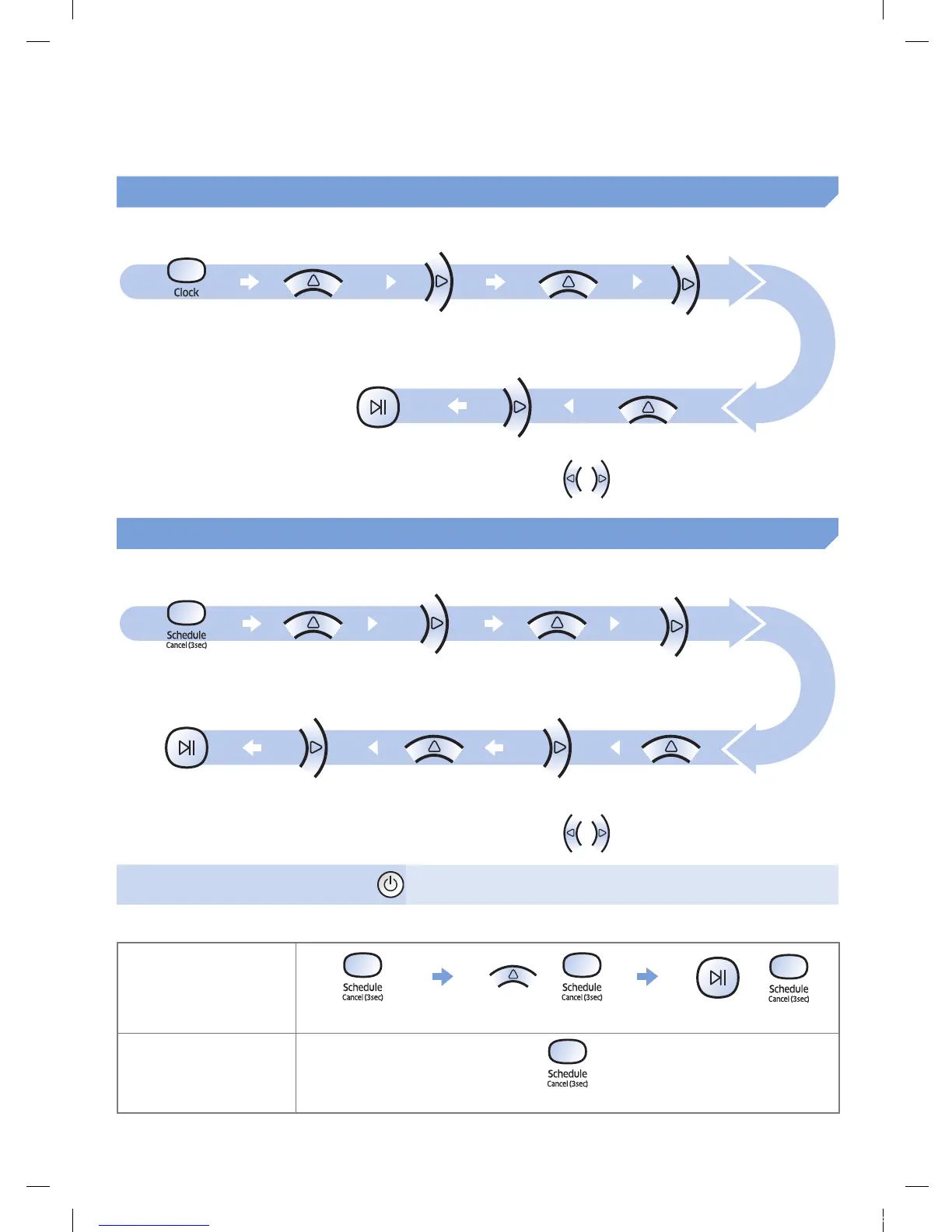
Setting the time
You must set the current time before using the One-time/daily schedule.
Start setting Select "Hour" Select "Minute"
Select "AM/PM"Setting complete
Skip to previous, next setting
Setting the schedule
Setting/cancelling the schedule can only be done while POWERbot is docked on the docking station.
Start setting Select "One-time" or
"Daily" schedule
Select "Hour"
Select "Minute"Select "AM/PM"Setting complete
Skip to previous, next setting
Cancelling during setup
fSetting will be canceled automatically when there's no
input for 7seconds.
Cancelling One-time/Daily schedule
When both One-time/
Daily schedule is set
or
or
Press for 3 sec. Select the schedule Cancel complete
When either one of
One-time or Daily
schedule is set
Press for 3 sec.
1_VR7000_EN_DJ68-00763C-02_USA.indd 23 2017-02-23 오전 12:26:59






 To Next Page