EasyManua.ls Logo

Samsung POWERBOT - Cleaning and Maintenance; Dustbin and Filter Cleaning; Sensor and Camera Cleaning

Samsung POWERBOT
120 pages
Print Icon
To Next Page IconTo Next Page
To Previous Page IconTo Previous Page
Loading...
ENGLISH-26
Cleaning and maintaining
You must turn off the emergency switch before cleaning POWERbot.
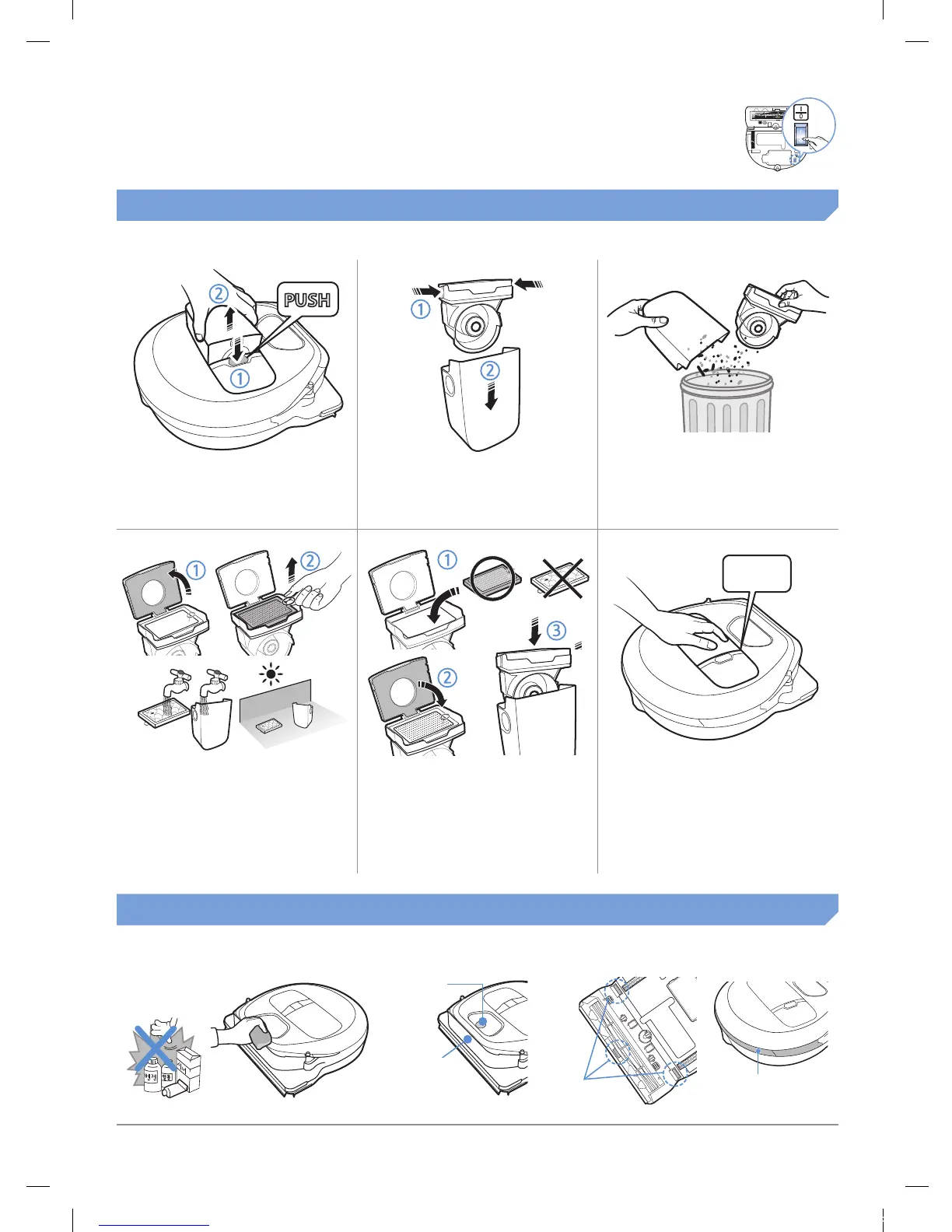
Cleaning the dustbin
1
Press the button to
remove the dustbin
2
Remove the dustbin
cover
3
Remove dust in the
dustbin and cyclone
unit
'Click'
4
Detach the cyclone
unit from the dustbin
cover, and then wash
the dustbin and the
lter
5
Reassemble the
dustbin
6
Reinsert the dustbin
into the main body
until it clicks
Cleaning the sensors and the camera
Lightly wipe with soft cloth. Do not use water or cleaning solutions.
Camera
Front sensor
window
Rear sensor
window
Cliff sensors
1_VR7000_EN_DJ68-00763C-02_USA.indd 26 2017-02-23 오전 12:27:01

Other manuals for Samsung POWERBOT

Related product manuals