ENGLISH-31
10. The connection between the wireless router and the robot vacuum is in progress.
11. When the product registration is completed, the message will appear.
12. When the product registration is completed, Robot vacuum icon is added on the device list.
Main screen
fSelect the Robot vacuum icon on the main screen, and you can move to the POWERbot control screen.
fYou can control your smart home appliances made by Samsung Electronics by Going out, Coming
home, Good night, and Good morning icons.
fHome view function is not supported for a POWERbot.
User menu screen
fYou can control the smart home appliances made by Samsung Electronics with Chat control and
Master key functions.
Chat control
fYou can control the smart home appliances or check about the
status of them conveniently.
Master key
fYou can control several home appliances at once using the master
keys(Going out, Coming home, Good night, Good morning).
Customer service
fYou can see the manual of the product.
fWhen a product is out of order, you can consult with our customer
center and request for an after-sales service.
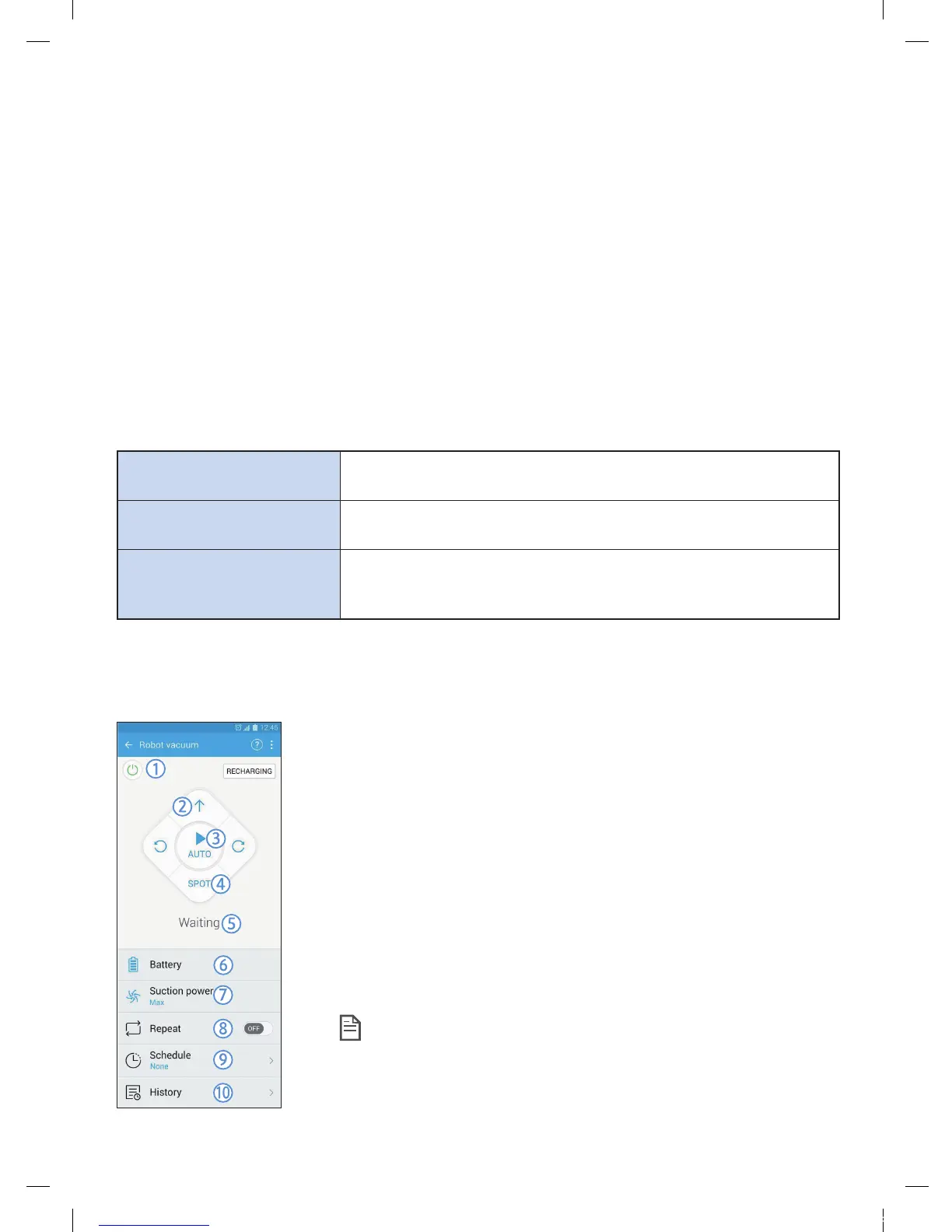
Controlling POWERbot
When accessing the Samsung Smart Robot vacuum app, the control screen will appear.
1. Power on/off
2. Manual clean mode and Direction control (forward movement, left
turn, right turn)
3. Auto clean mode start/stop
4. Spot clean mode
5. Current status indicator
6. Battery status
7. Suction power
8. Repeat clean on/off
9. Schedule (You can set the desired time for each date.)
– The POWERbot operates by synchronizing the set time in the
network.
10. Cleaning history check
Note
f A scheduled cleaning runs only when the POWERbot is
docked on the docking station.
1_VR7000_EN_DJ68-00763C-02_USA.indd 31 2017-02-23 오전 12:27:03






 To Next Page