ENGLISH-20
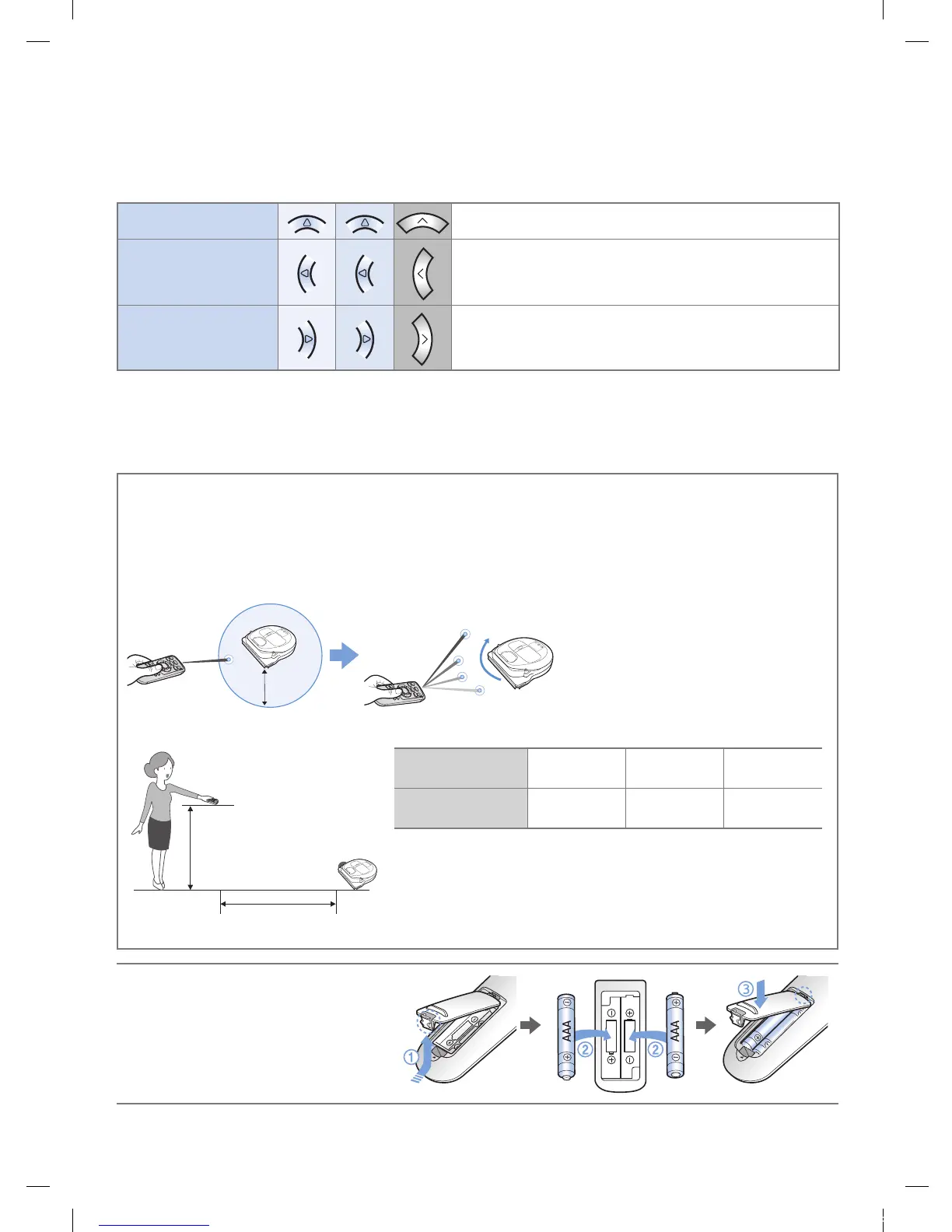
5 Manual clean mode & Direction control
Move forward
Select to move forward
Turn left
Select to turn left
Turn right
Select to turn right
Moving backward is not available.
6 Point cleaning
Available only with C type remote controllers.
You can use the remote control to point and clean the desired spot while the
POWERbot is in cleaning process.
Point the red light on the oor within 1.6ft (0.5m) around POWERbot's location.
Press and hold the Point cleaning button to move the red light to the desired spot. The POWERbot
will follow the light while cleaning.
1.6ft
(0.5m)
Operating distance of the remote control
Height of the
remote control
Operating distance
Height of the
remote control
1.6ft (0.5m) 3.3ft (1m) 5ft (1.5m)
Operating
distance
About 5ft
(1.5m)
About 6.6ft
(2m)
About 10ft
(3m)
Inserting batteries
Open the battery cover by lifting it
up while pressing the locking tab
and insert the batteries as shown
in the illustration. Then, close the
cover until it clicks into place.
Using the remote control
1_VR7000_EN_DJ68-00763C-02_USA.indd 20 2017-02-23 오전 12:26:57






 To Next Page