135
Setting a Supervisor Password
ASupervisorPasswordisrequiredtoturnthecomputer
onortostarttheSystemSetup.
WhensettingaSupervisorPassword,usersotherthana
supervisor cannot use the computer.
1
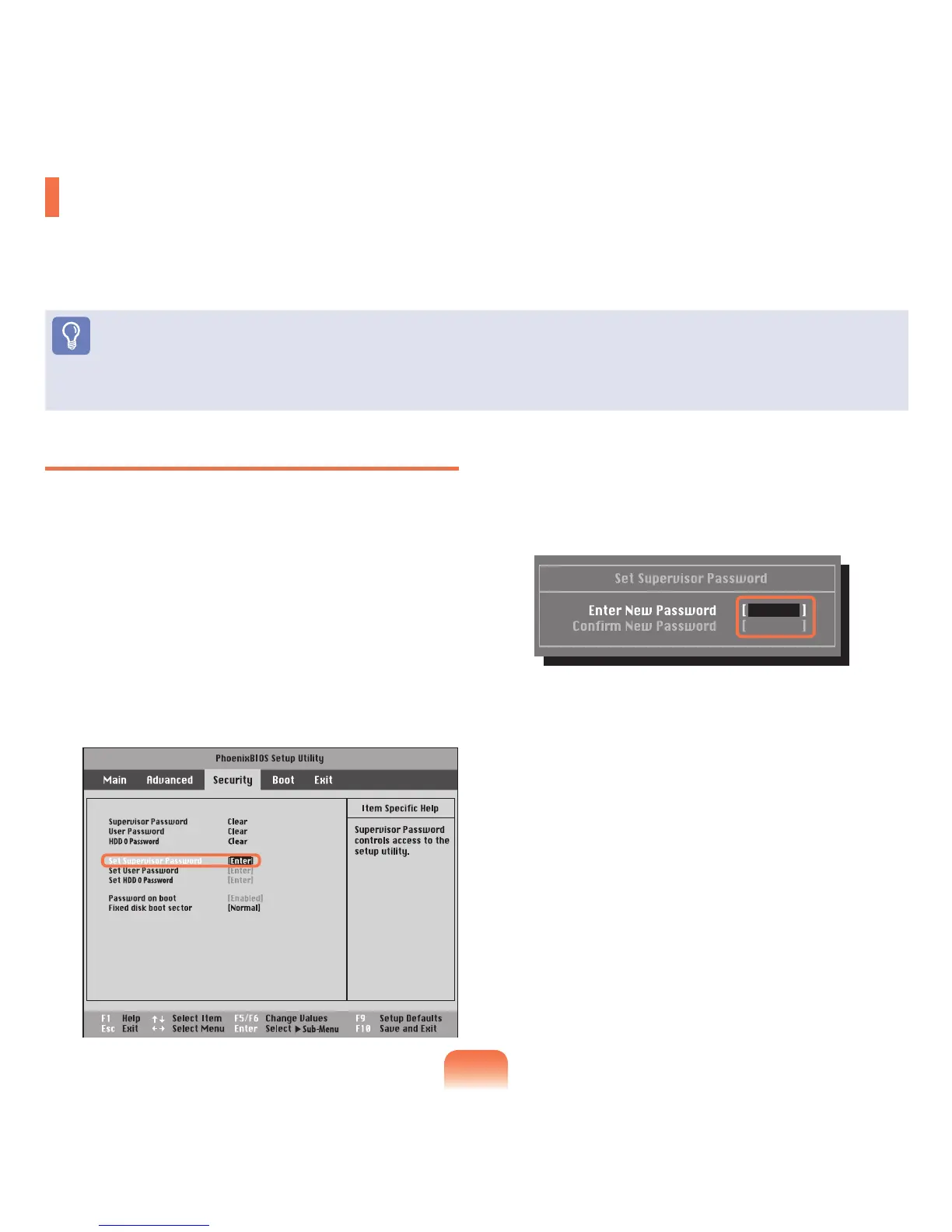
SelecttheSecuritymenuintheBIOSSetup.
2
In the Set Supervisor Password item, press
<Enter>.
3
Enter a password, press <Enter>,re-enterthe
passwordforconrmation,andpress<Enter> again.
Thepasswordcanbeupto7alphanumeric
characters.Specialcharactersarenotallowed.
4
Whenamessageconrmingthepassword
congurationappearsinthe[Setup Notice]window,
press <Enter>.
Thesupervisorpasswordhasbeenset.The
supervisor password is required to turn the computer
onortoentertheBIOSSetup.
Setting a Boot Password
Whensettingapassword,youhavetoenterapasswordtousethecomputerorentertheBIOSSetup.
Byconguringapassword,youcanrestrictsystemaccesstoauthorizedusersonlyandprotectdataandlessaved
on the computer.
Before You Start!
Donotloseorforgetyourpassword.
Ifyouhaveforgottenyourpassword,contactaSamsungservicecenter.Inthiscase,aservicefeewillbecharged.



 To Next Page