95
Bluetooth Software Setup
Bluetoothsoftwareisinstalledoncomputerssupporting
Bluetooth.
Forrsttimeuse,setuptheBluetoothsoftwareas
follows.
1
Double-clickMy Bluetooth Placesicon( )
on the desktop.
2
ClicktheNextbuttontostartsettingup.
■
Inthesettingupsteps,enteradevicenametobe
displayedintheBluetoothManagerprogram.Enter
a name in the Computer Nameeldandselect
Laptop for the Computer Typeeld.
■
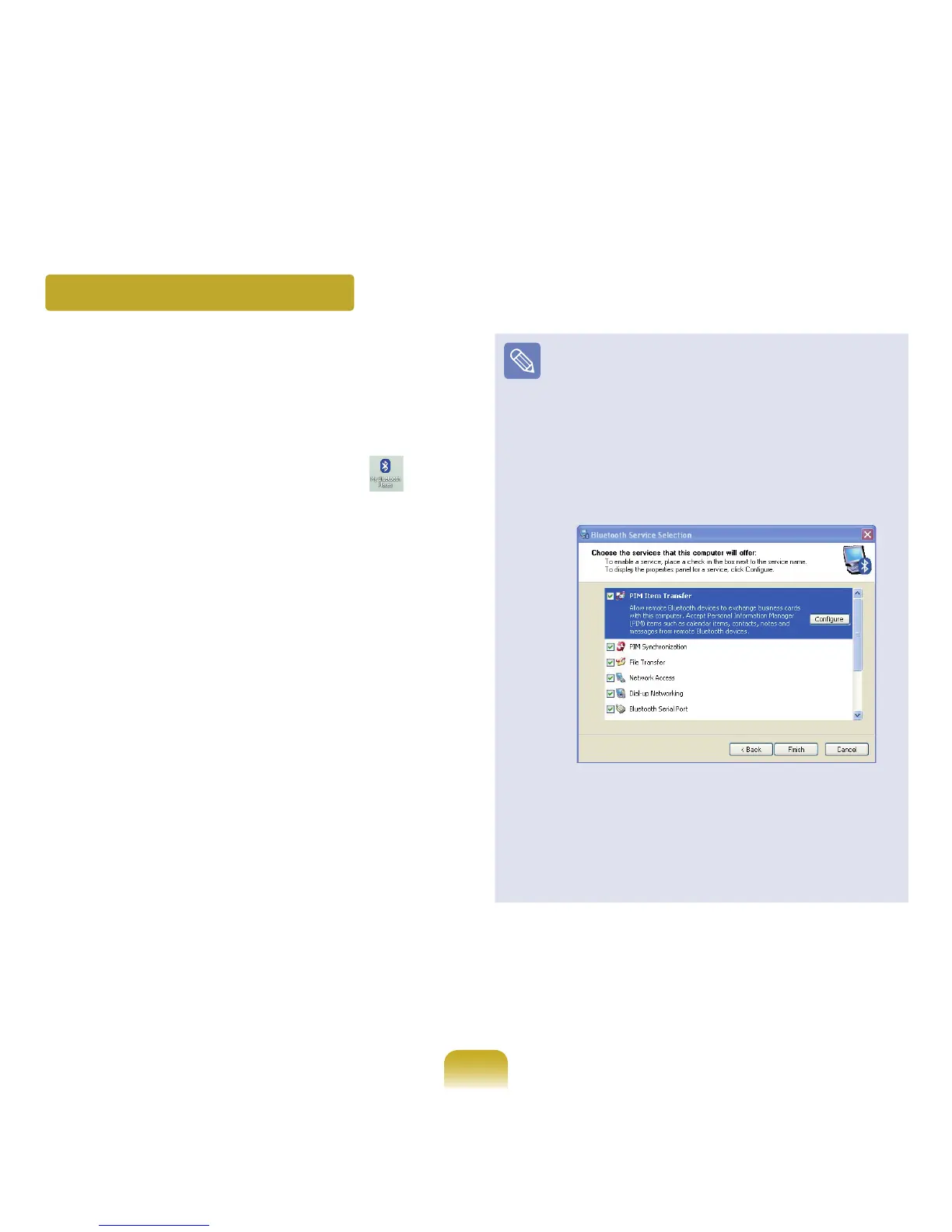
Also,astepappearsforselectingtheservicestobe
providedbyyourBluetoothdeviceforotherBluetooth
devices.Atthispoint,theprogramautomatically
detectsavailableservicesanddisplaysthemas
selected.Itisrecommendednottochangethe
defaultselection.
Ifyouchangetheservicesettings,thedriver
necessaryfortheadditionallyselectedservicesare
installed.
Atthispoint,awarningmessagemayappear
informingyouthatthereisnoMicrosoftlogo.
Since it does not affect the operation, continue the
installation.



 To Next Page