73
Changing Resolution and Color
Aresolutionisthenumberofpixelsdisplayedonthe
screen.Ifyousettheresolutiontoahighervalue,items
onthescreenwillbedisplayedsmallerandthescreen
lookswiderthanthepervious.Ascolorqualitygetshigher,
morecolorscanberepresented.
1
ClickStart > Control Panel > Appearance and
Themes > Change the screen resolution.
2
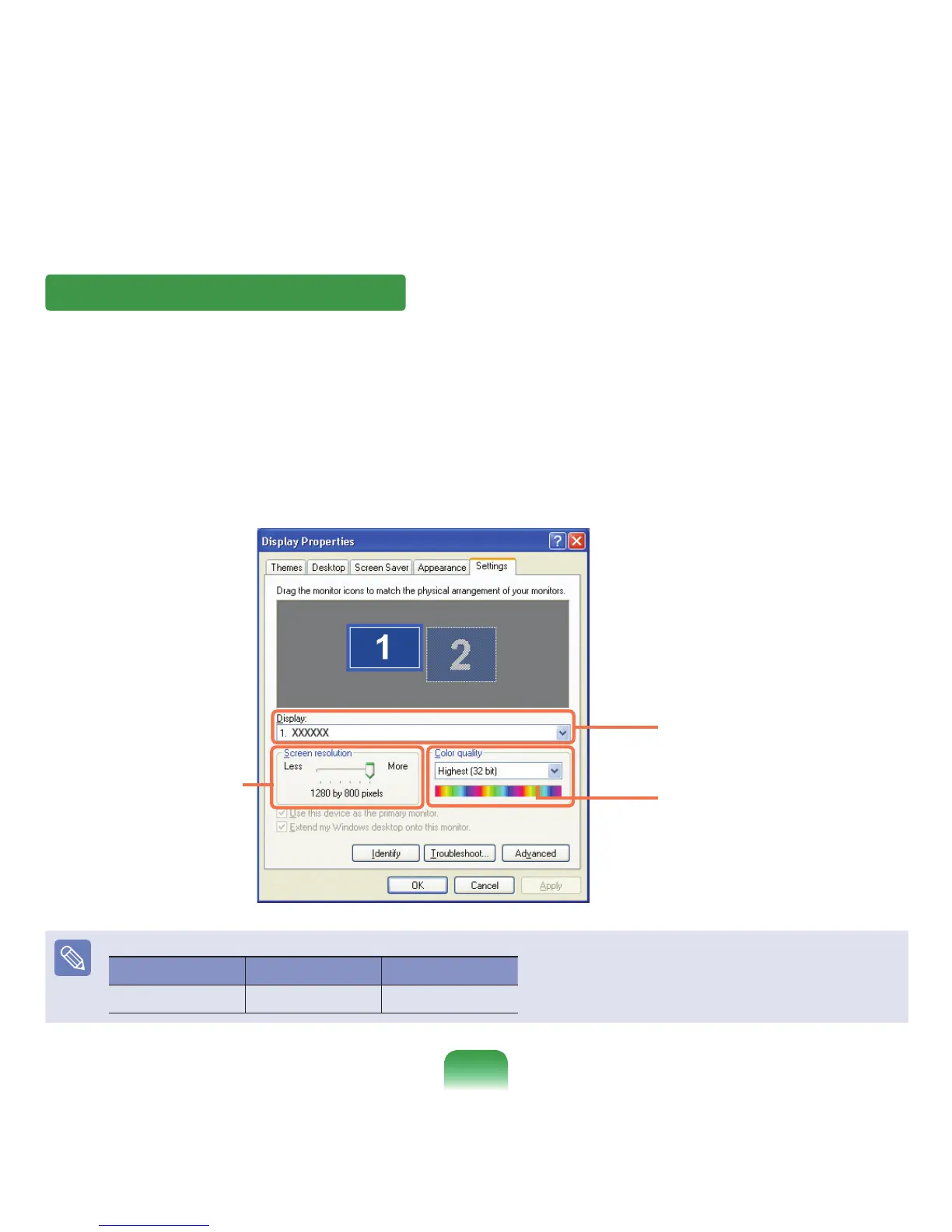
ClickSettingsandchangetheresolutionandcolor
quality.Then,clickOK.
ItisrecommendedtosettheresolutionandcolorqualitydependingontheLCDtypeofyourcomputerasthefollowing:
LCDType Resolution ColorQuality
WXGA 1280x800 Veryhigh(32-bit)
Youcanselectagraphicchipset.
Clickthepull-downmenubuttonto
selectthenumberofcolorsyouwant.
Movethesliderbartosetthe
resolution.



 To Next Page