62
Setting the Sound to Digital Sound
Output on the Computer
SincethesoundofthecomputerissettoDigitalOutputby
defaultwhenpurchasingthecomputer,additionalsettings
arenotrequired.Youcanconrmthesettingasfollows.
1
Double-clicktheVolumeControl( )inthe
noticationareaoftheTaskbar.
2
In the Master Volume window, make sure the SPDIF
muteboxisunchecked.
Selecting Digital Output in the DVD Player
Program
SincethesoundsettingissettoDigitalOutputbydefault,
youdonotadditionallyneedtocongureitfordigital
output.Youcanconrmyoursettingsasfollows.
1
IftheCyberLinkPowerDVDprogramisnotinstalled,
installtheprogramusingthesystemsoftwaremedia
(oradditionalCDdependingonthecomputermodel).
2
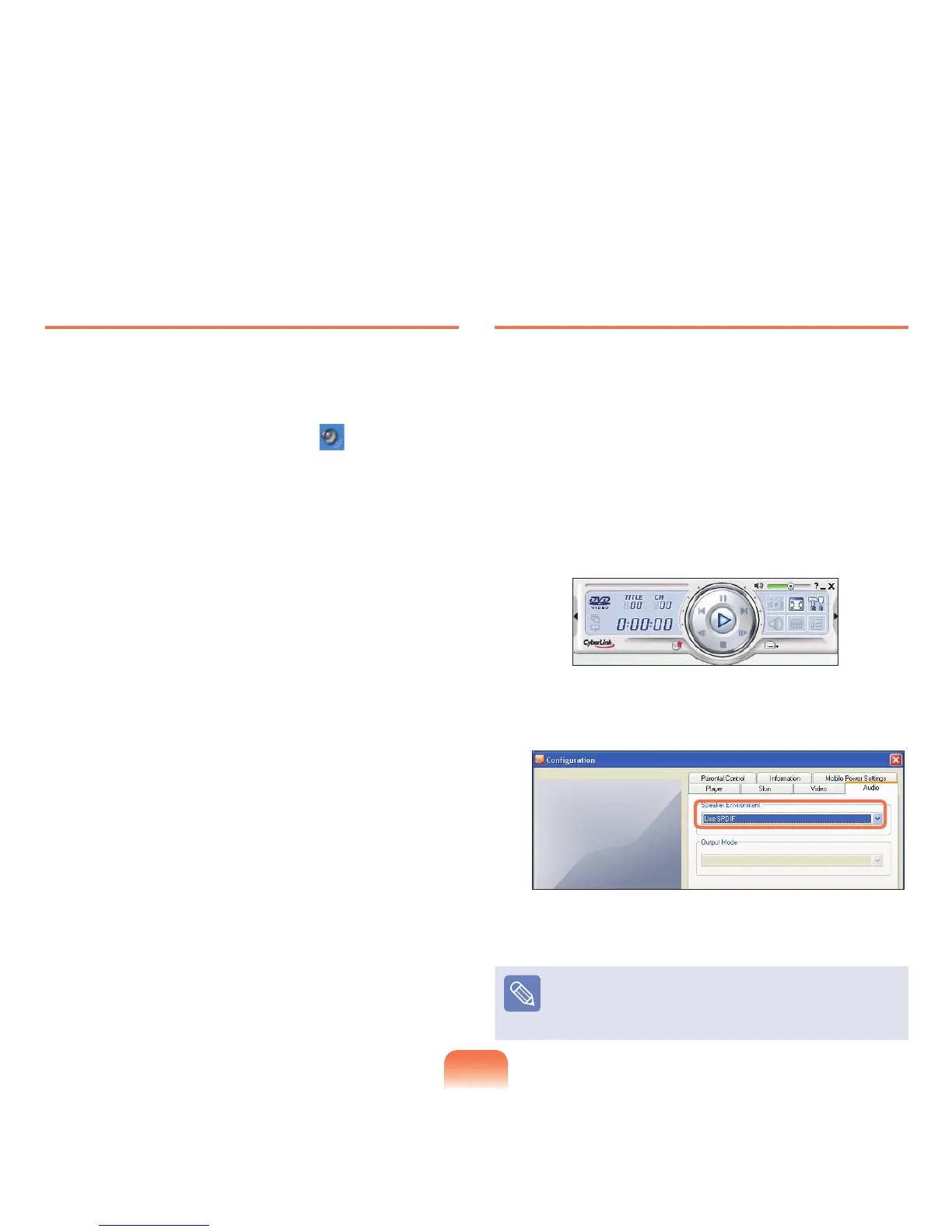
LaunchCyberLinkPowerDVDandclickCongure.
3
ChangetheSpeakerEnvironmentvaluetoUseS/
PDIFintheAudiotab.
4
InsertandplayaDVDtitle.YoucanlistentoS/PDIF
sound.
Note
ForsomeDVD titles,you canlisten to more realistic
soundif you additionallyselectS/PDIF fromthe Setup
menuoftheDVDtitle.



 To Next Page