EasyManua.ls Logo

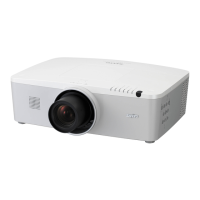
Sanyo PLC-XM100 - User Manual

Sanyo PLC-XM100
149 pages
Print Icon
To Next Page IconTo Next Page
Loading...
Owners Manual
¹
Projection lens is optional.
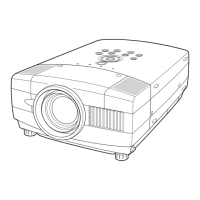
Multimedia Projector
MODEL PLC-XM100
PLC-XM150
PLC-XM100L
¹
PLC-XM150L
¹
Network Supported
Refer to the Owner's Manual below for
details about network function.
Ƒ Network Set-up and Operation

Table of Contents

Other manuals for Sanyo PLC-XM100

Questions and Answers

  • S
    Samantha BrownAug 12, 2025
    What to do if my Sanyo Projector has no power?
    • J
      john94Aug 12, 2025
      If your Sanyo Projector isn't powering on, here are a few things to check: * Ensure the power cord is securely plugged into the AC outlet. * Wait for the POWER indicator to stop blinking before attempting to turn the projector on again. * Check the WARNING TEMP indicator; the projector may not turn on if it's blinking. * Make sure the Key lock function is unlocked. * Verify that the filter cartridge is properly inserted. * Check the projection lamp.
  • J
    Jacqueline ReynoldsAug 16, 2025
    What to do if my Sanyo Projector has no image?
    • N
      Neil CunninghamAug 16, 2025
      First, check the connection between your computer or video equipment and the projector. Ensure that the input signal is correctly output from your computer, as some laptops may require setting adjustments for monitor output when connected to the projector. Note that it can take about 30 seconds for an image to appear after turning on the projector. Also, verify that the selected system corresponds with your computer or video equipment and select the correct input source again through the menu. Make sure the temperature is within the projector's operating range (41°F–104°F [5°C–40°C]).
  • A
    Ashley KelleyAug 19, 2025
    How to troubleshoot a Sanyo PLC-XM100 Projector that has no power?
    • T
      terrelljonathanAug 19, 2025
      First, ensure the projector's power cord is securely plugged into the AC outlet. If the power indicator is blinking, wait until it stops before attempting to turn the projector on again. Check the WARNING TEMP indicator; the projector will not turn on if it's blinking. Also, make sure that the Key lock function is unlocked, the filter cartridge is correctly inserted, and the projection lamp is working.
  • A
    Alexandra LynnAug 23, 2025
    Why does a PIN code dialog box appear at start-up on my Sanyo PLC-XM100 Projector?
    • D
      Darrell VangAug 25, 2025
      The PIN code lock feature is enabled. Enter the correct PIN code, which is either the default “1234” or a custom code you previously set.
  • L
    Logan BradfordAug 27, 2025
    What to do if the initial display is not shown on my Sanyo PLC-XM100?
    • S
      shanewilliamsAug 27, 2025
      Ensure that 'Off' or 'Countdown Off' is not selected in the Display function settings.
  • J
    James AustinAug 30, 2025
    Why is the initial display on my Sanyo PLC-XM100 Projector not the default one?
    • K
      Kevin BrownAug 31, 2025
      Verify that 'User' or 'Off' is not selected in the Logo select function.
  • J
    Jennifer CannonSep 4, 2025
    What does it mean when an icon other than the Lamp mode icon appears when I press the input button on my Sanyo Projector?
    • S
      Scott MooreSep 4, 2025
      This indicates the Filter warning icon is displayed.
  • D
    Daniel CervantesSep 7, 2025
    What does it mean when an icon other than Input mode or Lamp mode icon appears on my Sanyo PLC-XM100?
    • T
      Tonya ThomasSep 7, 2025
      This indicates the Lamp replacement icon or the Filter warning icon is displayed.

Summary

Features and Design

Functionality and Features

Details the projector's various operational and practical features.

Advanced Features

Highlights advanced functionalities like multilingual support, custom logos, and network capabilities.

To The Owner

Safety Precautions

Essential safety guidelines for operating and handling the projector to prevent hazards.

Safety Instructions

General Safety Warnings

Important warnings and cautions for safe operation, covering electrical shock, water exposure, and ventilation.

Air Circulation and Filter Safety

Guidelines for proper ventilation and essential filter maintenance to ensure projector longevity and safety.

Projector Positioning and Installation Safety

Safe practices for positioning, mounting, and installing the projector to prevent accidents.

Safe Carrying and Handling

Precautions for safely moving, carrying, and handling the projector to avoid damage and injury.

Compliance

Regulatory Notices

FCC compliance information and AC power cord requirements for different regions.

Part Names and Functions

Physical Component Identification

Identifies projector parts on front, back, and bottom panels.

Terminal and Port Identification

Details all input/output ports and connectors on the projector's rear panel.

Side Controls and Indicators

Explains the projector's side control buttons and top panel status indicators.

Remote Control Overview

Identifies all buttons and features of the projector's remote control.

Remote Control Setup and Use

Instructions for remote control battery installation, receiver range, and code settings.

Installation

Projector Positioning and Lens Setup

Guidance on optimal projector placement and using the lens shift function for image positioning.

Lens Installation and Removal

Step-by-step instructions for installing and removing the projector lens.

Peripheral Connection Guide

How to connect computers, video, audio devices, and power sources to the projector.

Basic Operation

Powering On;Off and Menu Navigation

Procedures for turning the projector on/off and using the on-screen menu system.

Function Control via Side Panel

Operating key projector functions like zoom, focus, lens shift, and shutter via side controls.

Input Source Selection

How to select input sources directly using buttons or through remote control operations.

Computer Input Setup

Setting up PC input using auto-scan, manual selection, and PC adjustment parameters.

Video Input Setup

Selecting video system formats, input sources, image levels, and adjustment parameters.

Image and Screen Adjustments

Adjusting image levels, parameters, screen size, and keystone correction for computer and video input.

Setting and Configuration

General Projector Settings

Configuring language, menu display, input, logo, lamp, filter, fan, and simple mode settings.

Security and Network Configuration

Setting up network PIN codes, PJLink, security locks, power management, and SNMP.

Advanced Settings and Alerts

Configuring auto-start, timers, shutter, freeze, and email alert settings.

Maintenance and Care

Filter Maintenance Procedures

Detailed instructions for cleaning, replacing, and resetting the projector's filter.

Lamp Replacement Procedure

Step-by-step guide and safety precautions for replacing the projector lamp.

Cleaning and General Care

Instructions for cleaning the projector lens and cabinet.

Appendix

Troubleshooting Common Issues

Solutions for common projector problems like no power, PIN code issues, and no image.

Technical Specifications and Connections

Detailed specs, terminal configurations, serial control, and network connection examples.

Network Setup and Control

Network environment requirements, setup procedures, and web browser control instructions.

Network Troubleshooting and Q&A

Answers common questions regarding network setup, access, browser issues, and firmware updates.

Sanyo PLC-XM100 Specifications

General IconGeneral
Vertical scan range48 - 100 Hz
Horizontal scan range15 - 100 kHz
Projection technologyLCD
Contrast ratio (typical)1000:1
Projector native resolutionXGA (1024x768)
Aspect ratio4:3
RS-232 ports1
Dimensions (WxDxH)497.8 x 375.9 x 165.1 mm
Lamp typeNSH
Lamp power275 W
Light source typeLamp
FocusManual
RMS rated power7 W
Serial interface typeRS-232
USB 2.0 ports quantityUSB 2.0 ports have a data transmission speed of 480 Mbps, and are backwards compatible with USB 1.1 ports. You can connect all kinds of peripheral devices to them.
Noise level31 dB
Weight and Dimensions IconWeight and Dimensions
Weight9661.5 g

Related product manuals