www.satlabgps.com
32
Aer giving a name to the job, the soware will
automacally be redirected to the Job Sengs menu.
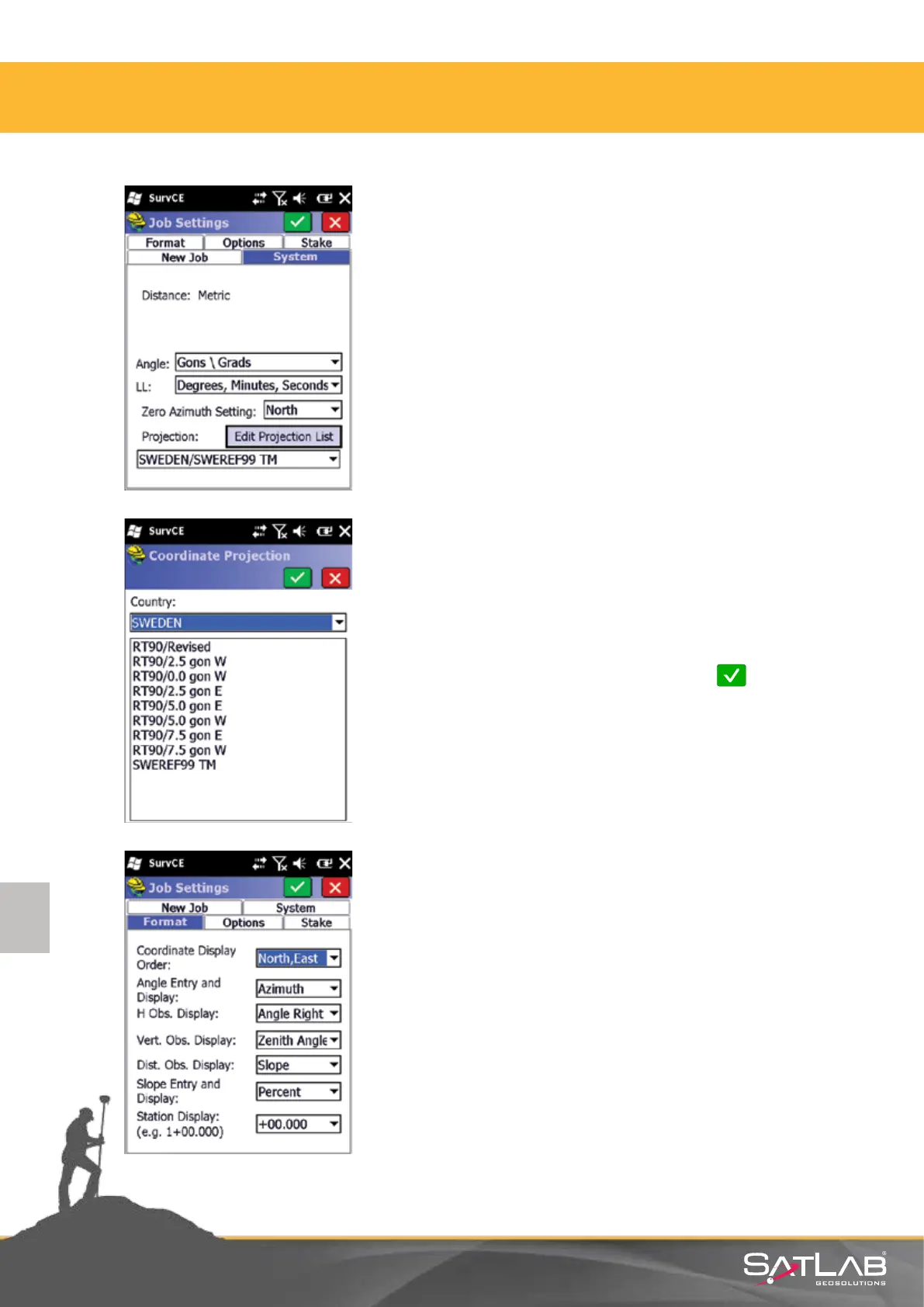
Choose the coordinate system from the System tab in
the Job Sengs menu, which is composed of
Format, Opons, Stake, New Job and System tabs.
Sengs belonging to System tab:
Distance: Metric
Angle: Gon / Grad
Zero Azimuth Seng: Must be North.
Edit Projecon List buon is clicked for the selecon of
Projecon.
Select Add Pre-dened in the pop-up window.
Then select your Country, followed by the name of
Coordinate Projecon (example is shown for Sweden
where SWEREF99 (Grid) has been selected.
Coordinate system selecon is nished by clicking
Okay .
In the Format tab of the tab sengs, Coordinate Display
Order is selected in accordance with the system used.
Please make sure that you set it as dened for your country.
4. Satlab SurvCE Guide



 To Next Page