Mistral Operating Instructions
Part No. SCAZ037980 v6.0.2 34 E&OE
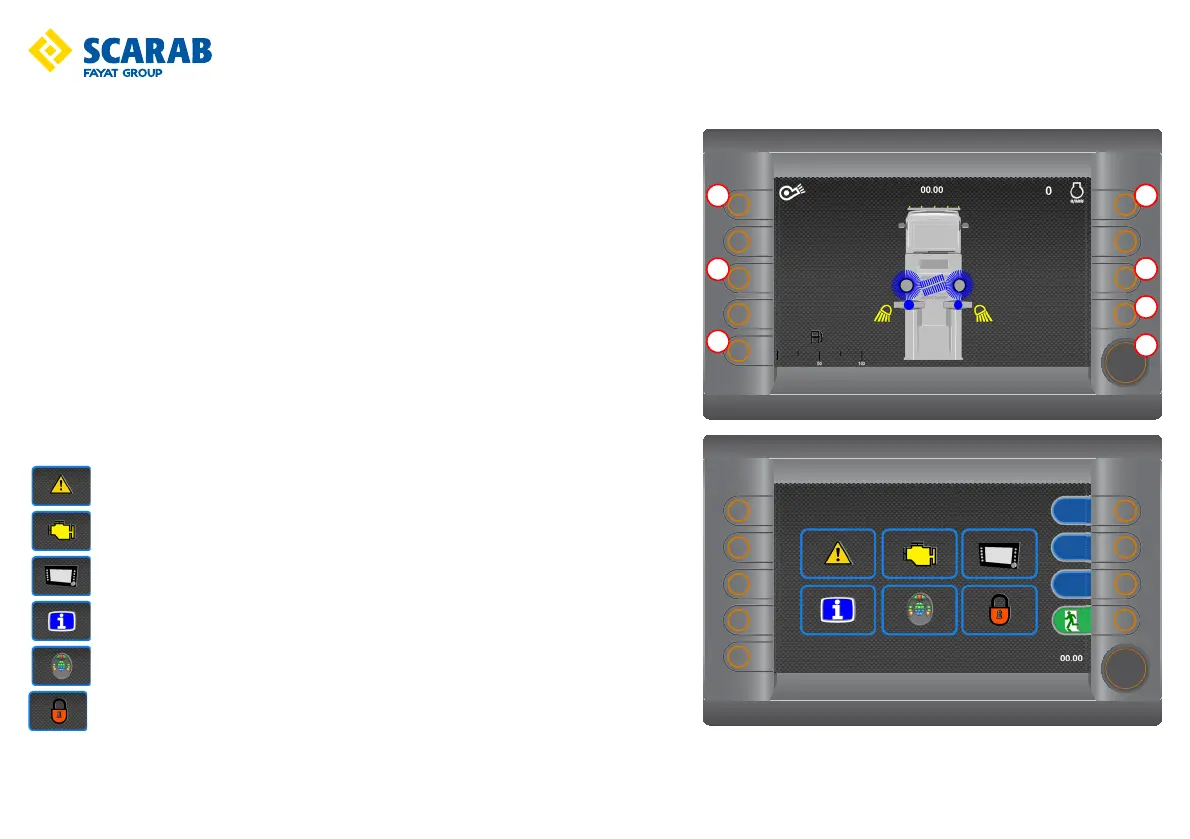
LCD monitor - Options screen
To access the option screen mode from the start up screen press button w.
Button function
q - Display: Press to change background colours (black/white).
w - Options: Press to access option screen mode (illustrated).
e - Hours: Press to view hours logged.
r - Return: Press to return to previous screen.
t - Encoder: Turn to highlight required option, press to enter. Used in all screen modes.
Press to display side tabs from the sweeping mode screen.
y - Camera: Press to enable in forward drive. (rear view only)
u - Warning buzzer: Press to disable the hopper raise/lower and rear door open/close warning
buzzer.
Option screen menu description
Driver’s fault codes
EDC
Screen settings
Information
Button check
CAN menu (Password protected)



 To Next Page