7 Press processes
SCHMIDT
®
PressControl 3000 – V1.3
34
Acknowledge the incorrect pressing. After that, you will be able to
continue the work.
If required, change to operating level 2.
When you want to reset the piece counter, press the "CNT-0-" softkey.
You can lock this counter and prevent the piece counter from being reset.
Select the "Data Input" system function key.
Select the "Counter access" parameter.
Enter the value "0".
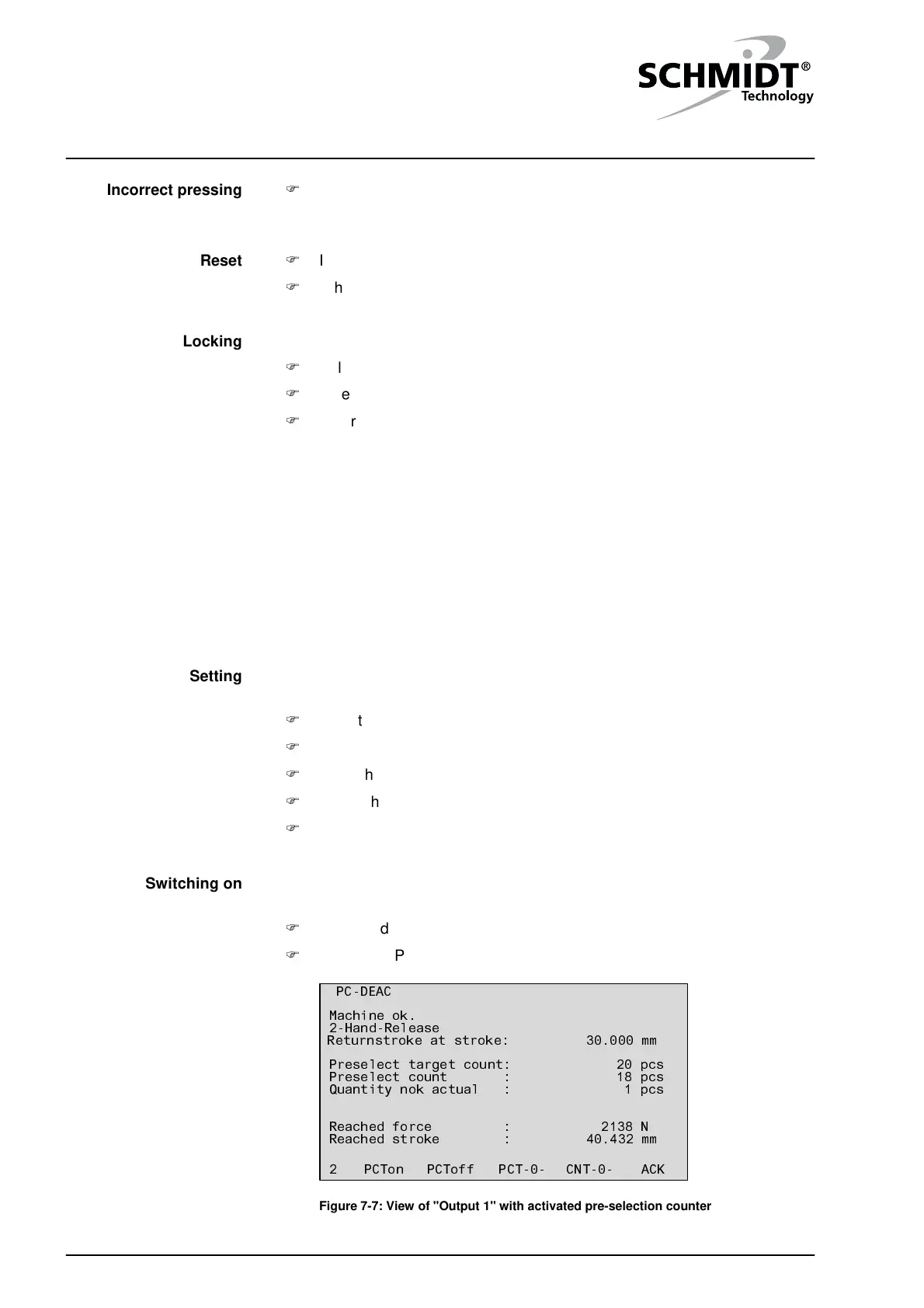
Pre-selection counter
A pre-selection counter is integrated into the control unit in case the lot/batch
sizes to be produced are always the same.
As soon as the set nominal piece number is reached, an alarm sounds. If,
for monitoring the quality, tolerances have been set (see chapter
"10.2 Tolerances"), the counter will distinguish between "OK parts" and "Not
OK parts".
The nominal piece number and/or the duration of the alarm can be set in the
data input, depending on the privilege level.
Select the "Data Input" system function key.
Select the "Target count" parameter.
Enter the desired piece number.
Select the "Alarmtime quan. reached" parameter.
Enter the desired duration of alarm in seconds.
After you have set the pre-selection counter, you can switch the pre-
selection counter on.
If required, change to operating level 1.
Press the "PCTon" softkey.
ACKCNT-0-PCT-0-PCToffPCTon2
40.432 mm
2138 N
Reached stroke :
Reached force :
Preselect target count: 20 pcs
Preselect count : 18 pcs
Quantity nok actual : 1 pcs
30.000 mmReturnstroke at stroke:
2-Hand-Release
Machine ok.
PC-DEAC
Dataset 1
( )
1
Figure 7-7: View of "Output 1" with activated pre-selection counter
Fehlpressung
Incorrect pressing
Locking
Reset
Setting
Switching on


 To Next Page