2. Initiation
2.1 Notes regarding transportation
2.2 Power supply voltage
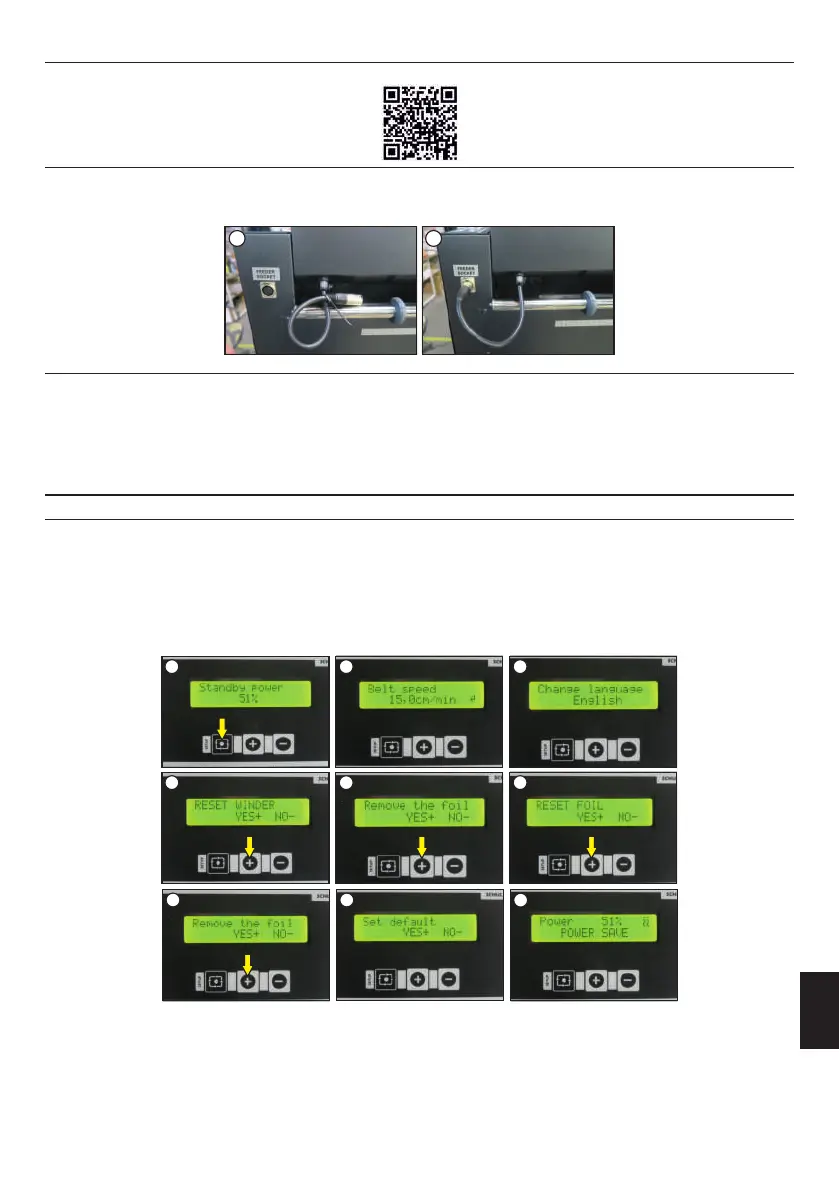
During transport, the machine is packed in protective foil, carton and fixed to a pallet. Immediately after the receipt of the machine, check if the
packaging is in good condition and the device is not damaged. It should be done with a courier. The powder feeder's power wire is secured with a
cable tie for transportation. Remove it and plug the wire into the powder feeder power socket (images 1-2). If the machine has to be send to
another place later on, it should be secured for transportation in the same way. The device must be cooled down and clean for further tranportation.
Very important! The device can only be connected to an installation equipped with a residual current and electric shock protection. Connecting
the press to a power outlet without additional grounding or with an inoperative grounding is dangerous and can result an accident or damage to the
press. The incorrect connection of the machine will void the warranty.
DTF PowDR has to be connected to a voltage of 200-240 VAC / 50 Hz. The device is equipped with a power cord with a plug. Pay special attention
to whether the power outlet is in good condition and whether the protective circuit is connected in it.
3. Preparation of the DTF PowDR
3.1 Tensometer calibration
4. Press the SETUP button shortly. 5 times, until the Reset Winder function appears (image 4). To calibrate, press the + (YES) button. The
message „Remove the foil” will appear (image 5), press the + (YES) button. The display will show "Please wait, calibration";
1. Hold down (for about 1 second) the SETUP button (image 1);
After unpacking the machine, before its first start-up (before the film is applied), the tensometer must be calibrated. The mode switch must be set to
DTF PowDR MODE (see chapter 4.1, image 1). To do the calibration, please follow to this instruction:
3. Hold the SETUP button for about 3 seconds, until the language change function appears (image 3);
2. Press the SETUP button shortly 3 times until the Belt Speed function appears (image 2);
5. The "Reset foil" function will appear (image 6). To calibrate, press the + (YES) button. "Remove the foil" will appear (image 7) press the + (YES)
button.There will be a message „Set default" If the user wants to return the settingsfactory settings, press + (YES), if not - (NO)( image 8).
1 2 3
4 5 6
ENGLISH
23
Version 23.05
1 2
The settings will be reset to the following values:
Standby power: 51%
Working power: 71%
Shaker power: 200 RPM
Speed of the conveyor belt: 15 cm/min
Amount of powder: 100 %
Dispenser adjustments: 1 s
Speed of the winder: 10
There will be a message "Please wait, calibration". Then the main menu screen will appear (image 9).
7
8
9
Attention! After receiving the machine, please watch the video, which shows the first commissioning of the machine. The QR code for the video is
below.



 To Next Page