5.5 Replacement of the electronic / display
Replacement of the electronic
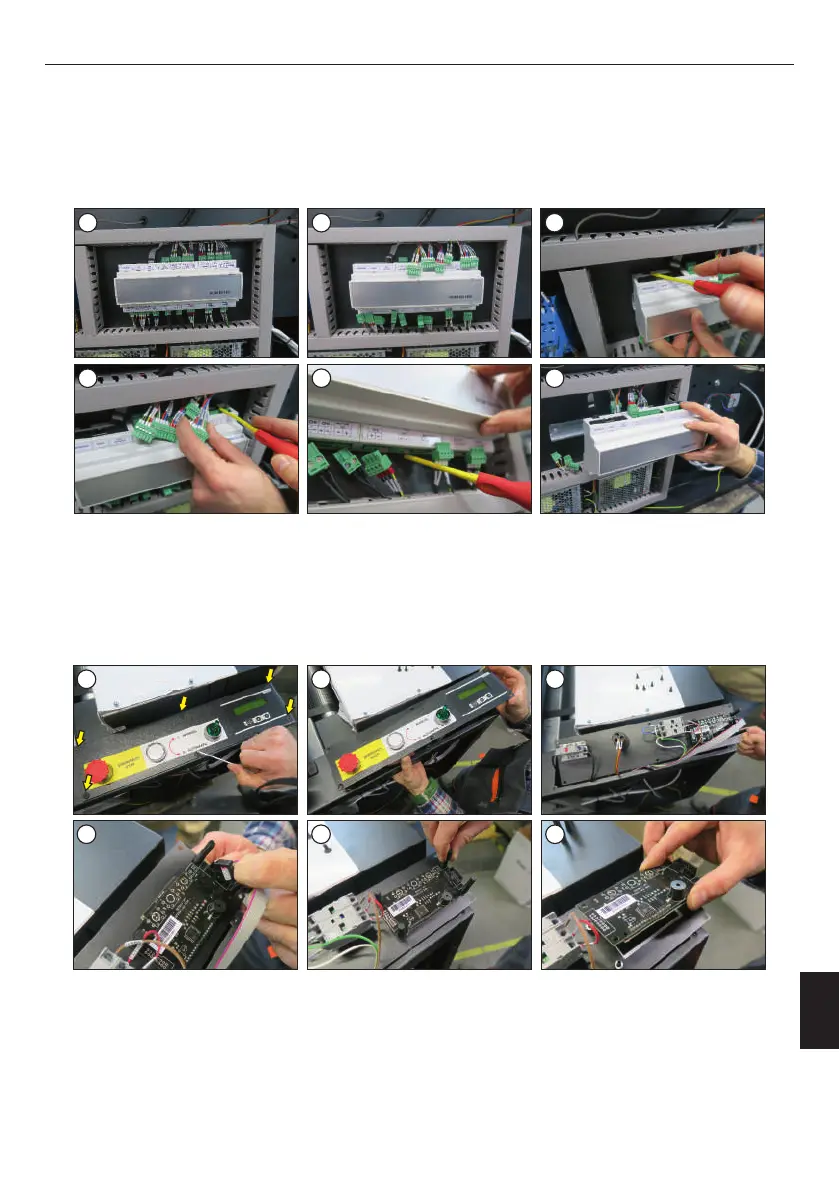
The electronic is located on the left side of the device, in the electrical box. To replace the electronics, make sure that the device is turned off
and the plug is removed from the power socket. Then follow the instructions:
6. Plug in the plugs;
7. Screw the cover.
5. Insert the new electronic, pin into the mountings (2 upper, 1 lower);
1. Unscrew the cover of the device;
2. Disconnect the plugs (images 1-2);
3. Unlock the mountings (2 top, 1 bottom) of the electronic (images 3-5);
4. Remove the electronic (image 6);
Replacement of the display
2. Remove the plug (image 10);
6. Plug in the plug;
5. Screw on the new display with the securing knobs;
To replace the display, make sure the device is turned off and the plug is removed from the power socket. Then follow the instructions:
1. Unscrew the control panel (images 7-9);
3. Unscrew the safety knobs (image 11);
4. Insert the new display (image 12);
7. Screw on the control panel.
1 2 3
4 5 6
7
8 9
10
11 12
ENGLISH
31
Version 23.05



 To Next Page