DTF PowDR MODE
This is the mode of work with the foil application described in chapter 3. It involves gelling the foil coming out of the DTF printer while the conveyor
belt is moving. Usually it used for factory-set working parameters (user can adjust them according to his needs).
DRYER ONLY
Dryer only mode can also be used to avoid large foil waste. To do this, switch the automatic mode to dryer only mode at the moment when the foil
passes the powdering zone.
Switching on DRYER ONLY / DTF PowDR MODE
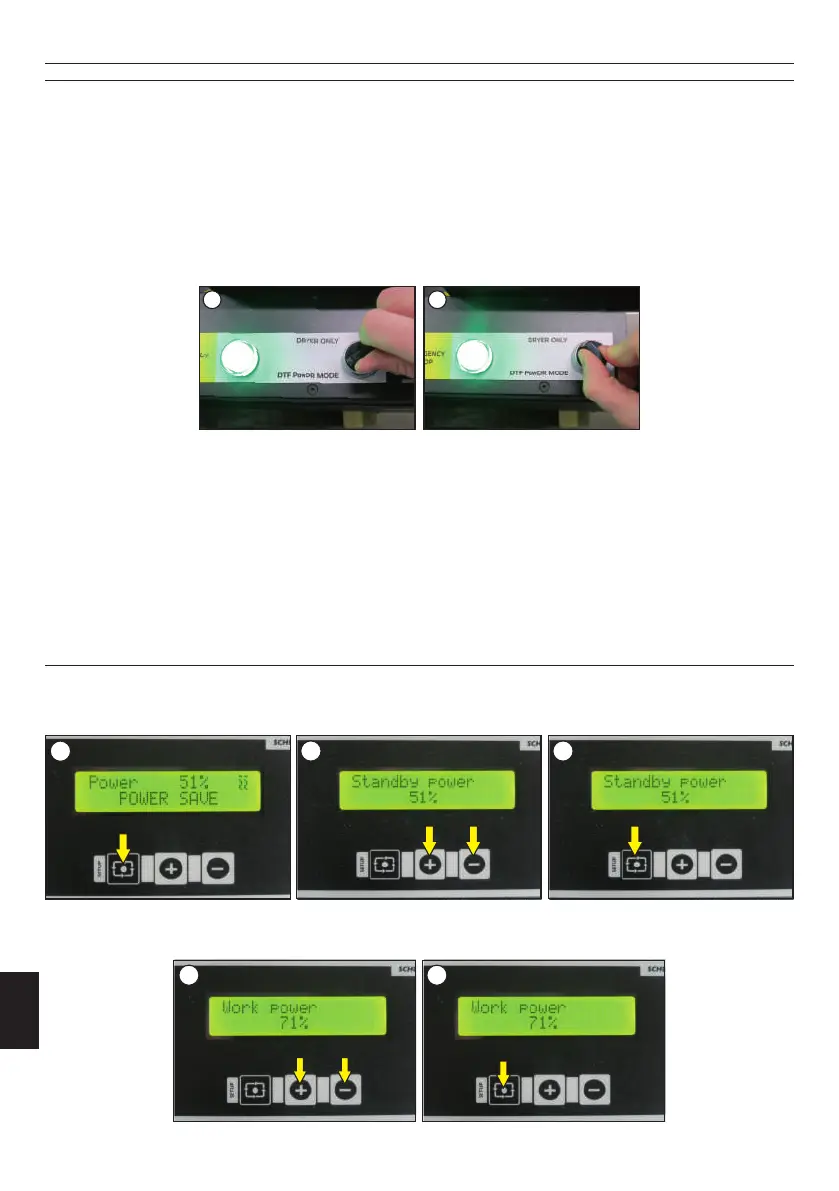
Turn the knob on the control panel from DTF PowDR MODE to DRYER ONLY / DRYER ONLY to DTF PowDR MODE (image 2).
Dryer only mode is used for fixing smaller formats. The belt is started according to the preset speed and power of the machine. Mechanical powder
feeding is stopped at that time, the scale and shaker paddles are turned off.
Working on the machine is possible in two modes: DTF PowDR MODE and DRYER ONLY (image 1).
4. Working with the DTF PowDR
4.1 Working modes
Standby power
When the device is in standby power mode, the foil doesn't move. Standby power is set to 51% by default. This value depends on the type of foil
used.For a specific foil, choose the highest possible power that will not cause deformation of the foil, for example, for thinner foils the standby
power will be lower. To change the standby power setting, press the SETUP button (for 1 sec.,image 1), then use the + and - symbols to set the
desired value (image 2). Confirm the setting with the SETUP button (image 3).
Working power
Working power is the power with which the device works ( the film is in motion, the printer prints). The working power should be selected
analogously to the standby power. The working power for a standard film is 71%. Adjustment of the working power is made after the approval of the
standby power. Use the + and - buttons to set the desired power (image 1). Confirm the choice with the SETUP button (image 2).
4.1 Programming of the electronic
1
2 3
1 2
ENGLISH
26
Version 23.05
The machine has a Standby function. When the machine is not working for about 3 minutes, the display shows information Standby.
Power down function
Power save function
When the machine is turned on, before the foil rolls onto the sensor, the display shows "Power save". Then "Warming up" appears (the machine is
warming up), after 5 seconds the conveyor belt starts, the display shows "Automatic work".
When the printer stops printing, the transport belt continues to move the foil until the foil rises and comes off the sensor. Then the display shows
"Power save" : the conveyor belt stops, the working power is reduced to 51%.
If the work is stopped for some reason, the machine also enters the power save mode.
Standby function
If the machine does not work for an hour, the display shows "Power down".
1 2



 To Next Page