ATTENTION
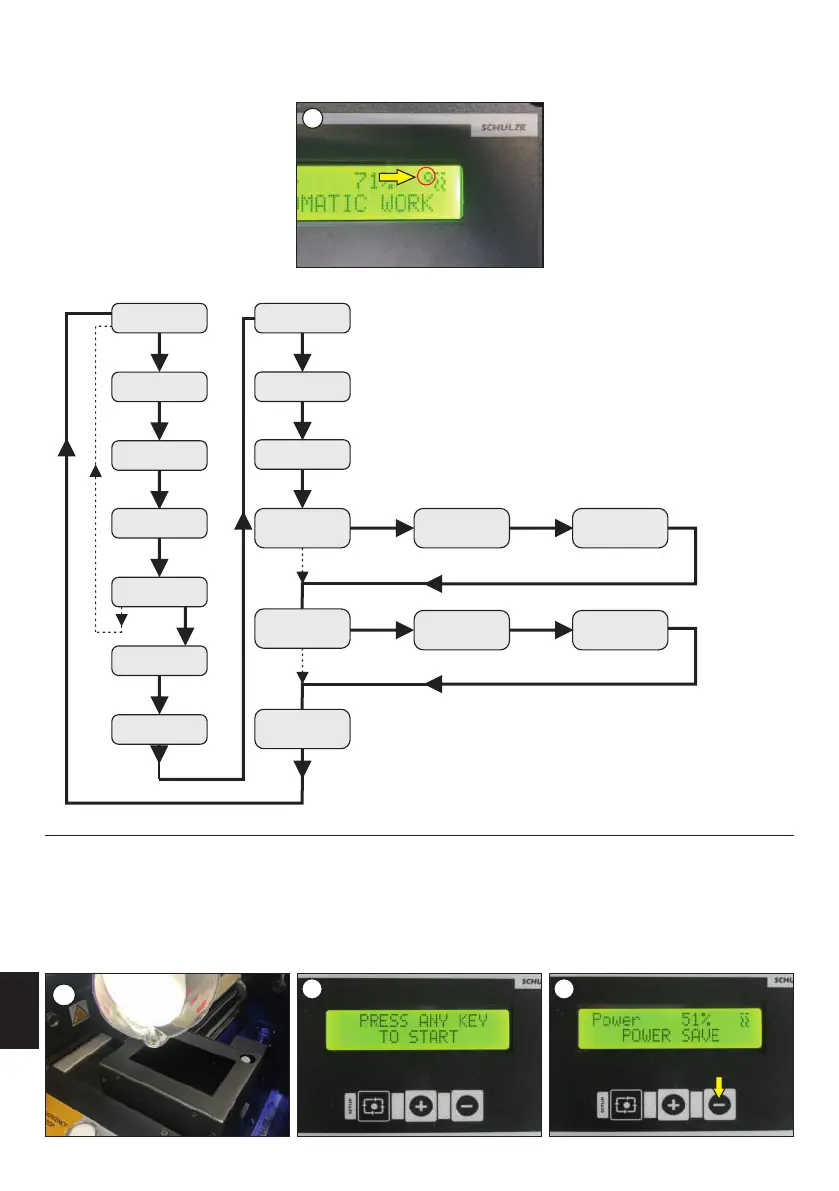
If the foil is not applied to the device and the display shows the foil sensor light (image 10), user must calibrate the foil sensor. Calibration of
the sensors is done without the foil.
Calibration of all strain gauges should be done each time the machine is transported.
10
3.2 Initiation of the powder zone
Remove the cover of the powder zone. For the first startup, or if the powder has been removed from the chamber of the dispensing mechanism:
take about 200 ml of powder (using the dispenser attached to the machine) and pour it directly into the chamber. Then fill the dispenser. (image 1).
Put the cover of the powder zone on; switch the machine on (with the main switch). Activate the machine by pressing any button on the control
panel (image 2), then press and hold the "-" button (image 3). The machine will start the conveyor belt of powder, and after 10 seconds, the
process of dispensing powder from the dispenser will start. When the powder is pouring from the top trough, let go of the "-" button, then the
powder mechanism is ready for work.
Preparing the DTF PowDR for work involves two steps: preparing the powder zone and applying the foil.
Initiation of the powder zone
2 3
1
ENGLISH
24
Version 23.05
Main menu
Press shortly
„Setup”
Standby power
(+ -)
Work power
(+ -)
Press shortly
„Setup”
Rotary vibration
speed
(+ -)
Press shortly
„Setup”
Belt speed
(+ -)
Hold 3 sec.
„Setup”
Press shortly
„Setup”
Hold 3 sec.
„Setup”
Change language
(+ -)
Press shortly
„Setup”
Change sound
(+ -)
Press shortly
„Setup”
Amount of powder
(+ -)
Press shortly
„Setup”
Winder speed
(+ -)
Press shortly
„Setup”
Reset winder
(sensor)
-N
Press shortly
„-” to cancel
Reset foil
(sensor)
-N
Set default
+ Y / -N
Press shortly
„+ Y”
Set dispenser
(+ -)
Press shortly
„Setup”
+Y
Remove
the foil
+Y
Press shortly
„+”
Press shortly
„+”
Please wait
CALIBRATION
Press shortly
„-” to cancel
Press shortly
„-” to cancel
+Y
Remove
the foil
+Y
Press shortly
„+”
Press shortly
„+”
Please wait
CALIBRATION
Press shortly
- to cancel
Make sure that the machine is in DTF PowDR MODE (chapter 4.1)



 To Next Page