Section 4: Deploying and Operating SBE 19plus V2
83
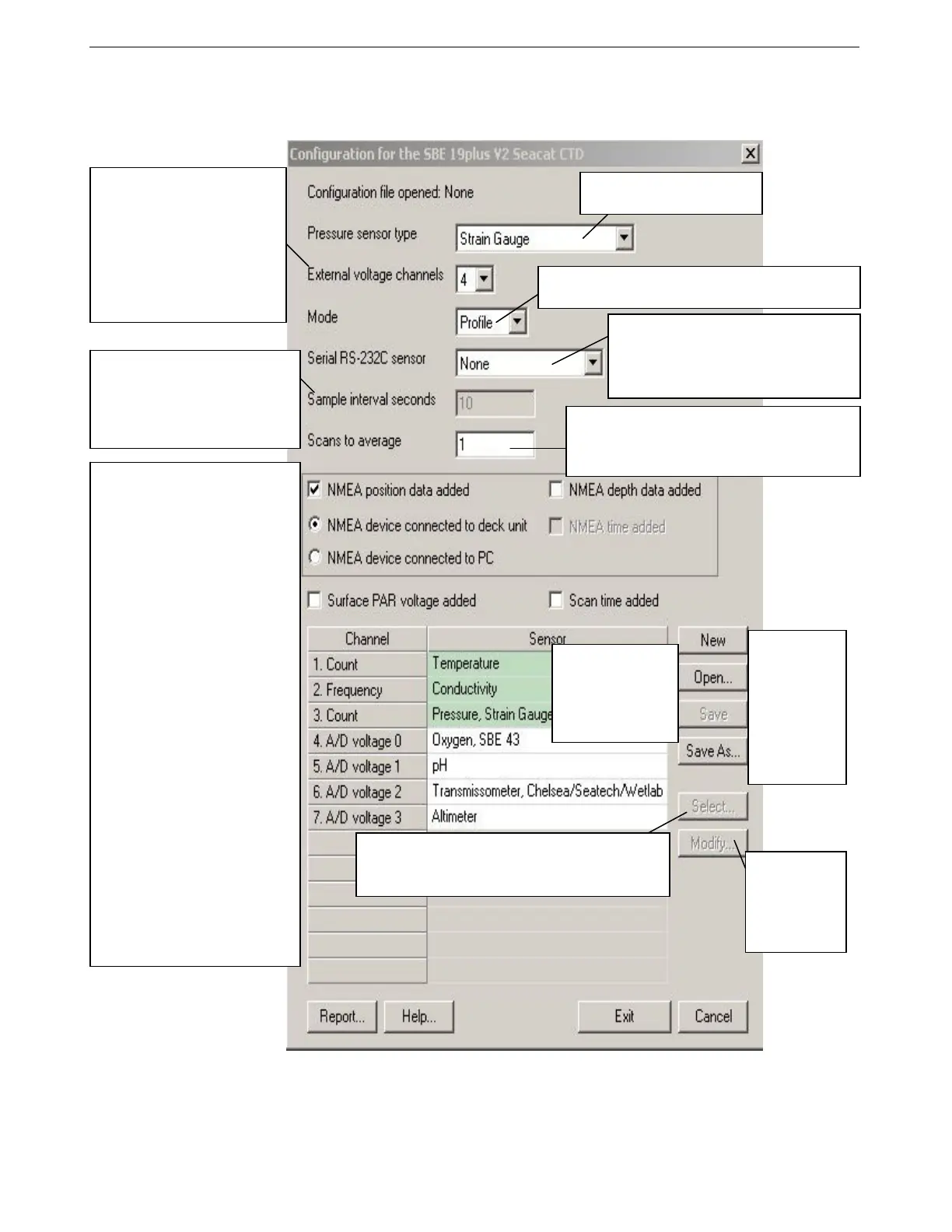
3. In the Open dialog box, select the appropriate .con file and click Open.
Verify that the sensors match those on your 19plus V2, auxiliary sensors are
assigned to the correct voltage channels, and calibration coefficients for all
sensors are up-to-date.
4. Click Save or Save As to save any changes to the .con file. Click Exit when
done reviewing / modifying the .con file.
Strain gauge or Digiquartz with
temperature compensation.
Click a sensor
and click Modify
to change
calibration
coefficients for
that sensor.
New to create
new .con file for
this CTD.
Open to select
different .con
file.
Save or Save
As to save
current .con file
settings.
Channel/Sensor table reflects this
choice (0, 1, 2, 3, 4, 5, or 6). Must
agree with 19plus V2 setup for
VoltN= (N= 0, 1, 2, 3, 4, and 5);
see reply from GetCD or DS.
Voltage channel 0 in .con file
corresponds to first external
voltage in data stream, voltage
channel 1 to second external
voltage in data stream, etc.
Shaded sensors
cannot be removed
or changed to
another type of
sensor. All others are
optional.
• NMEA - Select if NMEA
navigation device used, and if
NMEA depth data and NMEA time
data were also appended.
SEASAVE adds current latitude,
longitude, and universal time code
to data header; appends NMEA
data to every scan; and writes
NMEA data to .nav file every time
Ctrl F7 is pressed or Add to .nav
File is clicked.
Note: Whether NMEA device was
connected to a deck unit or
directly to computer during data
acquisition in SEASAVE has no
effect on data file used by SBE
Data Processing, and therefore
has no effect on data processing.
• Surface PAR - Select if using with
deck unit connected to Surface
PAR sensor. SEASAVE appends
Surface PAR data to every scan.
Adds 2 channels to
Channel/Sensor table. Do not
increase External voltage
channels to reflect this; External
voltage channels reflects only
external voltages going directly to
19plus V2 from auxiliary sensor.
See Application Note 47.
• Scan time added - Select to
include time of each scan
(seconds since January 1, 1970
GMT) with data.
Number of samples to average (samples at 4 Hz) in
Profiling mode. Used to calculate elapsed time, if
time is output parameter. Must agree with 19plus V2
setup (NAvg=); see reply from GetCD or DS.
Click a (non-shaded) sensor and click Select to pick a
different sensor for that channel. Dialog box with list of
sensors appears. Select sensors after number of
voltage channels have been specified above.
Interval between scans in Moored
mode. Used to calculate elapsed
time, if time is an output parameter.
Must agree with 19plus V2 setup
(SampleInterval=); see reply from
GetCD or DS.
SBE 38 (secondary temperature), or up to 2
GTDs (dissolved oxygen or nitrogen). Must
agree with 19plus V2 setup; see reply from
GetCD or DS. Channel/Sensor table lists
RS-232 sensors below voltage channels.
Must agree with 19plus V2 setup (MP for Profiling mode,
MM for Moored mode); see reply from GetCD or DS.
90



 To Next Page