Function check • 63
17-10-06-643-100a/04-2018S
7. FUNCTION CHECK
► Perform a function check prior to each use.
A complete function check includes:
• visual inspection for mechanical damage
• checking the alignment of the device
• visual and function check of the display elements
• function check of all the controls shown in the section entitled
“Overview”
• function check of optional accessories
If you notice any faults or deviations during the function check, first try to
resolve the error with the aid of the section entitled “What do I do if ...” in this
document.
CAUTION!
Personal injury
If you notice any faults or deviations during the function check which
cannot be resolved with the aid of the section entitled “What do I do
if ...” in this document, you may not use the device.
► Have the device repaired by seca Service or by an authorized ser-
vice partner.
► Follow the section entitled “Servicing” in this document.
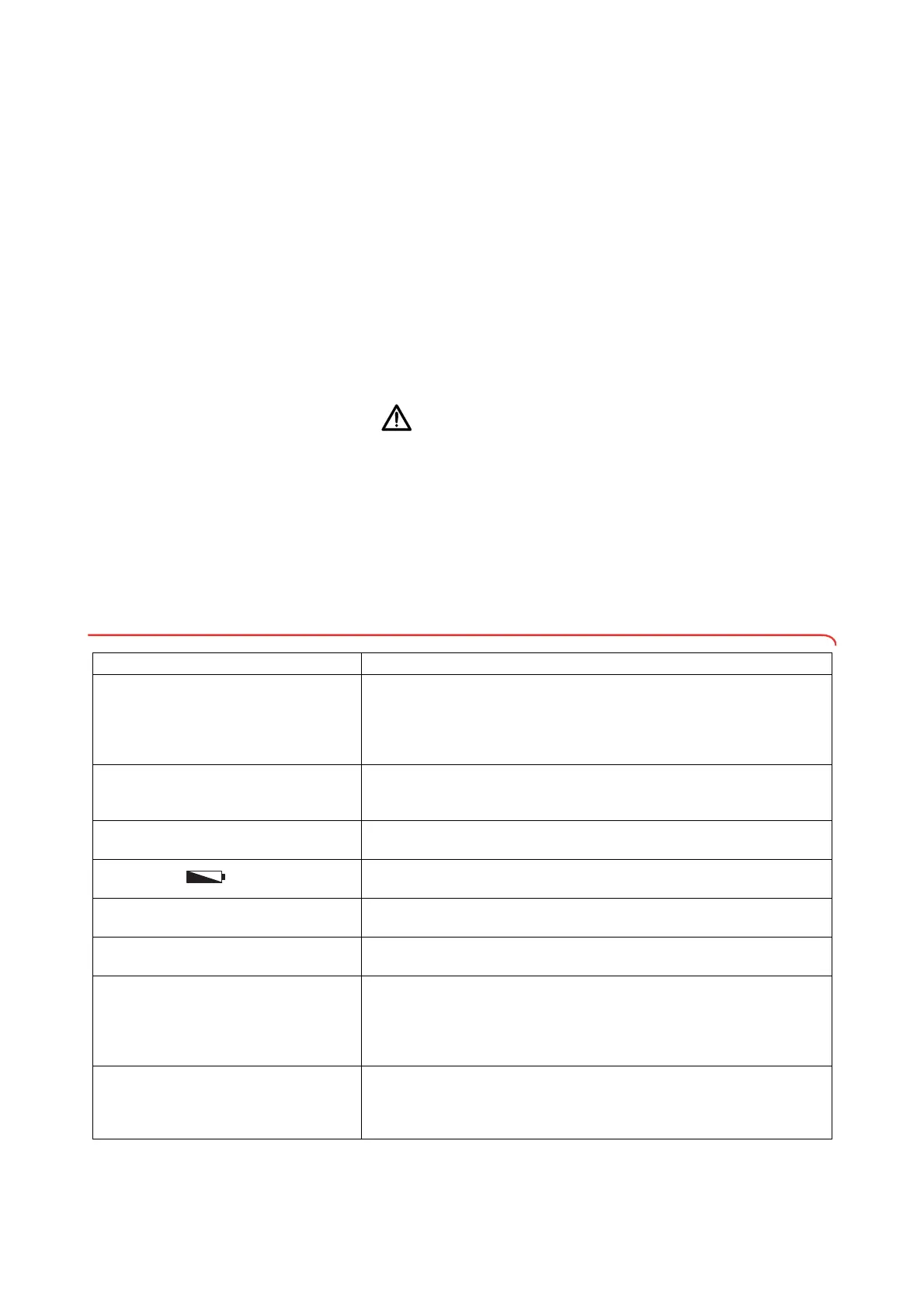
8. WHAT DO I DO IF ...
8.1 Troubleshooting
Problem Cause/solution
... no weight is displayed with a load on the
scale?
The device has no power supply.
- Check whether the scale is switched on
- Check whether batteries are inserted (devices operated by battery)
- Check whether there is a power supply (devices operated by power
supply)
... 0.000 does not appear before weighing?
A load was already on the device before it was switched on.
- Remove the load from the scale
- Switch off the scale, then switch back on again
... one segment is illuminated either
continuously or not at all?
The corresponding point has a fault.
- Inform seca Service
… the display appears?
Battery voltage is dropping.
- Replace batteries
… the display bAtt appears?
The batteries have discharged.
- Replace batteries
… the message StOP appears?
Maximum capacity has been exceeded.
- Remove the load from the scale
... the display tEMP appears?
The ambient temperature of the device is too high or too low.
- Set up the device in an ambient temperature between +10 °C and
+40 °C.
- Wait for around 15 minutes until the device has adapted to ambient
temperature.
… the display Err:11 appears?
The scale has too high a load or too high a load in one corner.
- Remove the load from the scale or distribute the load more evenly
- Restart the scale
- Inform seca Service



 To Next Page