Doc. No.: A05280692 Rev. AE ECO: 13200 Date: 11/04/2019
SECTION 9 INSTALLATION AND CONNECTIONS
Single XIU Connection
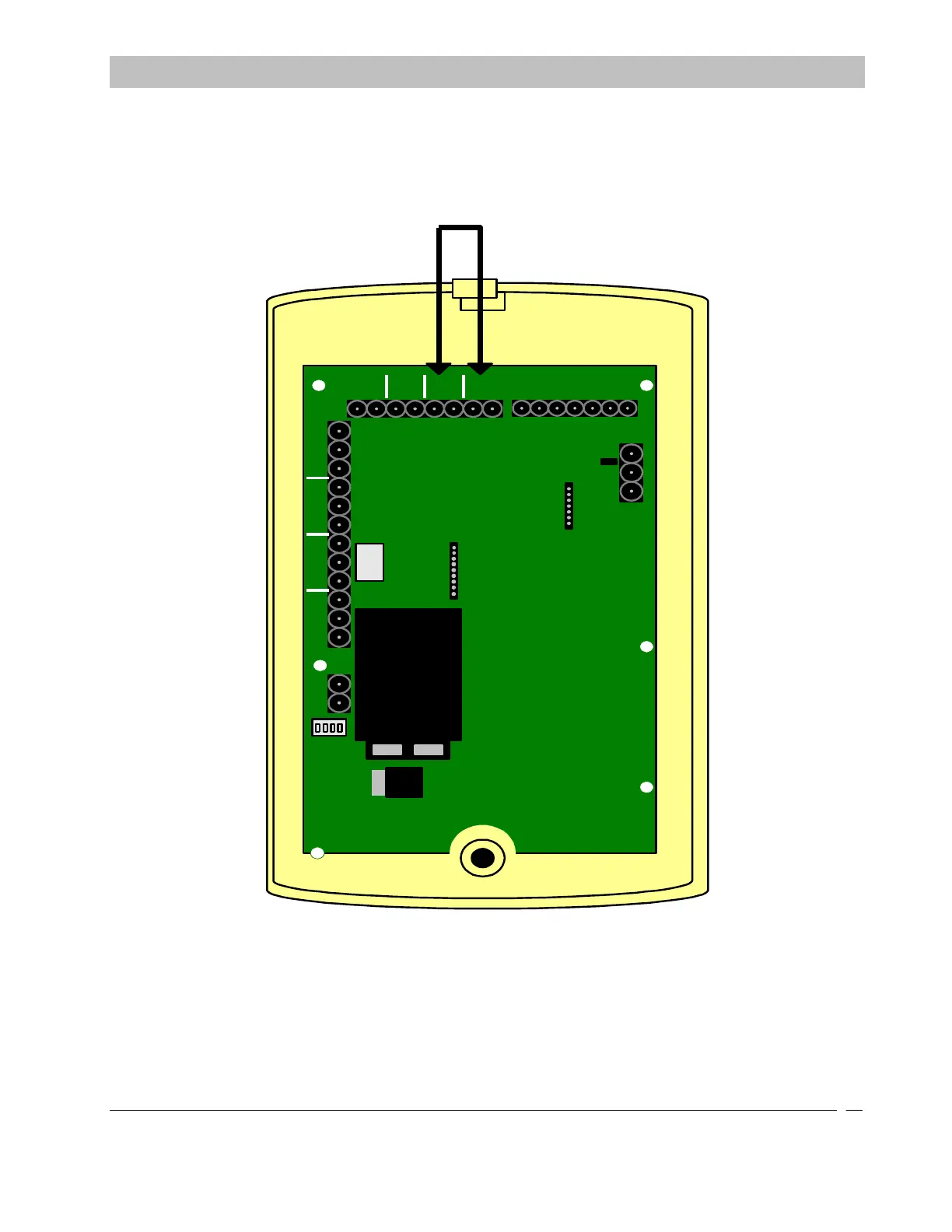
When a system setup is using only one XIU for both the Exit Panels and the Cutband Receivers you will need to place a
jumper on the XIU as shown. This will allow the XIU to internally tell the doors to lock during a Cutband. When
running the Can Bus wire it is best to run the wires for the Exit Panels and the Cutband receivers in separate legs and
have each leg connect to the single XIU.
FIRE
PUSH
DOOR
EGRESS
AUX
CA
NL
CANHGND
SECURE CARE
PRODUCTS
LOCK
- +
NO C NC
- +
KEYPAD
O
N
1 2 3 4
1 2 3 4 5 6 7
1) POWER
2) NOT USED
3) NOT USED
4) NOT USED
LOCK
NO C NC
AUX
NO C NC
NO C NC
Place jumper across the
first PB input and the
positive (+) Fire input.
NOTE: An improper connection on the single XIU application will result in the Secure
Care Software displaying an XIU- cross communication error. This is a logged event and
can be viewed through the Device Reader in our software.
Figure 9-16 Single XIU Connection



 To Next Page