93
K600000000SE 030804 011018
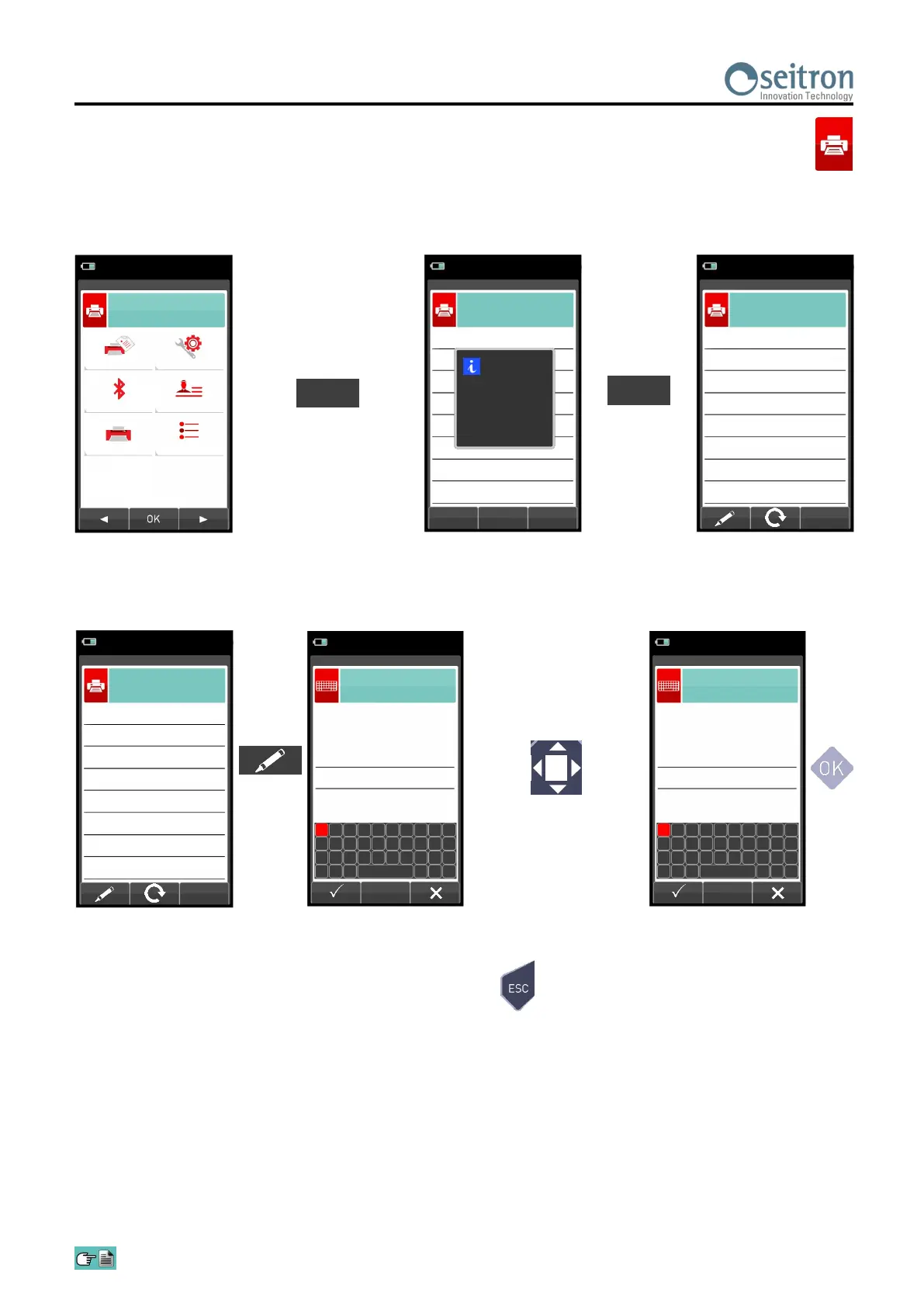
1. Once the Bluetooth printer is configured, proceed as follows:
15/01/14
10:00
Report
Pairing
Printer
Configuration
Header
Measures list
Print
OK
Select icon 'Pairing' to
start configuration
15/01/14
10:00
Print
Printer
F1
F2
WARNING
F1: search
F2: esc
Turn on the printer and
start searching
F1
15/01/14
10:00
Print
Printer
SPP-R200
MPT-II
MAC
2. Select the line corresponding to the desired Bluetooth printer, then proceed as follows:
15/01/14
10:00
Edit text
_
Aa#
1
6 8 3 7 0 2 4 9 5
A F H C G J B D I E
K P R M Q T L N S O
U X W Z V Y
15/01/14
10:00
Print
Printer
SPP-R200
MPT-II
MAC
Enter the PIN code of the
printer (this can be found in
the printer user manual) to
complete the instrument-
printer pairing procedure.
15/01/14
10:00
Edit text
0000_
Aa#
1
6 8 3 7 0 2 4 9 5
A F H C G J B D I E
K P R M Q T L N S O
U X W Z V Y
3. The instrument-printer pairing is completed. Press key ' ' to return to the previous screen.


 To Next Page