3.2.2 Save
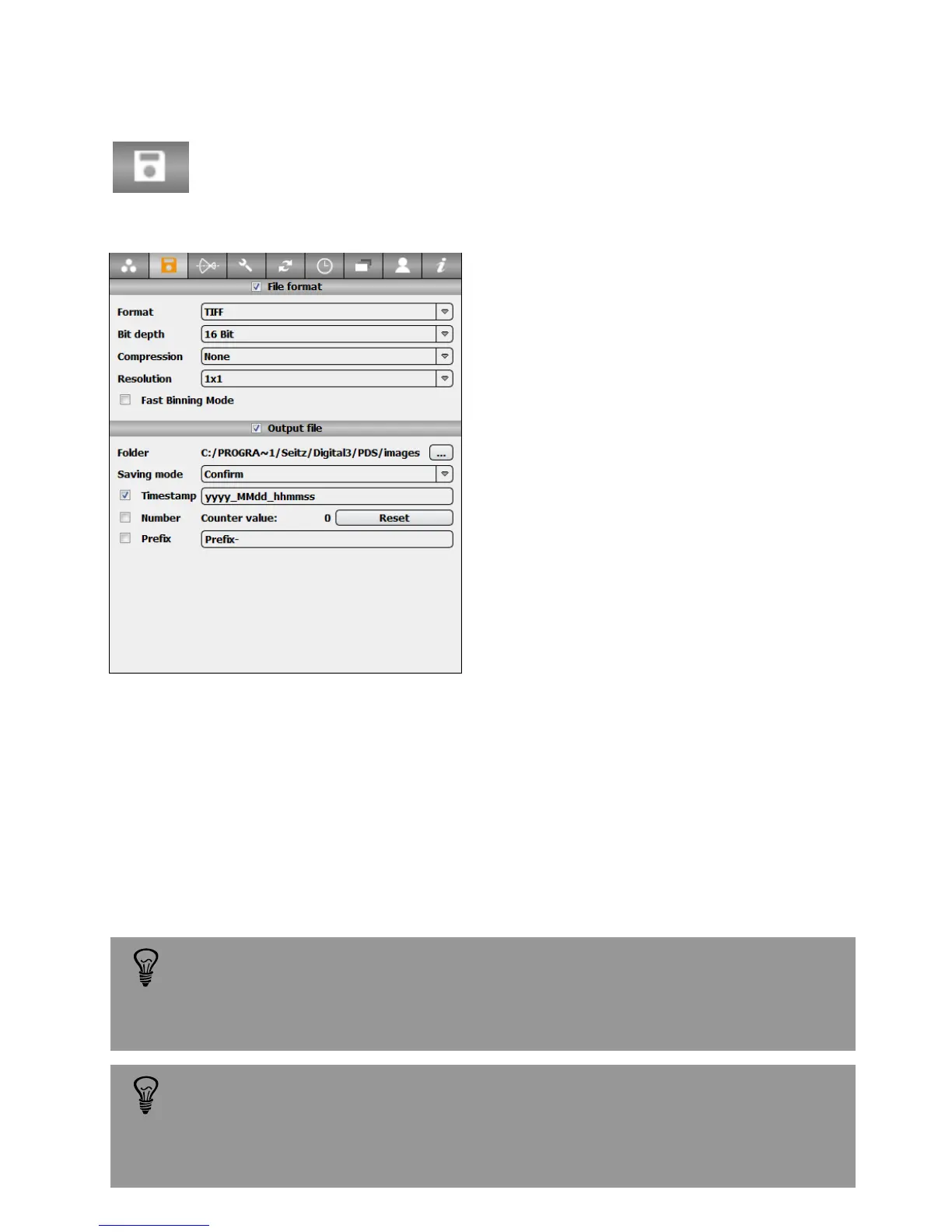
Press the „Save“ button in the „Parameter“ menu to activate the „Save“ tab:
This tab contains the following options:
When changing resolution parameters the previous scan will be lost and
the preview will disappear. A new scan of the scene is then necessary.
This is required because the data transfer is optimised for a specific
resolution.
Format: sets the output file format. DNG,
JPEG or TIFF
Bit depth: defines the colour bit depth for
TIFF files
Compression: sets the level and type of
compression of the output file
Resolution: defines the final resolution of
the image. DNG format is only compatible
with 1x1 and 3x3 resolutions
Fast binning mode: allows faster image
data transfer from camera to PC. However,
this options might decrease image quality
Folder: define the location of the save files.
The standard location is: C:\Program
Files\Seitz\Digital3\PDS\images
Saving mode: choose between “automatic”, “save as” and “confirm” saving modes. If
automatic or confirm modes are selected it is necessary to select the file naming
option
• Time stamp: write the timestamp in the image name (yyyy-MM-ddThh-mm-ss)
• Number: write a number in the image name (1, 2, 3, ...). It is possible to reset the
image numbering to restart from 1
• Prefix: add a defined prefix before the timestamp or the number
3.1.8 File type (continued)
Saving the image as a DNG file has the advantage of significantly smaller
file sizes (33% of TIFF). Also, making the demosaicing (colour conversion
into RGB) and optimisations as a second step is beneficial as the original
image data is left unchanged and can always be accessed later.
Instruction Manual Seitz 6x17 Digital - version 4.05 - May 2013- © by Seitz Phototechnik AG / Switzerland www.roundshot.ch page 34



 To Next Page