3.2.3 Lens
Press the „Colour“ button in the „Parameter“ menu to activate the „Colour“
tab:
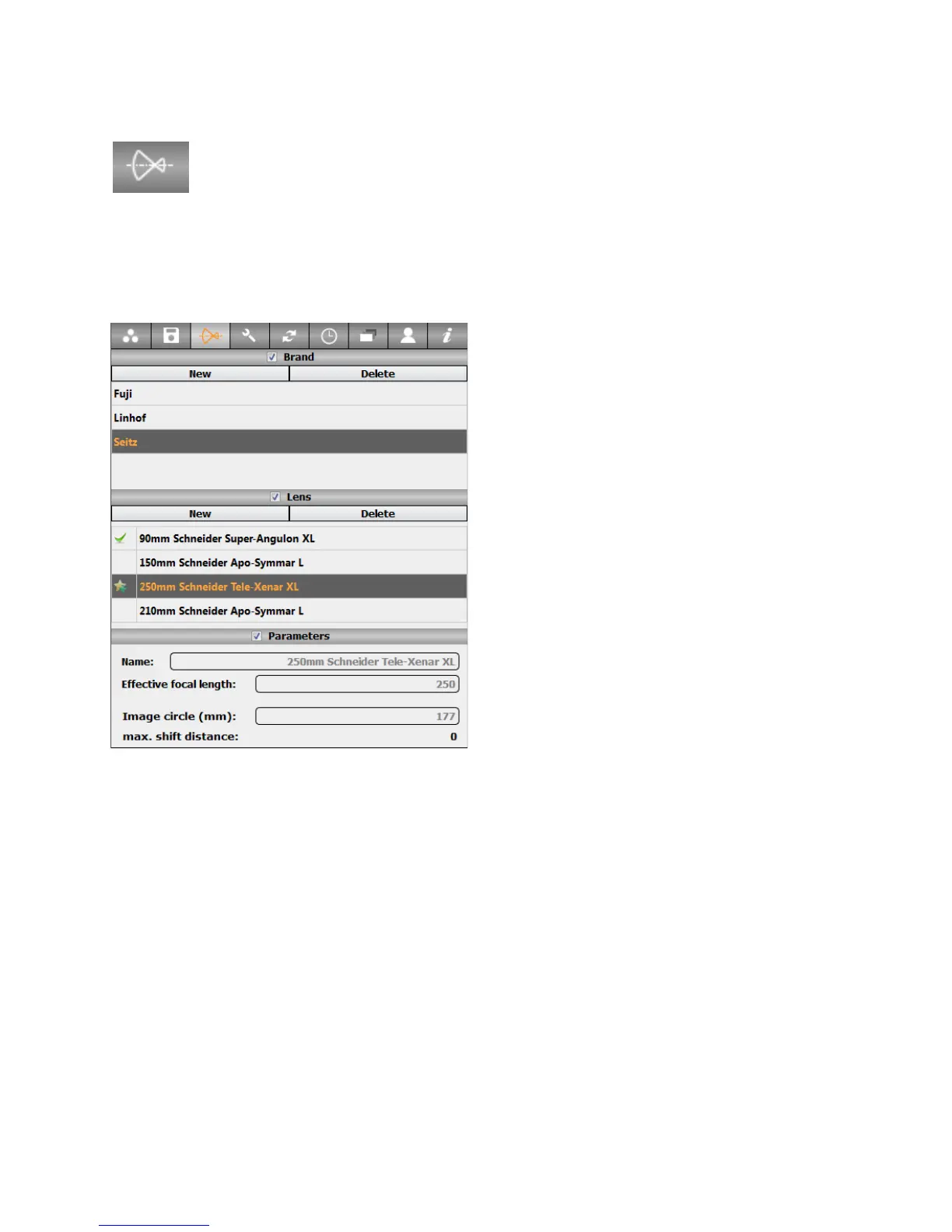
The lens tab contains the database of all lenses that can be used with the camera. It is
possible to add or remove a lens from the favourite lens list or edit properties. It is also
possible to create a new lens as described below:
The tab is divided into three sections:
Brand, Lens, Parameters
Brand: contains a list of all lens brands
stored in the data base
• New: click on “New” to create a new
brand
• Delete: click on “Delete” to delete
existing brands. Please note that factory
lens brands are not removable.
• Select: click on any brand to display all the
corresponding lenses in the next field
Lens: contains all lenses of the selected brand
• Click on “New” to create a new lens
• Click on “Delete” to delete existing lenses.
Please note that factory lenses are not removable.
• Favourite: activate or deactivate the checkbox on the left side of any lens to add or
remove the lens from the favourite lens list
• Select: click on any lens to display all its attributes in the next field (name, focal
length...). The attributes of factory calibrated lenses cannot be edited.
Parameters: contains all the selected lens attributes (name, focal length...). It is
possible to edit these attributes. Please refer to next page for detailed explanation of
every attribute.
Instruction Manual Seitz 6x17 Digital - version 4.05 - May 2013- © by Seitz Phototechnik AG / Switzerland www.roundshot.ch page 35



 To Next Page