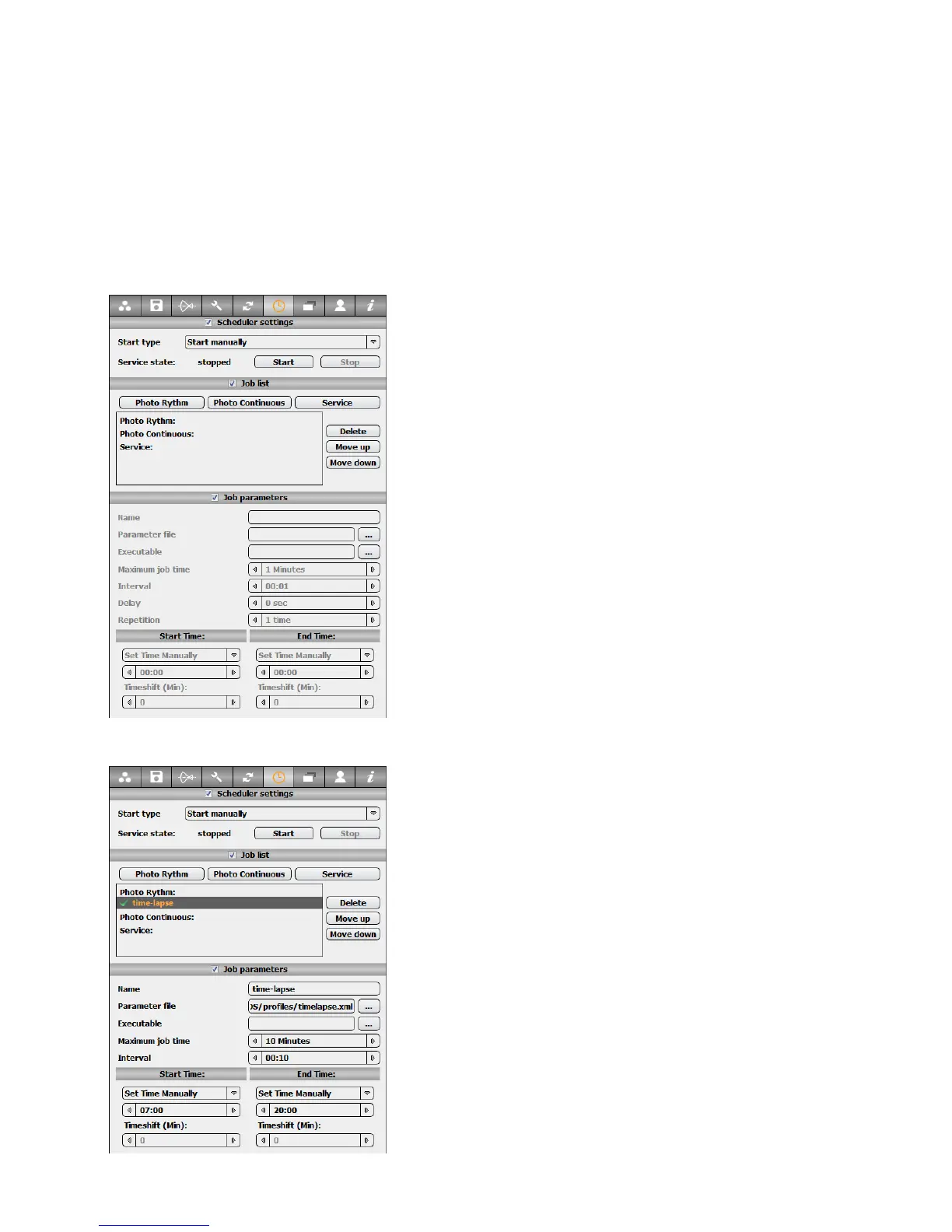
4.8 … program the scheduler
• Name
• Parameter file
• Executable
• Maximum job time
• Start / end time
• Interval
• Repetition (continuous job only)
• Delay (continuous job only)
The scheduler is often used to create a time-lapse over a defined period with the
Roundshot D3.
Before programming the scheduler, make sure to create one or more profiles as
presented in section 3.1.7. with the image parameters to be used for the time-lapse.
In the “Parameter” menu. Select the Scheduler tab
In the “Job list” section different jobs (or tasks) can
be defined:
• Photo Rhythm Job
• Photo Continuous Job
•
Service Job (not used for Roundshot D3
cameras)
In the “Job parameters” section the selected job
parameters can be defined:
For example define a “Photo Rhythm Job” to take
an image at constant time intervals.
Click on “Photo Rhythm Job” to define a new job.
• Change its name. (ex: time-lapse)
• Define the profile that will be used for image
parameters. (ex: timelapse.xml)
• Define the interval of image taking (in hours :
minutes). (ex: 10min)
• Define the start time and end time. In this
example the images will be taken from 7:00 to
20:00
Instruction Manual Seitz 6x17 Digital - version 4.05 - May 2013- © by Seitz Phototechnik AG / Switzerland www.roundshot.ch page 56



 To Next Page