3.2.4 Camera parameters
All settings in this menu controls the camera operation mode. Any change will be
applied starting from the next scan.
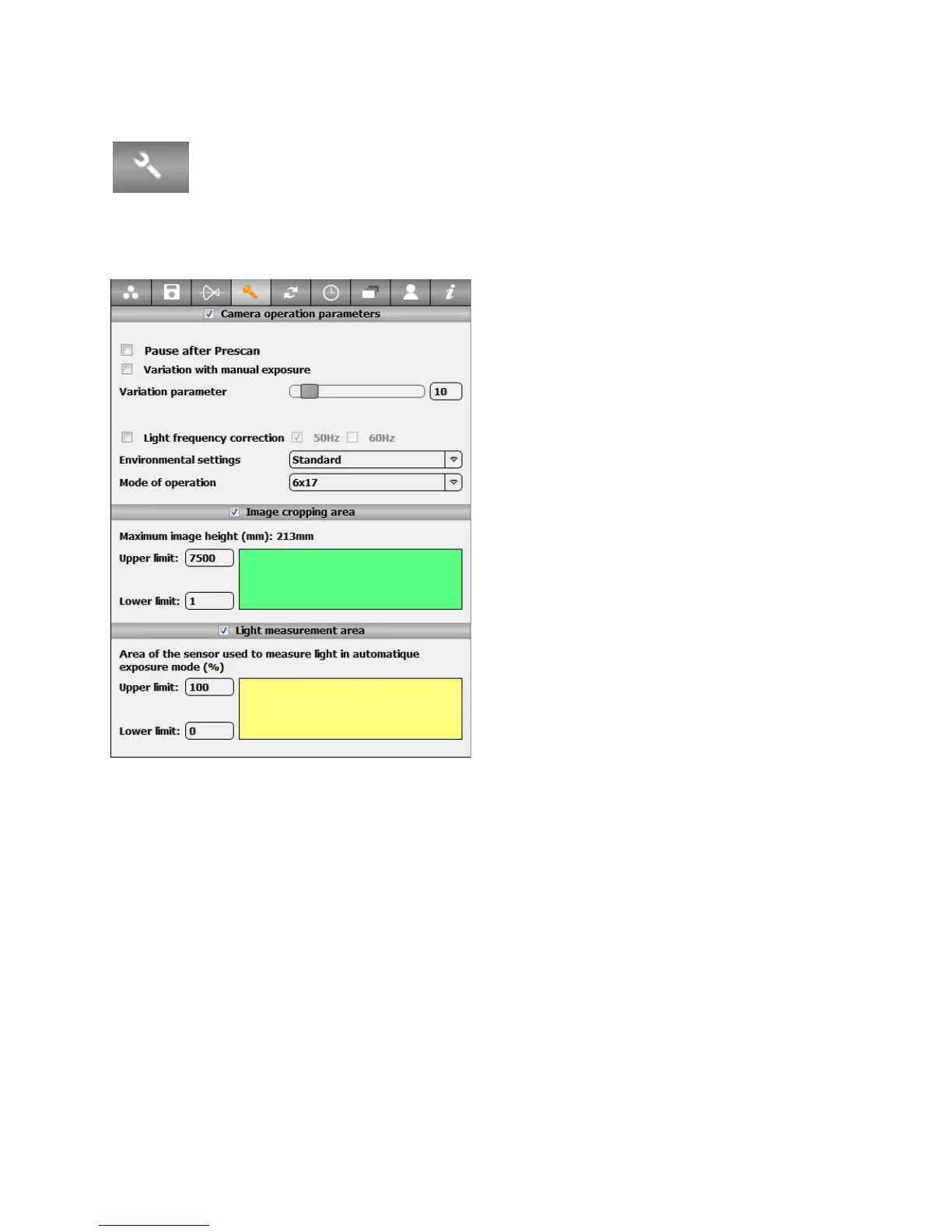
Press the „Camera parameter“ button in the „Parameter“ menu to activate
the „Camera parameter “ tab:
The tab contains the following options:
Pause after prescan: after making a
prescan, the camera stops at starting
position. When the button resume after
pause is pressed the image scan is done
directly using the previous exposure
measurement
Variation with manual exposure: after
taking an image using a fixed exposure
time, it is possible to edit an exposure
correction curve overlayed on the image.
The image exposure time will vary within a
single image according to the defined curve
Variation parameter: defines how fast the
exposure correction can be done. A small
value gives a smooth adjustment, a strong
value gives a sharp adjustment.
Light frequency correction: Compensates for indoor light frequencies (50Hz for
Europe/ 60Hz for US). With fluorescent lighting and without correction the image
will contain darker and lighter vertical stripes at fast scanning speeds
Environmental settings: Choose between standard and cold condition. The cold
condition gives more power to the motor avoiding it to block in a low-temperature
environment, but it consumes more battery
Mode of operation: it is possible to use the digital back in other modes of operation
like linear scanner.
Instruction Manual Seitz 6x17 Digital - version 4.05 - May 2013- © by Seitz Phototechnik AG / Switzerland www.roundshot.ch page 36



 To Next Page