3.2.6 Scheduler 3.2.6 Scheduler
Press the „Scheduler“ button in the „Parameter“ menu to activate the
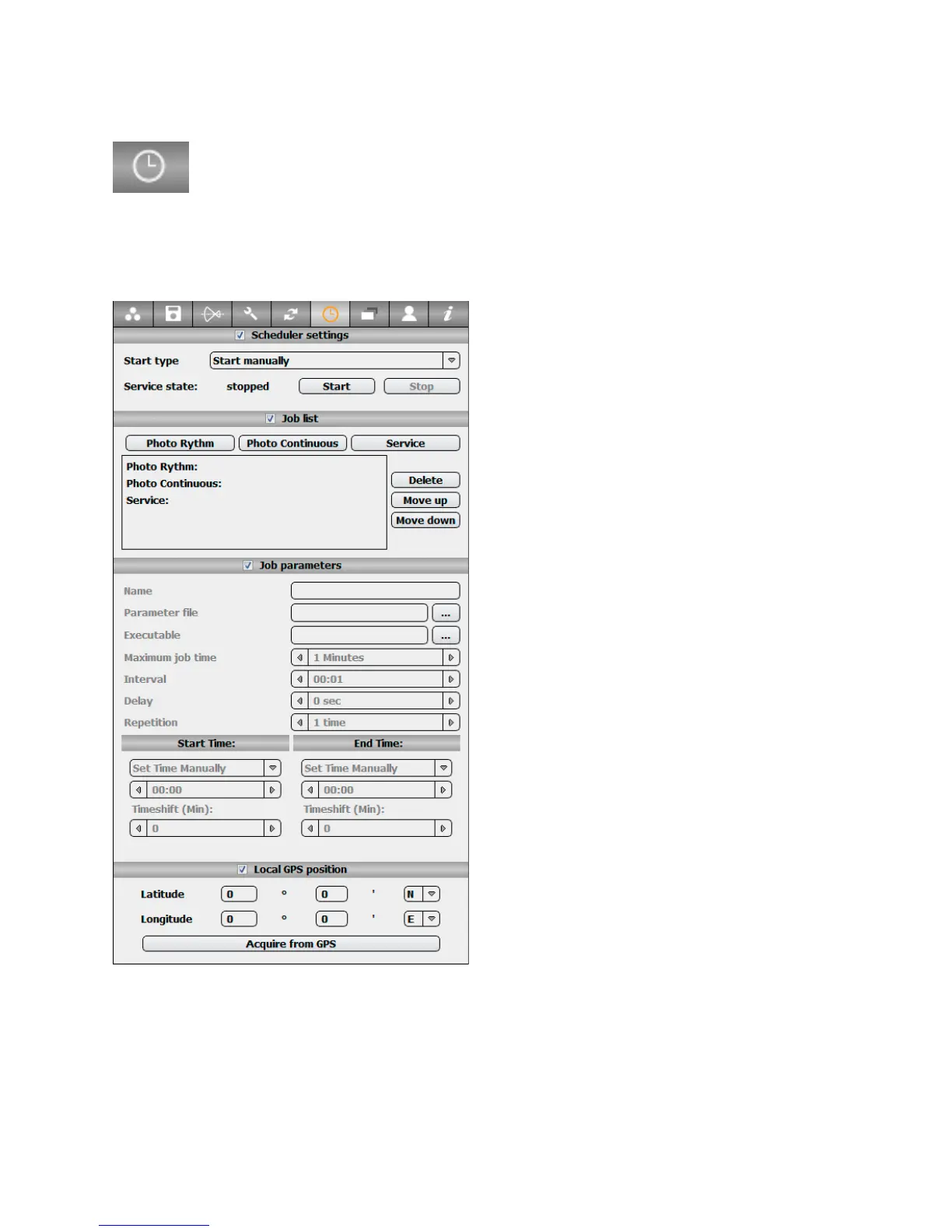
„Scheduler“ tab:
This menu allows to program automatic image-taking with predefined parameters.
For example, the “Scheduler” can be used to create a time-lapse over a day.
The tab contains the following options:
Scheduler settings: Select the start type for
scheduler to use (manual/automatic).
By pressing “start” the Scheduler can be
started.
Please refer to section 4.7 for a more detailed
explanation on the scheduler.
Job list: define the image sequence to be
done
• Photo rhythm job: creates a photo job that
will be repeated in a fixed interval
• Photo continuous job: creates a photo job
that will be continuously repeated until the
Scheduler is stopped
• Service job: allows to activate external
postproduction scripts at defined intervals
•
Delete/move up/move down: allow to
manage the jobs and their sequence. The first
job in the list is done first followed by the
second in the list.
Job parameters: define the parameters of the
selected job in the list including job name,
start and end times, intervals between jobs or
repetition and delays for photo continuous
jobs.
Assign a profile for the job to be applied for every image in “Parameter file”. It is also
possible to automatically start post-processing scripts after image taking.
Local GPS position: define the GPS position of the camera manually. This will allow to
use sunset / sunrise or nautical twilights as start/end time.
If a GPS Device is connected to the computer it is also possible to load the GPS location
by clicking on “Acquire from GPS”
Instruction Manual Seitz 6x17 Digital - version 4.05 - May 2013- © by Seitz Phototechnik AG / Switzerland www.roundshot.ch page 40



 To Next Page