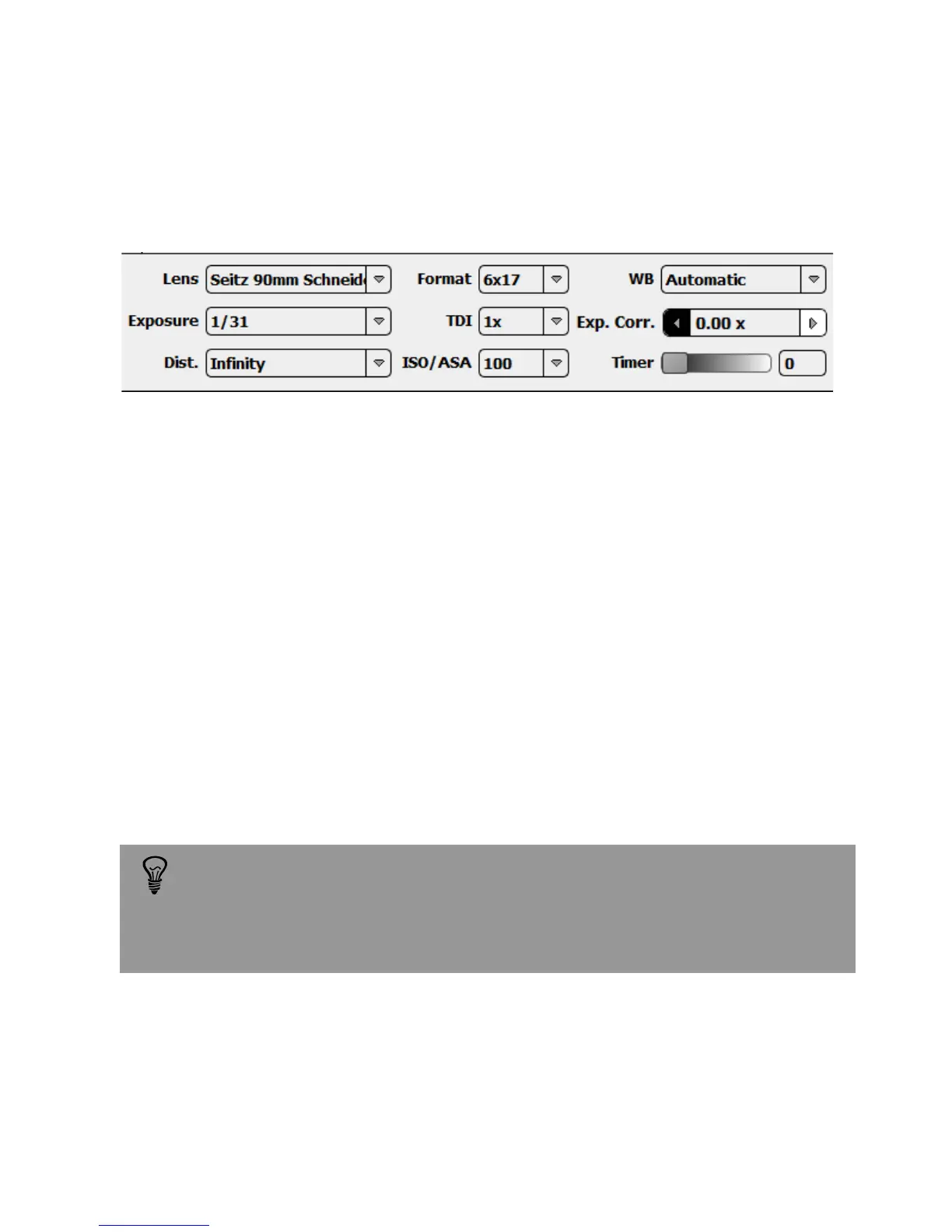
3.1.1 Shoot settings
The „Shoot Settings“ list allows to select and modify those parameters which are
most often used during image taking:
Lens: select the correct lens from the lens list. This list contains the “favourite lenses”.
If a lens is not available, open the lens tab in the parameter menu to access a full lens
list. You can also create your own lens if necessary (refer to section 3.2.3).
Format: defines the image angle. It is possible to take pictures 1x1 to 6x17.
White balance: select the white balancing mode. The “Automatic” white balancing
will apply different adjustments for every light situation. It is also possible to select a
predefined light condition as “Tungsten” or “Day light”. Finally there is the option to
choose a grey point on the image using the white balance pipette tool.
Distance: select the same focusing distance as defined on the lens. The exact
distance setting is required by the software to adjust the effective focal length.
Setting the distance correctly enhances sharpness.
„Automatic white balance“ sets the white point according to predefined
assumptions. This settings works well for most situations. In situations
with special light conditions select „choose in picture“ or one of the light
presets (tungsten, fluorescent, direct sun, cloudy).
Instruction Manual Seitz 6x17 Digital - version 4.05 - May 2013- © by Seitz Phototechnik AG / Switzerland www.roundshot.ch page 24



 To Next Page