5.4.2 Image capture (continued)
5.4 HDR workflow (continued)
Step 4: Program HDR Image sequence
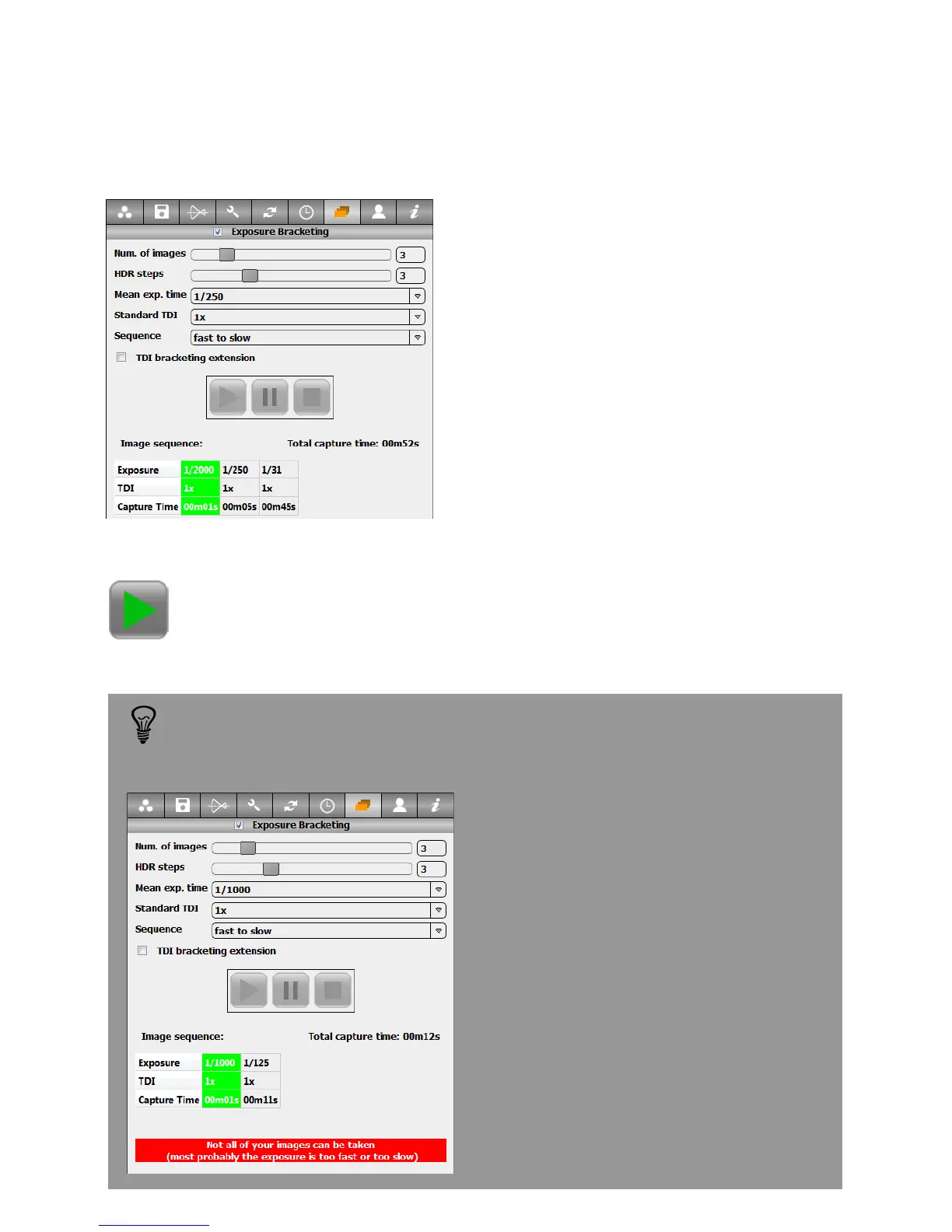
Open the HDR menu and set the desired
number of images and HDR steps. In
this example we take 3 images with each
time 3 f-stops difference.
Define the mean exposure time and
standard TDI. This results in the
following sequence
Exp1=1/2000s; TDI=1x
Exp2=1/250s; TDI=1x
Exp3=1/31s; TDI=1x
If the scanning speed range is not sufficient to generate an image
sequence corresponding to the defined parameters, the image sequence is
cropped to the maximum possible and a warning will be displayed.
Press the „Start“ button to initiate the image sequence
In this case it is possible to:
• Change the mean exposure time
• Activate the TDI Bracketing extension
• Reduce either the number of images or
the HDR steps
Instruction Manual Seitz 6x17 Digital - version 4.05 - May 2013- © by Seitz Phototechnik AG / Switzerland www.roundshot.ch page 82



 To Next Page