65
English
Follower
Wallboxes
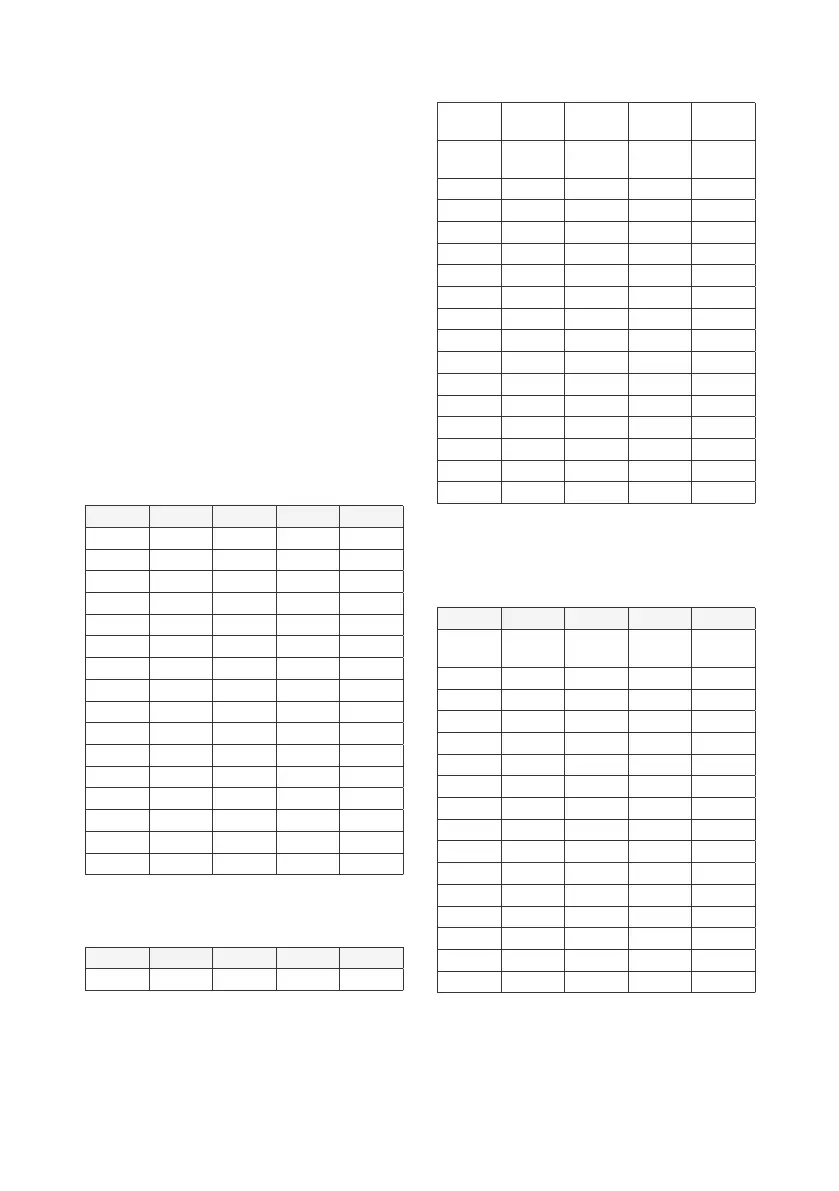
S4/1 S4/2 S4/3 S4/4
No
follower
OFF OFF OFF OFF
1 OFF OFF OFF ON
2 OFF OFF ON OFF
3 OFF OFF ON ON
4 OFF ON OFF OFF
5 OFF ON OFF ON
6 OFF ON ON OFF
7 OFF ON ON ON
8 ON OFF OFF OFF
9 ON OFF OFF ON
10 ON OFF ON OFF
11 ON OFF ON ON
12 OFF ON OFF OFF
13 ON ON OFF ON
14 ON ON ON OFF
15 ON ON ON ON
CongurationofthebusIDoftheindividualfollower
Wallboxes:
• NeverassigndoublebusIDs.
• ThebusIDoftherstfollowerWallboxmust
begin with a 1.
BusID S4/1 S4/2 S4/3 S4/4
Only
leader
OFF OFF OFF OFF
1 OFF OFF OFF ON
2 OFF OFF ON OFF
3 OFF OFF ON ON
4 OFF ON OFF OFF
5 OFF ON OFF ON
6 OFF ON ON OFF
7 OFF ON ON ON
8 ON OFF OFF OFF
9 ON OFF OFF ON
10 ON OFF ON OFF
11 ON OFF ON ON
12 OFF ON OFF OFF
13 ON ON OFF ON
14 ON ON ON OFF
15 ON ON ON ON
External load management: conguration of bus
IDs of follower Wallboxes 1 to 15
SetthebusIDsoffollowerWallboxes1-15using
switchS4.
Switch functions in external load management
mode:
S2:congurationofbusID16
S4:congurationofbusIDs1to15
S5:settingofleaderorfollower,frontillumination
4.1 Conguration of maximum
(switchS1) and minimum (switchS3)
charging current (per Wallbox)
Rotary switch S1 – setting of the maximum charging
currentfrom6Ato16A
Rotary switch S3 – setting of the minimum charging
currentfrom6Ato16A
0 6A(defaultsetting,as-deliveredstate)
1 8A
2 10A
3 12A
4 14A
5...9 16A
4.2 Switch S2
Localloadmanagement:congurationofmaximum
system current in the leader Wallbox
S2/1 S2/2 S2/3 S2/4
10A OFF OFF OFF OFF
16A OFF OFF OFF ON
20A OFF OFF ON OFF
25A OFF OFF ON ON
32A OFF ON OFF OFF
35A OFF ON OFF ON
40A OFF ON ON OFF
50A OFF ON ON ON
63A ON OFF OFF OFF
80A ON OFF OFF ON
100A ON OFF ON OFF
125A ON OFF ON ON
160A ON ON OFF OFF
200A ON ON OFF ON
224A ON ON ON OFF
250A ON ON ON ON
Externalloadmanagement:microswitchS4is
withoutfunctionintheWallboxconguredforbus
ID16.
BusID S2/1 S2/2 S2/3 S2/4
0 OFF OFF OFF ON
4.3 Switch S4
Localloadmanagement:congurationofthe
numberoffollowerWallboxesintheleaderWallbox


 To Next Page
 Loading...