22
Putting the HE 1 into operation | Using the tube headphone amplier connected to a Mac/PC
Using the Sennheiser Control Panel
The Control Panel allows you to congure the HE 1 for the reproduction of
high-resolution music les and to monitor the current operating state.
Tab Control Panel view Display/Setting option
Status
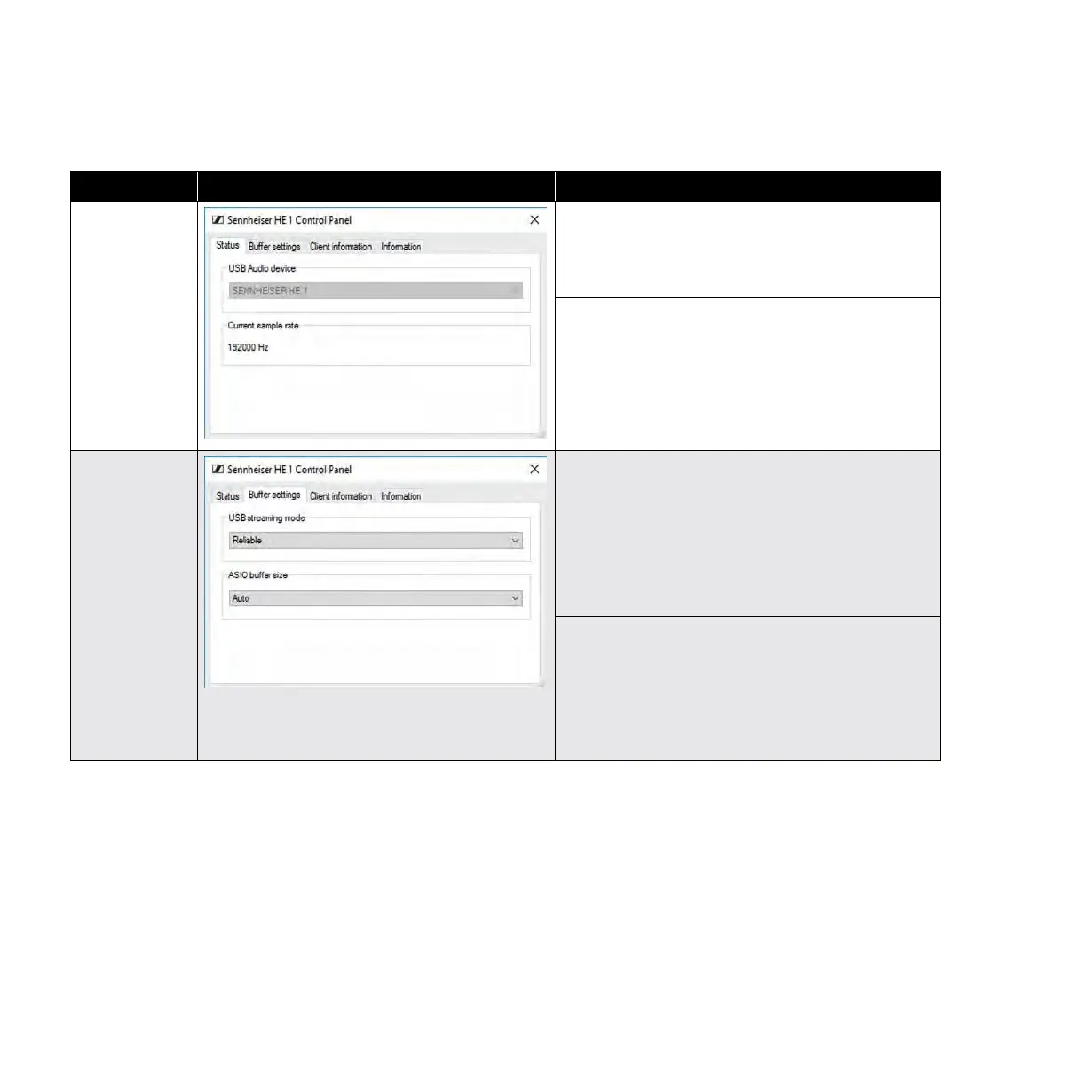
USB Audio device
Currently connected and used device. If several
devices devices are connected simultaneously, you
can select the desired device here.
Current sample rate
PCM: 44100, 48000, 88200, 96000, 176400,
192000, 352800, 384000 Hz
DSD: 2822400, 5644800, 11289600 Hz
Buffer settings
USB streaming mode
The buffer of the USB streaming mode controls
the latency of the music signal from the le source
(PC client) and the DAC (HE 1). The lower the
latency, the more CPU power the PC client has to
allocate to this process. Recommended setting:
“Reliable”.
ASIO buffer size
The ASIO buffer size controls the data transfer
between the driver and the playback software.
The ASIO buffer size depends on the buffer of the
USB streaming mode.
Recommended setting: “Auto”.



 To Next Page