TV menu
E Single RF Scan
Ifusingdigitalbroadcasts,youcancheckthequality
andsignalstrengthofdigitalchannels.Thisallowsyou
torepositionandtestyourantennaorsatellitedish.
1� Press MENU on the remote control and select
TV ≥ Channels.
NOTE
• Youarepromptedtoentercurrentpasswordtoenter
ChannelsifChannel Block/Parental Guidance/
Input BlockintheParentalmenuisnotthedefault
setting.
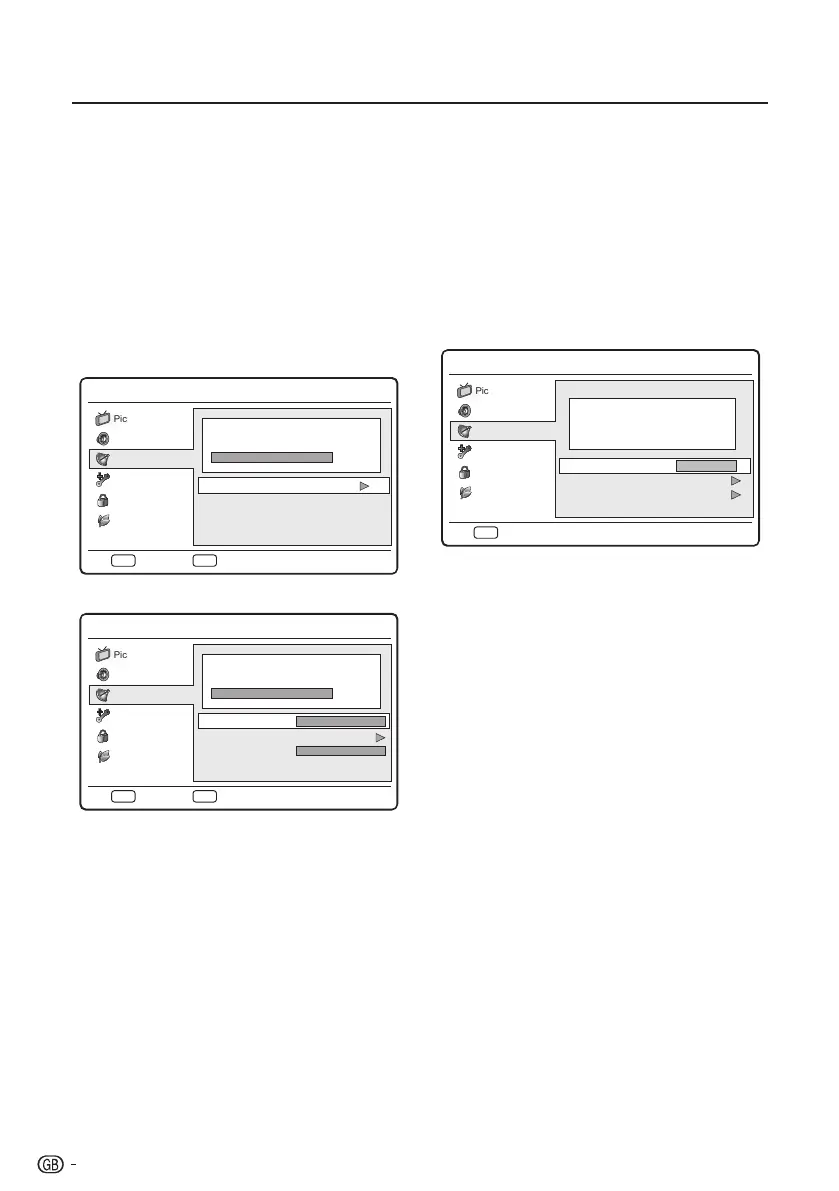
2� Press <> to select Single RF Scan and press
OK or ≥ to enter.
Antenna mode
Menu
0 %
Scan single RF channel. (Digital Only)
RF Channel
Signal Strength
Signal Quality
21
0
Poor
Sound
Picture
TV
Eco
ExitEXITScanOK
Features
Parental
Cable mode
Menu
0 %
Scan single RF channel. (Digital Only)
Frequency (KHz)
Modulation
Symbol Rate (Ksym/s)
Signal Strength
474000
Auto
0
6875
Sound
Picture
TV
Eco
ExitEXITScanOK
Features
Parental
3� <Antenna Mode>
Highlight the RF Channel box, and press ≤≥
to select a channel number you prefer to scan.
<Cable Mode>
Configure the Frequency, Modulation, and
Symbol Rate box to scan.
4� Press OK to start scanning.
5� When the scan is completed, the result of
signal strength and signal quality appear on the
screen.
6� Follow the on-screen instructions to exit.
NOTE
• Ifthesignalqualityandstrengthispoor,repositionthe
antennaorsatellitedishandretest.
• Ifyouhavefurtherproblemswiththereceptionofyour
digitalbroadcast,contactaspecialisedinstaller.
E Analogue Manual Scan
Thissectiondescribeshowtosearchandstore
analogueTVchannelsmanually.
1� Press MENU on the remote control and select
TV ≥ Channels.
NOTE
• Youarepromptedtoentercurrentpasswordtoenter
ChannelsifChannel Block/Parental Guidance/
Input BlockintheParentalmenuisnotthedefault
setting.
2� Press <> to select Analogue Manual Scan
and press OK or ≥ to enter.
Menu
Search for analogue channels
Start Frequency (MHz)
Scan Up
Scan Down
45.00
Sound
Picture
TV
Eco
BackEXIT
Features
Parental
3� In the Start Frequency (MHz) box, enter the
frequency by using the digit buttons on the
remote control.
4� Press <> to select Scan Up or Scan Down to
scan the next available analogue channel from
the frequency you have entered.
5� Press OK or ≥ to start scanning.
6� When complete, follow the on-screen
instructions to exit.
E Favourite Network Select
WhenwatchingthedigitalTV,selectyourfavourite
networkinordertoallocatechannelsofyourfavourite
networkonthetopofchannellist(PRLIST).
1� Press MENU on the remote control and select
TV ≥ Channels�
NOTE
• Youarepromptedtoentercurrentpasswordtoenter
ChannelsifChannel Block/Parental Guidance/
Input BlockintheParentalmenuisnotthedefault
setting.
2� Press <> to select Favourite Network Select
and press OK or ≥ to enter the network list.
3� Select your favourite network and press OK.
4� Follow the on-screen instructions to exit.
NOTE
• Thismenuisavailableonlywhen1)“Norway”isselected
oncountrysettingand2)morethantwonetworksare
foundafterautomaticchannelscan.
14



 To Next Page