Introduction
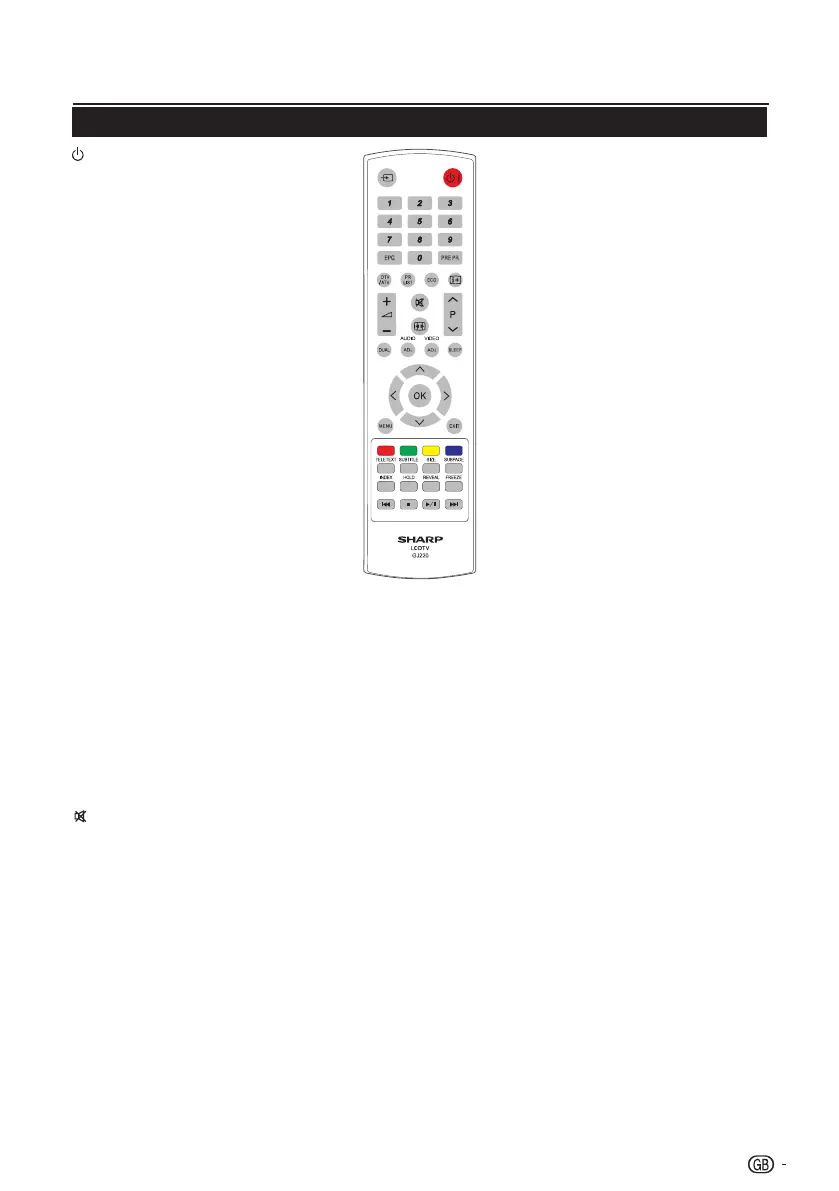
I (POWER)
PresstoturntheLCDTVonor
enterstandbymode.
b (INPUT SOURCE)
Selectaninputsource.
0-9 DIGIT BUTTONS
ToselectaTVchanneldirectly.
EPG
Pressthisbuttontodisplay
electronicprogrammeguidewhen
watchingdigitalchannels.
PRE PR
TodisplaythepreviousselectedTV
channel.
DTV/ATV
Pressthisbuttontoswitchbetween
ATVandDTVchannels.
PR LIST
Presstodisplayalistofchannels.
ThenpressRed buttontoselect
thedigitaloranaloguechannellist.
(Onlyavailablewhenyourinput
sourceisTV).
ECO
Pressthisbuttontosetthepicture
withlessbrightnessforsaving
energy.
Ë
Displayprogrammeinformation,if
available.
” (+/-)
Presstoadjustthevolume.
Presstotoggleaudioonandoff.
Youcanalsopress” (+/-)to
restorethepreviousvolumelevel.
∏ (Picture format)
Selectpictureformatto
Auto /
Normal / Zoom 1 / Zoom 2 / Wide.
P (</>)
Presstoselectthechannel.
DUAL
Select
MONO / STEREO / DUAL
1 / DUAL 2
forATVchannel.Select
AudiolanguageforDTVchannel.
AUDIO (ADJ)
PresstosettheLCDTVtoa
predefinedsoundsetting.
Personal / Music / Speech
Remote control unit
VIDEO (ADJ)
PresstosettheLCDTVtoa
predefinedpicturesetting.
Personal / Standard / Vivid /
Movie / Eco
SLEEP
PresstoturntheLCDTVoffwithin
anamountoftime.(10~120
minutes.)
<>≤≥
Press<>≤≥tonavigateand
confirmyourselection.
OK
Presstoactivateasetting.
MENU
PresstoactivatetheLCDTVOSD.
EXIT
PresstoexittheLCDTVOSDor
returntothepreviouslayer.
R/G/Y/B (COLOUR BUTTON)
Pressbuttonstoselectthepictures
withvariouscoloursoftext.Different
channelsdisplaydifferentfunctions.
TELETEXT
PressthisbuttontoactivateTeletext.
PressagaintoactivateTeletextwithTV.
PressagaintoturnoffTeletext.
SUBTITLE
ForDTV,pressthisbuttontotoggle
off/betweenavailablesubtitle
languages.
ForATV,pressthisbuttontotoggle
off/betweenavailablesubtitlepages
inTeletext.
SIZE
Pressthisbuttontochangethe
fontsize:Fullscreen,Tophalfand
Bottomhalf.
SUBPAGE
Toselectthesubpagewhenthe
currentpagecontainssubpage(s).
INDEX
Pressthisbuttontoreturntopage
100ortheindexpage;andthen
press0to9.Theteletextpagewill
benumberedandaddedtothepage
youselectorthesecondaryitem.
HOLD
Pressthisbuttontostopthe
scrollingofpages.
Thetextdecoderstopsreceiving
data.
REVEAL
Revealhiddeninformationsuchas
answerstoaquiz.
FREEZE
Presstofreezeamovingimageon
thescreen.(Onlyavailablewhen
yourinputsourceisTV).
Scartoutputsignalwillalsobe
frozenwhenyouarewatchingdigital
channels.
In USB mode:
K
Presstoskipbacktotheprevious
titleortrack.
H
Presstostopplayback.
I / F
Presstostart/pauseplayback.
Caution:Donotfreezethevideo
imageforlongperiodsoftime.You
maydamagetheTVscreen.
L
Presstoskipforwardtothenexttitle
ortrack.
3




 To Next Page