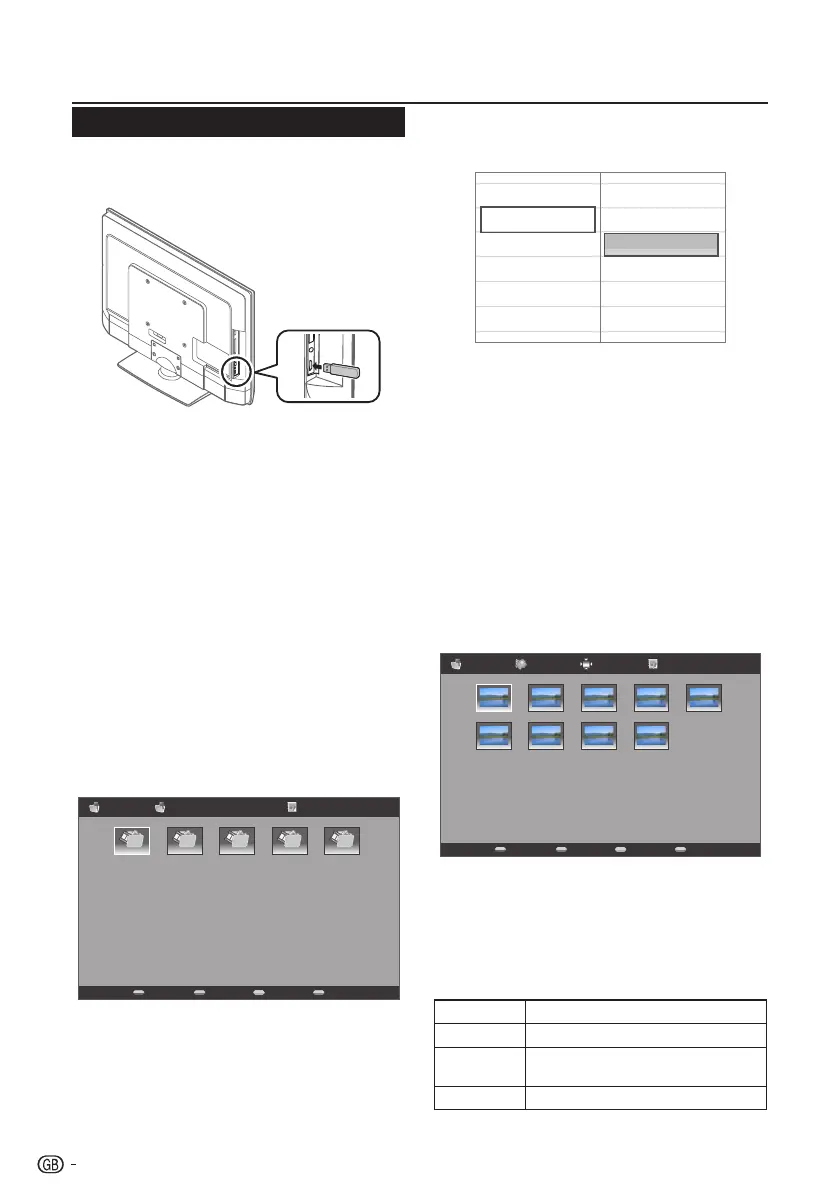
Connecting a USB device
USB function
ThisTVisequippedwithaUSBconnectorthatenables
youtoviewphotos,listentomusic,andplayvideos
storedonaUSBstoragedevice.
NOTE
• DependingontheUSBdevice,theTVmaynotbeable
torecognisethecontaineddata.
• Useonlyalphanumericcharactersfornamingfiles.
• Filenamesover80characters(mayvarydependingon
characterset)maynotbedisplayed.
• DonotdisconnectaUSBdeviceormemorycardfrom
theTVwhiletransferringfiles,usingtheslideshow
function,whenascreenisswitchingtoanotherorbefore
youexit“USB”fromthe“SOURCE”menu.
• DonotconnectanddisconnectaUSBdevicefromthe
TVrepeatedly.
E Basic Operation
1� Turn on the TV.
2� Connect the USB storage device to the USB
port on the side of your TV.
3� Press b on the remote control and press <>
to select USB input source and press OK. The
USB thumbnail browser appears.
PhotoFile name 1 01/01
File name 1 File name 2 File name 3 File name 4 File name 5
4� Press MENU to display the sub-menu. Select
Media Type (Photo/Music/Video) of the file
you wish to play.
Sort
Media Type
Thumbnail Size
Photo
Music
Video
Your Media Type selection will be displayed
at the upper-right corner of the thumbnail
browser.
5� Press <>≤≥ and OK to browse the files or
folders. Press EXIT to return to the previous
operation / folder.
NOTE
• Sort:enablesyoutosortoutthefilesintheselected
Media Typecategory.
• Thumbnail Size:enablesyoutochangethesizeof
thumbnails.
E View Photos
1� In the Photo thumbnail browser, press <>≤≥
to select a photo or a photo album.
PhotoFile name (1) SizeFile name 1 01/01
File name (6) File name (7) File name (8) File name (9)
File name (1) File name (2) File name (3) File name (4) File name (5)
2� Press OK to view a full screen image. The slide
show begins.
3� Use the buttons on the remote control and
follow the on-screen instructions to view
photos.
Buttons for enlarged photo display operation
Buttons Descriptions
I
/
F
Playorpausetheslideshow.
T
/
U
Gototheprevious/nextphotointhe
samedirectory.
MENU OpenthePhotosub-menu.
22



 To Next Page