53 | Page
MAINTENANCE
Continued next page
CO
2
Calibration Continued
3
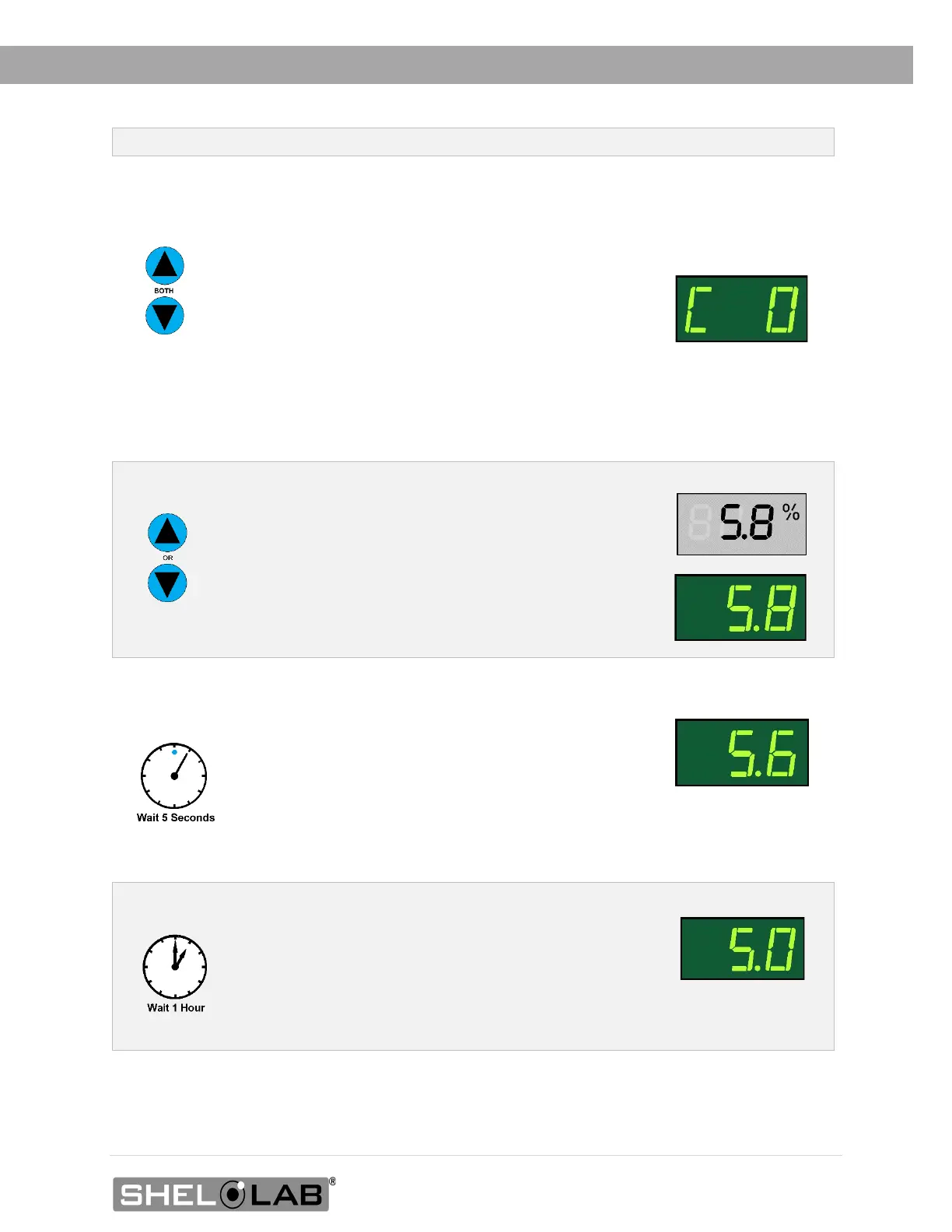
Place the incubator CO
2
display in its calibration mode.
a. Press and hold both the Up and Down CO
2
arrow
buttons simultaneously for approximately 5
seconds.
b. Release the buttons when the CO
2
display shows
the letters “C O”. The display will then begin
flashing the current CO
2
display value.
Note: The display will automatically exit calibration mode
after 5 seconds of inactivity, with the last shown CO
2
display value saved.
4
Use the Up and Down arrow buttons to adjust the
current display CO
2
% value until it matches the
reference device concentration reading.
Reference Device
5
After matching the display to the reference device, wait 5
seconds.
• The gas display will cease flashing and store
the corrected chamber display value.
• The incubator will now begin injecting CO
2
or
allowing the current concentration to decay in
order to achieve the setpoint with the
corrected display value.
Decaying to Setpoint
6
Allow the incubator sit for at least 1 hour undisturbed to
stabilize after the incubator has achieved the corrected
gas setpoint.
• Failure to wait until the incubator is fully
stabilized will result in an inaccurate reading.
Setpoint Achieved


 To Next Page