84
66 SettingsSettings
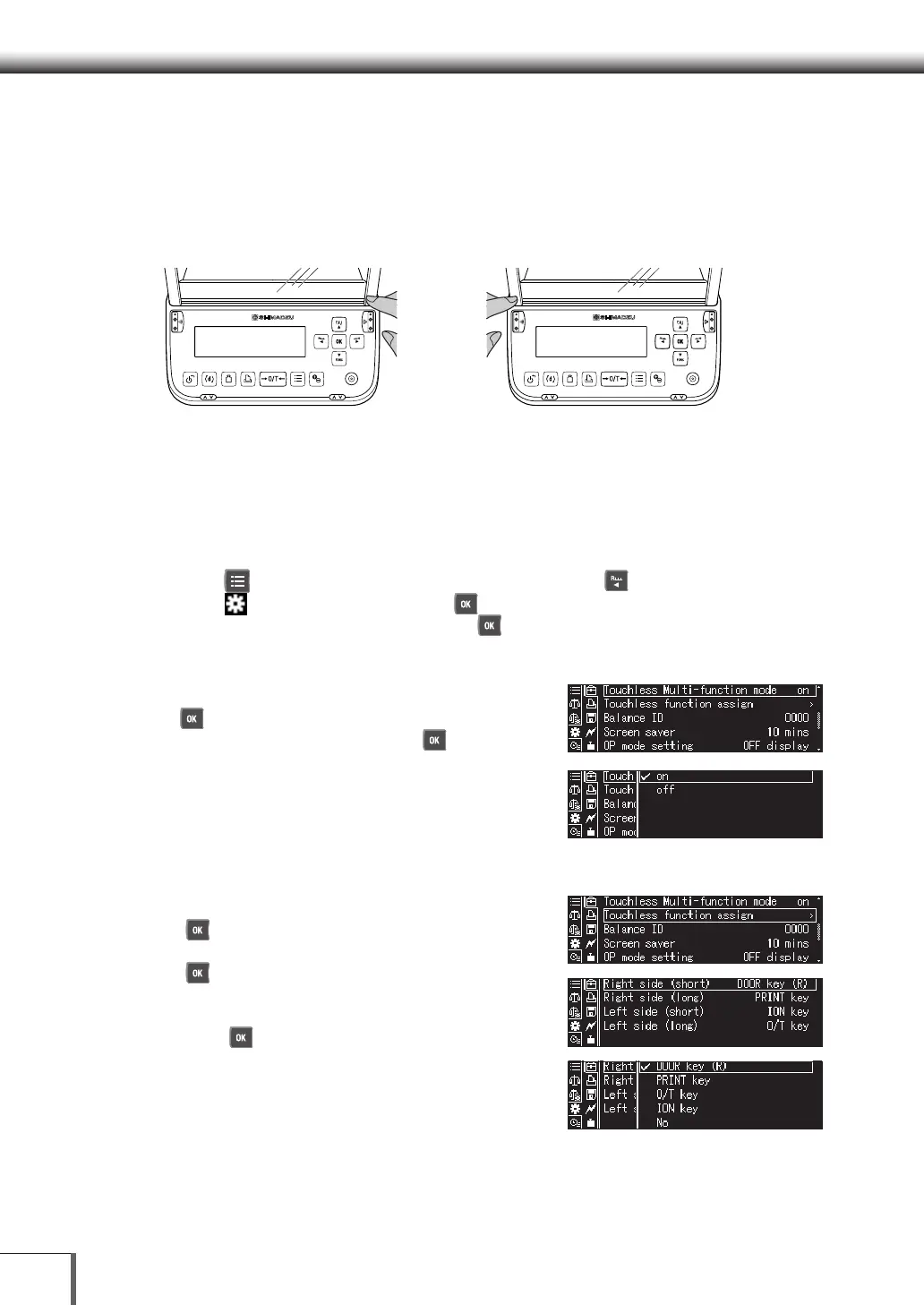
< Touchless sensor operation when multifunction mode disabled >
Disabling multifunction mode allows for faster operation using the touchless sensors than when
multifunction mode is enabled. When multifunction mode is disabled, functions can be assigned to
each of the operations shown in E and F of Figure 2 below.
E: Right touchless sensor (immediate)
Swipe hand or fingers to
light up the LED.
F: Left touchless sensor (immediate)
Swipe hand or fingers to
light up the LED.
Figure 2. Touchless sensor operation when multifunction mode disabled
* The function will execute when you swipe your hand or fingers over the touchless sensor and the LED lights up.
< Multifunction mode configuration procedures >
1. Opening the environmental settings
(1) Press [
MENU] on the weight display screen, then press [ LEFT].
(2) Select [
System settings] and press [
OK].
(3) Select “Environmental settings] and press [
OK].
2. Turning the multifunction mode on/ off
(1) Select [Touchless multifunction mode] and press
[
OK].
(2) Select [on] or [off], and then press [
OK] (set to
[on] by default).
3. Conguring the assignment of touchless functions
(1) Select [Assign touchless functions] and press
[
OK].
(2) Select [Right touchless sensor (short)] and press
[
OK].
(3) Select the function to assign to right touchless
sensor (short) from the menu that is displayed and
press [
OK].
[Door open and close key (right)]:
Open and close the right door
[Door open and close key (left)]:
Open and close the left door
[[PRINT key]: Outputs data
[O/T key]: Tares the balance
[ION key]: Turns the ionizer ON/OFF
[None]: Disables the touchless sensors
(4) Configure right touchless sensor (long), left touchless sensor (short), and left touchless
sensor (long) in the same manner.










 To Next Page