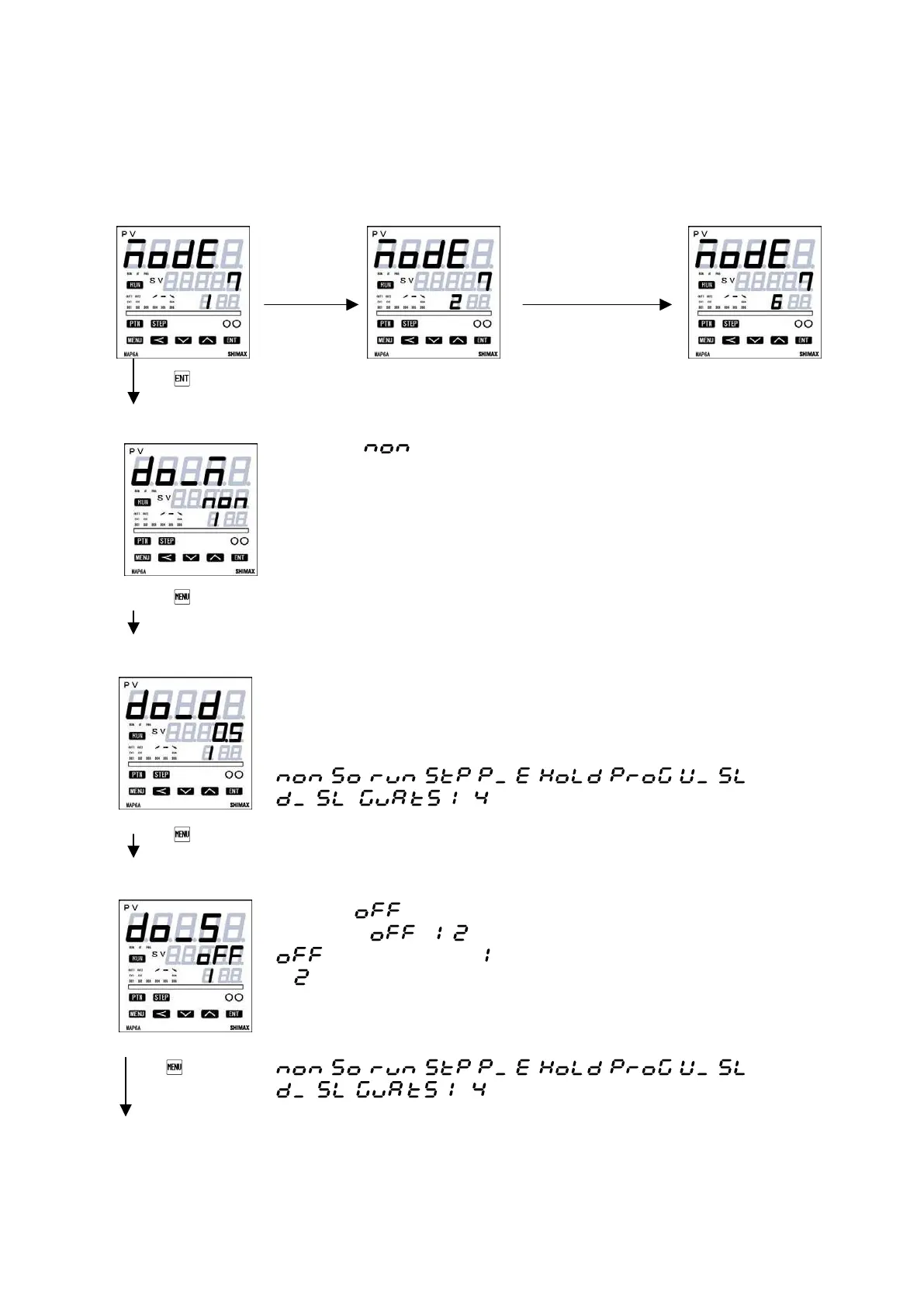
6-6-7. Mode7 DO setting
Not displayed of Event 4 when option is not added.
When CT or FB option is added, it is impossible to choose
Shift Shift
DO mode setting screen
Initial Value:
Setting range : Chosen from Event type character table.
Being initialized if measuring range, scaling, and unit are changed.
Differential Gap setting
Initial Value:5 digit
Setting range:1~9999digit
ON-OFF differential gap of DO 1 is set
Not displayed, when the event 1 mode are as follows.
. ~
Being initialized if measuring range, scaling, and unit are changed.
Stand by operation setting screen
Initial value :
Setting range : 、 、
:No standby operation、 : standby-operation only at the time of a power-
on. :Standby-operation in the following cases. ;At the time of power-on. When each
alarm's operating point is changed, When deviation alarm's SV is performed, When
RUN/STBY (RST) is switched, When AUTO/MAN is switched. Not displayed, when
the event 1 mode are as follows.
~
Being initialized if measuring range, scaling, and unit are changed.


 To Next Page