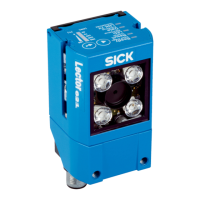
The Lector621 ECO variant does not have a laser alignment aid.
NOTE
To avoid being dazzled by the integrated illumination unit, do not look into the viewing
window of the device.
3.3.2 Display and operating elements
Ready
Read Diagn
Result
TeachIn
LED
Auto-Setup
Data
Autofocus
LNK TX
Userdefined
300
200
100
70
40
100
0
[mm]
[%]
O
O
O
O
O
Figure 5: Status LEDs, bar graph display and function keys on the top of the device
Status LEDs in read mode
Table 4: Device status (first display level)
Display LED Color Status
Ready Lights up Green Device is ready
Lights up Red Hardware or software error
Flashing Green and
orange
PROFINET operation (single port)
The LEDs on the device flash in an alternating cycle of
green and orange. The status depends on the duration of
the flashing:
•
7 seconds green and 1 second orange: The device is
searching for a PROFINET network. The duration of the
search can be configured in SOPAS ET.
•
0.5 seconds green and 0.5 seconds orange: PROFINET
is activated in the device. The device is not connected
to the PLC. The cable is not connected or the device is
not being configured.
Flashing Green and
red
PROFINET operation (single port)
The LEDs flash in an alternating cycle of green and red:
PROFINET is activated in the device. The “Flashing” func‐
tion was activated for the device in the configuration soft‐
ware of the PLC (device identification).
Result Lights up Green Read operation successful
Lights up Red Read operation unsuccessful
LED Lights up Green Read mode: illumination on, internal reading interval open
Data Lights up Yellow Data output via host interface
LNK TX Flashing Green Data traffic via Ethernet
Function buttons and status LEDs in configuration mode
The two function buttons are used for manually calling up device functions without
using a computer. On the second display level, the status LEDs indicate the selectable
device functions and the execution of a device function.
1.
Start Setup mode: press the return key (p) for approx. 3 seconds.
✓
The device interrupts the current read mode, switches off all status LEDs and the
bar graph display and switches into button operating mode.
PRODUCT DESCRIPTION 3
8022502/15NT/2020-02-11 | SICK O P E R A T I N G I N S T R U C T I O N S | Lector621
17
Subject to change without notice






 To Next Page