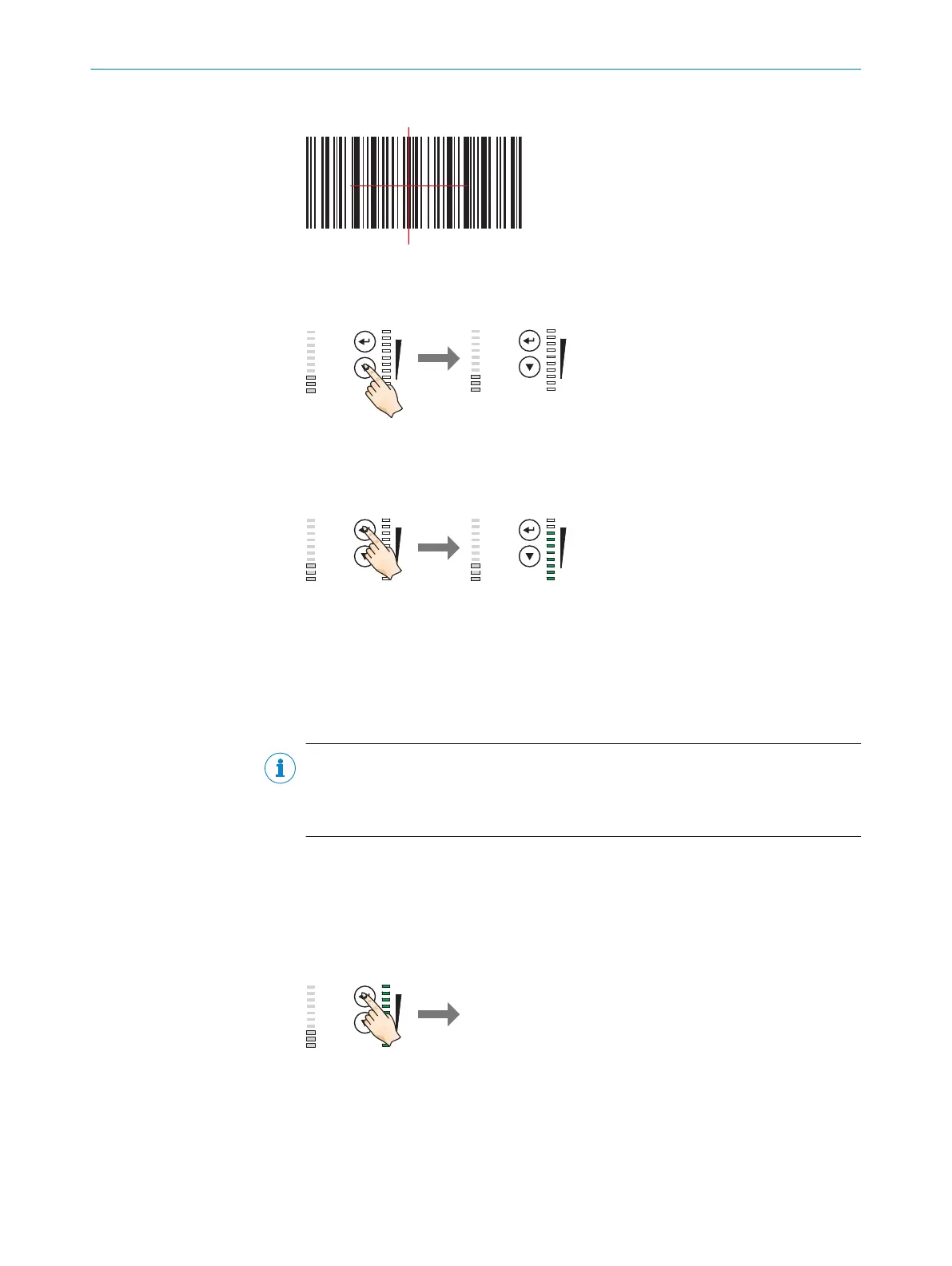
2. Align the device with the code.
Figure 16: Test code
3. Select Auto-Setup (A-S).
0%
100%
Ready
Result
FB|ERR|MS
|Tst
|Tch
|Usr
|A-S
SF|RUN|NS
L/A P1 FB
L/A P2 FB
L/A P1 GbE
L/A P3 GbE
Funct
Light
O
Press key 2 x shortly 1
0%
100%
Ready
Result
FB|ERR|MS
|Tst
|Tch
|Usr
|A-S
SF|RUN|NS
L/A P1 FB
L/A P2 FB
L/A P1 GbE
L/A P3 GbE
Funct
Light
O
1
Press the ▼ function button twice briefly.
✓
The Auto-Setup (A-S) LED lights up blue.
4. Start Auto-Setup (A-S).
0%
100%
Ready
Result
FB|ERR|MS
|Tst
|Tch
|Usr
|A-S
SF|RUN|NS
L/A P1 FB
L/A P2 FB
L/A P1 GbE
L/A P3 GbE
Funct
Light
O
Press key 1 x shortly 1
0%
100%
Ready
Result
FB|ERR|MS
|Tst
|Tch
|Usr
|A-S
SF|RUN|NS
L/A P1 FB
L/A P2 FB
L/A P1 GbE
L/A P3 GbE
Funct
Light
O
Ö
1
Press the p function button once briefly.
✓
The Auto-Setup (A-S) LED flashes blue.
The device adjusts itself automatically to suit the lighting conditions, working
distance
1)
and quality of the code presented. According to the default setting, the
device permanently stores the values determined for the two parameter modules
(image, decoder) during this process, thereby overwriting the existing configura‐
tion.
NOTE
If the Auto-Setup (A-S) LED lights up yellow or red, the read result is inadequate. If
this is the case, check the alignment and distance of the device in relation to the
code and repeat the procedure.
5. Wait until Auto-Setup (A-S) has finished. The bar graph display shows the percent‐
age progress of the Auto-Setup (A-S) function. 100% means Auto-Setup (A-S) has
finished.
✓
The Auto-Setup (A-S) LED indicates the result, see "Display and control elements",
page 17.
6. Exit Setup mode and save the parameters.
Device saves
the parameters 2
3 seconds 1
0%
100%
Ready
Result
FB|ERR|MS
|Tst
|Tch
|Usr
|A-S
SF|RUN|NS
L/A P1 FB
L/A P2 FB
L/A P1 GbE
L/A P3 GbE
Funct
Light
O
1
Press the p function button for 3 seconds
2
Device permanently saves the parameters
✓
The existing configuration in the device is overwritten.
1)
Only applies for complete device (Dynamic Focus).
COMMISSIONING 7
8016185/19E9/2020-10-21 | SICK O P E R A T I N G I N S T R U C T I O N S | Lector64x/65x Flex, Lector65x Dynamic Focus
49
Subject to change without notice










 To Next Page