Operating Instructions Chapter 5
V200/V300
8012227/YT87/2016-03-29 © SICK AG • Industrial Safety Systems • Germany • All rights reserved 33
Subject to change without notice
Electrical installation
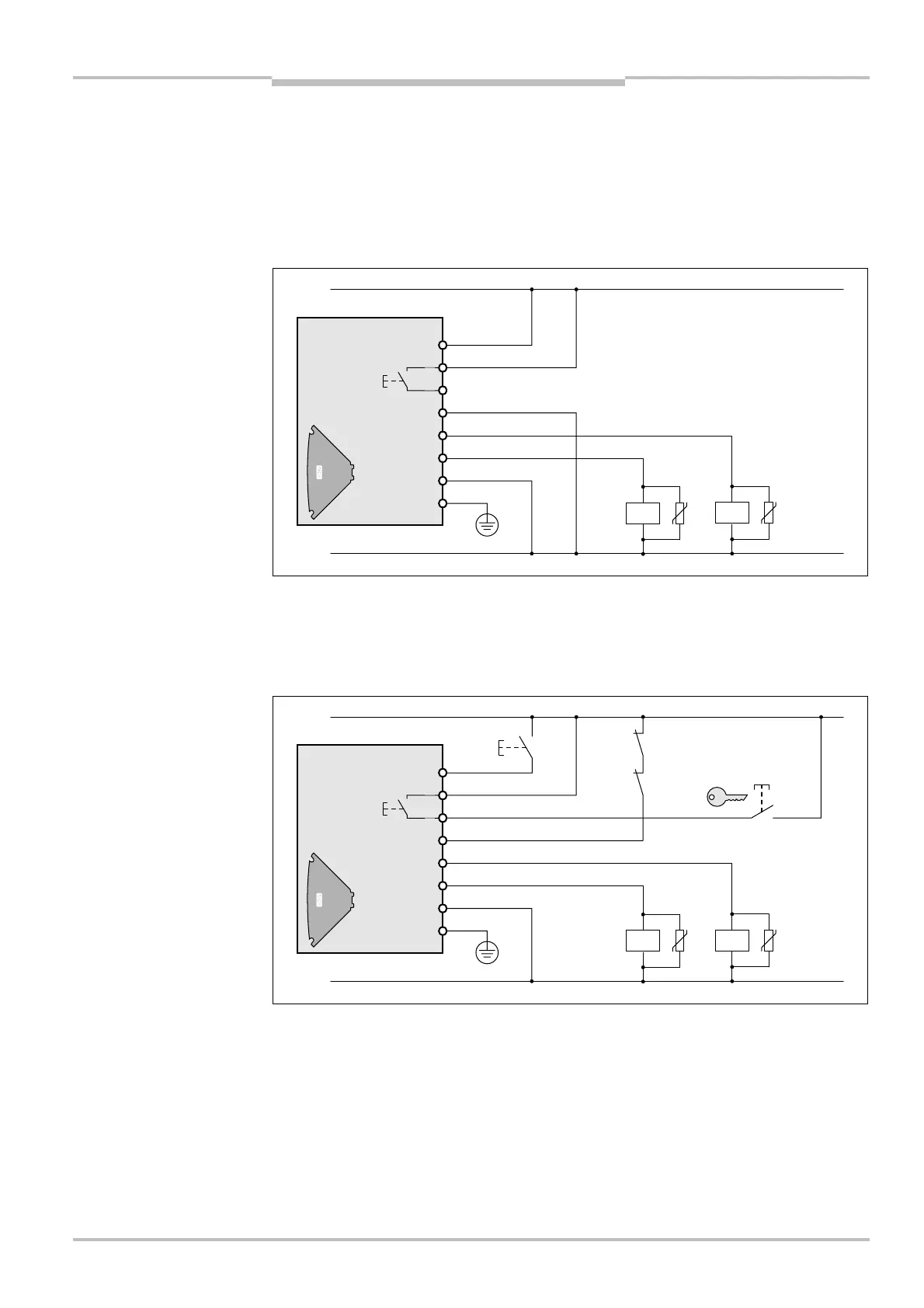
5.2 Connecting the V200/V300 without external device
monitoring (EDM), without internal restart interlock
and without external key-operated pushbutton for
teach-in
If you use the V200/V300 without the internal restart interlock, then you must implement
the restart interlock externally, i.e. machine-side.
5.3 Connecting the V200/V300 with external device
monitoring (EDM), with internal restart interlock and
with external key-operated pushbutton for teach-in
Note
V200/V300 without external
device monitoring (EDM),
without internal restart
interlock and without external
key-operated pushbutton for
teach-in
V200/V300 with external
device monitoring (EDM),
with internal restart interlock
and with external key-
operated pushbutton for
teach-in
1
2
3
4
5
6
7
8
teach-
1
2
3
4
5
6
7
8
teach-
key
Key-operated
pushbutton for
teach-in



 To Next Page