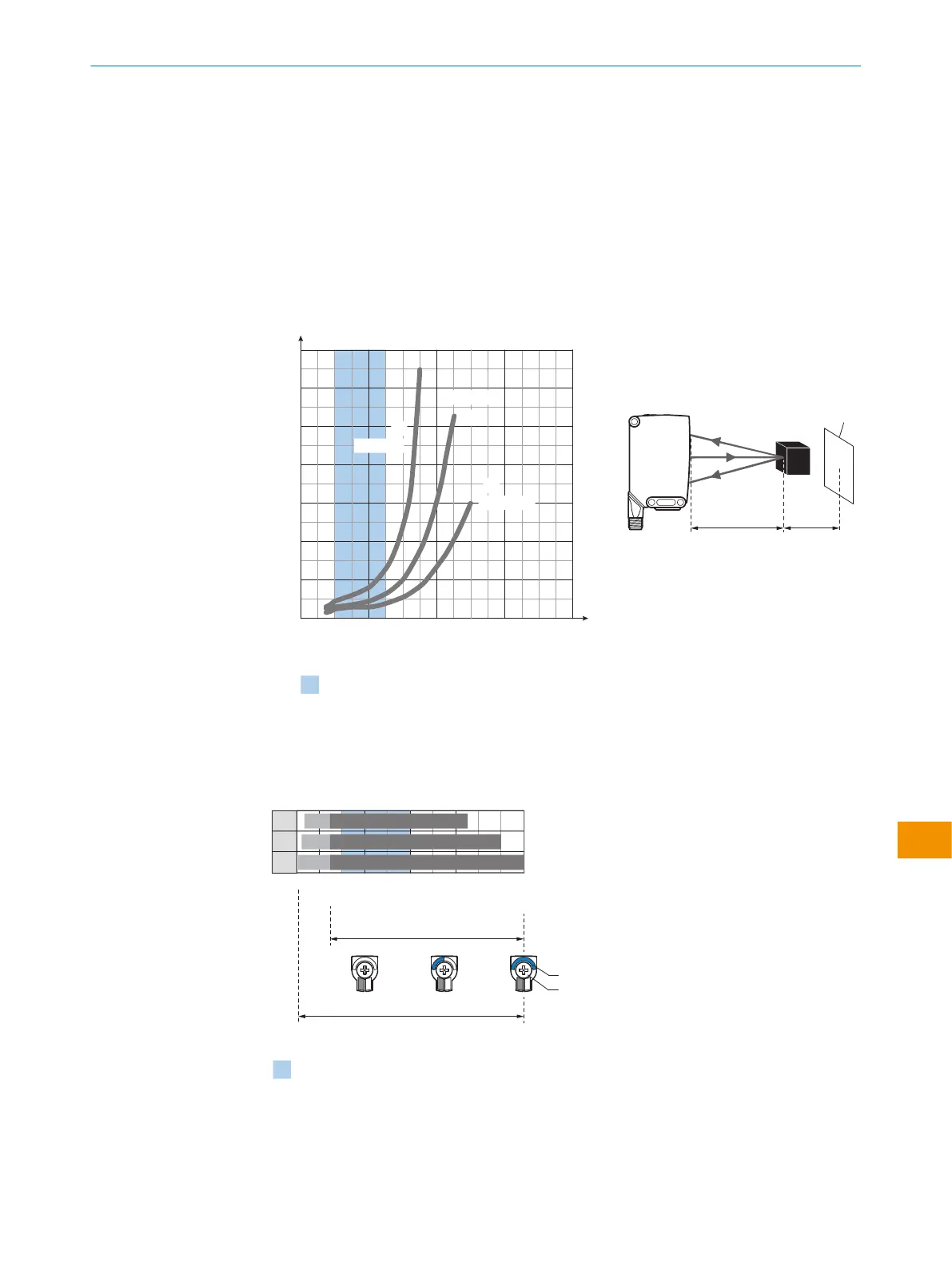
检查使用条件:使用随附的图表 [参见 表格 69] 调整触发感应距离和与物体及背景
的距离,以及物体的反射能力(x = 触发感应距离,y = 已设置的触发感应距离和背
景(白色,90%)之间的最小距离)。反射:6% = 黑色 1,18% = 灰色 2,90%
= 白色 3(以 DIN 5033 规定的标准白为基准)。我们建议您使用低漫反射比的物
体进行设置。
背景抑制功能的最小距离 (= y) 可以从图表 [表格 69 1] 中如下确定:
示例:x = 500 mm,y = 25 mm。即,当距设置的触发感应距离 > 25 mm 时,才
能抑制背景(白色,90%)。
表格 6: 使用条件
Recommended sensing range for the best
performance
0
20
80
60
40
120
100
140
400 800
1,200
1,600
0
1
3
6%/90%
90%/90%
y
x
Minimum distance in mm (y) between the set sensing
range (x) and white background (90 % remission)
Distance in mm
2
18%/90%
Black object (6 % remission)
Set sensing range x = 500 mm
Needed minimum distance to white
background y = 25 mm
Example:
Safe suppression of the background
yx
White
background (90 %)
插图 3: 特性曲线,WTS26P
1
触发感应距离,基于黑色,6% 反射比
2
触发感应距离,基于灰色,18% 反射比
3
触发感应距离,基于白色,90% 反射比
Distance in mm (inch)
150
(5.91)
300
(11.81)
500
(19.69)
700
(27.56)
1,000
(39.37)
0
1
2
3
40 750
25
10
150
150
150
900
1,000
D
C
A B
BluePilot
E
F
Recommended sensing range for the best performance
插图 4: 条形图,WTS26P
操作指南
8020355.1GI9/2022-07-13 | SICK 操 作 指 南 | WTS26
201
如有更改,恕不另行通知
zh











 To Next Page